Question: Assignment 2V4 - Access... Sheridan Lab 2: Access Control with Security Groups and TCP analysis Submission Team assignment with 2 members in each team, You
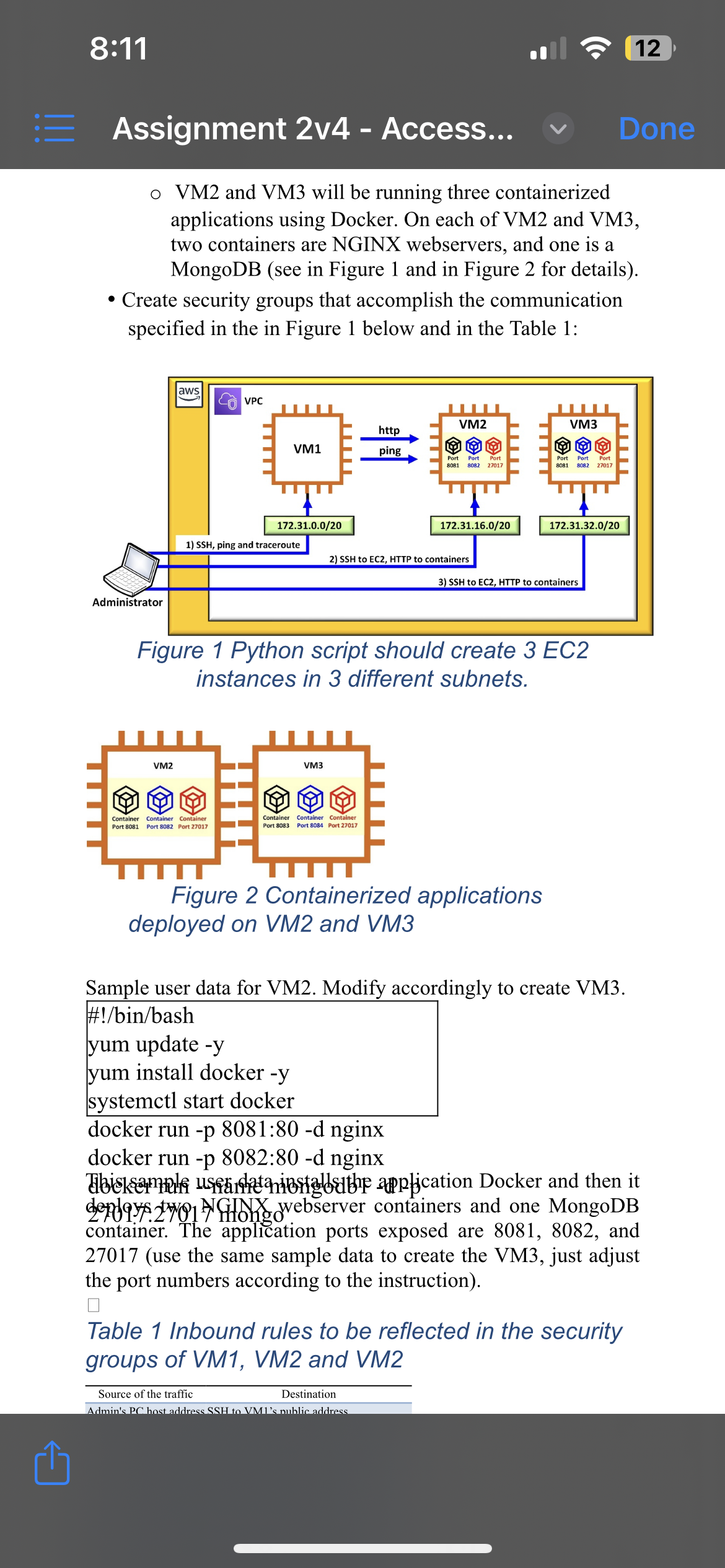
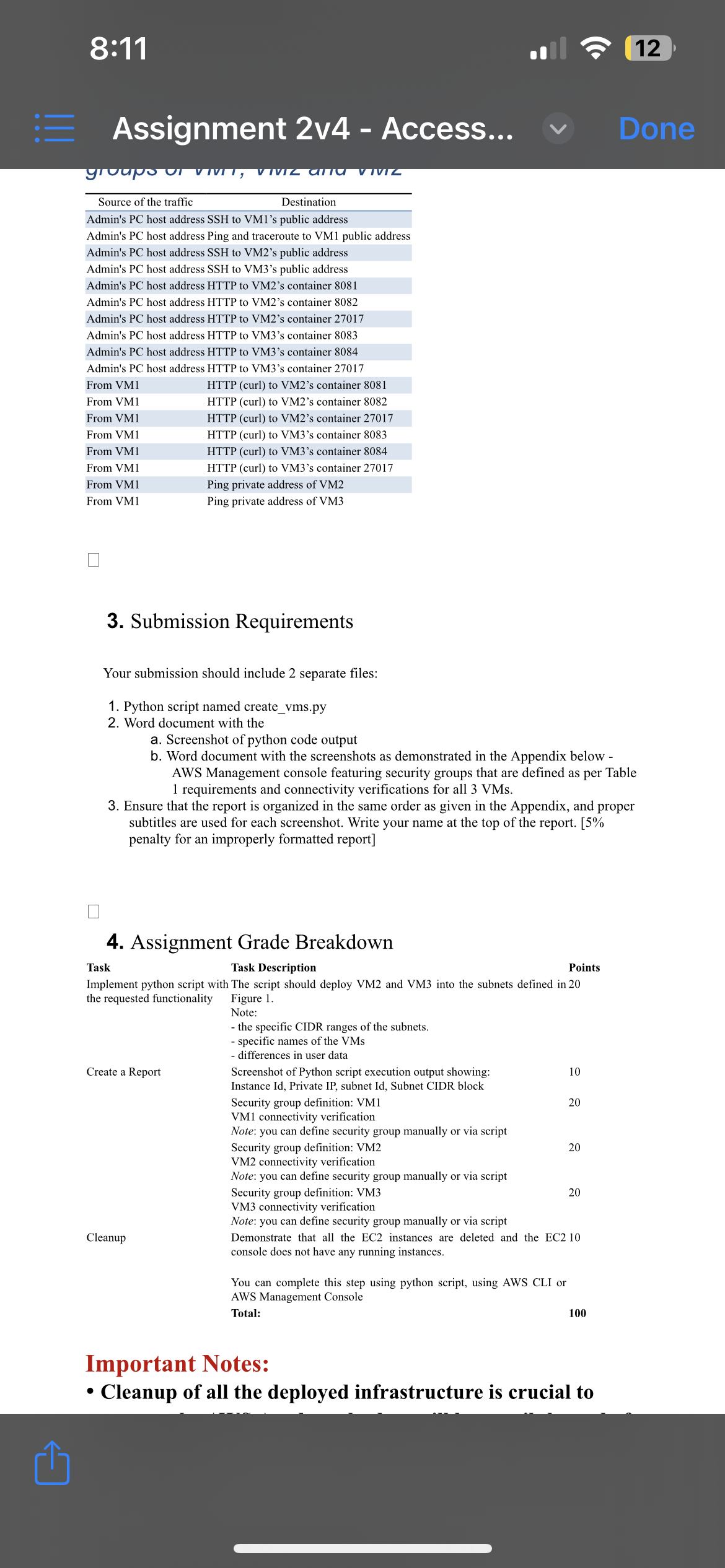
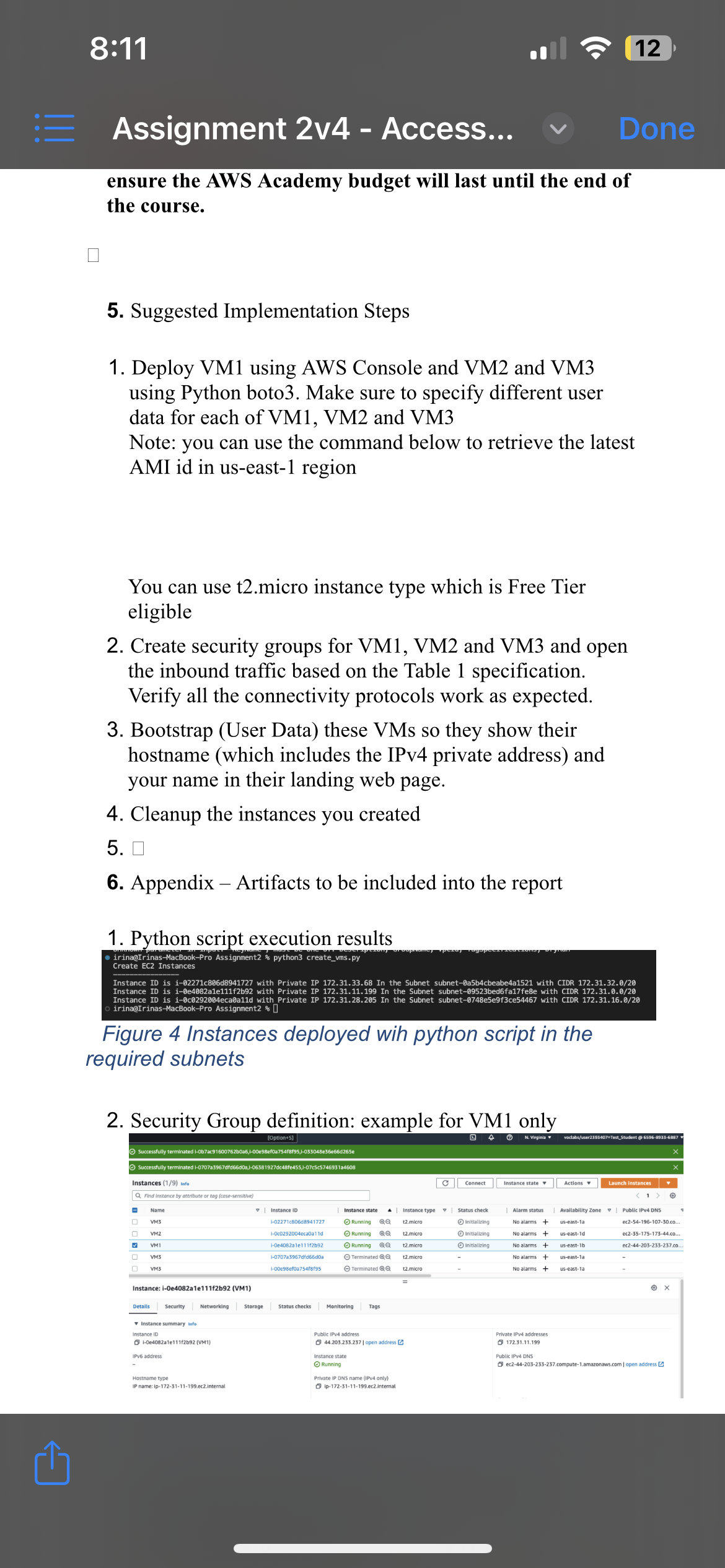
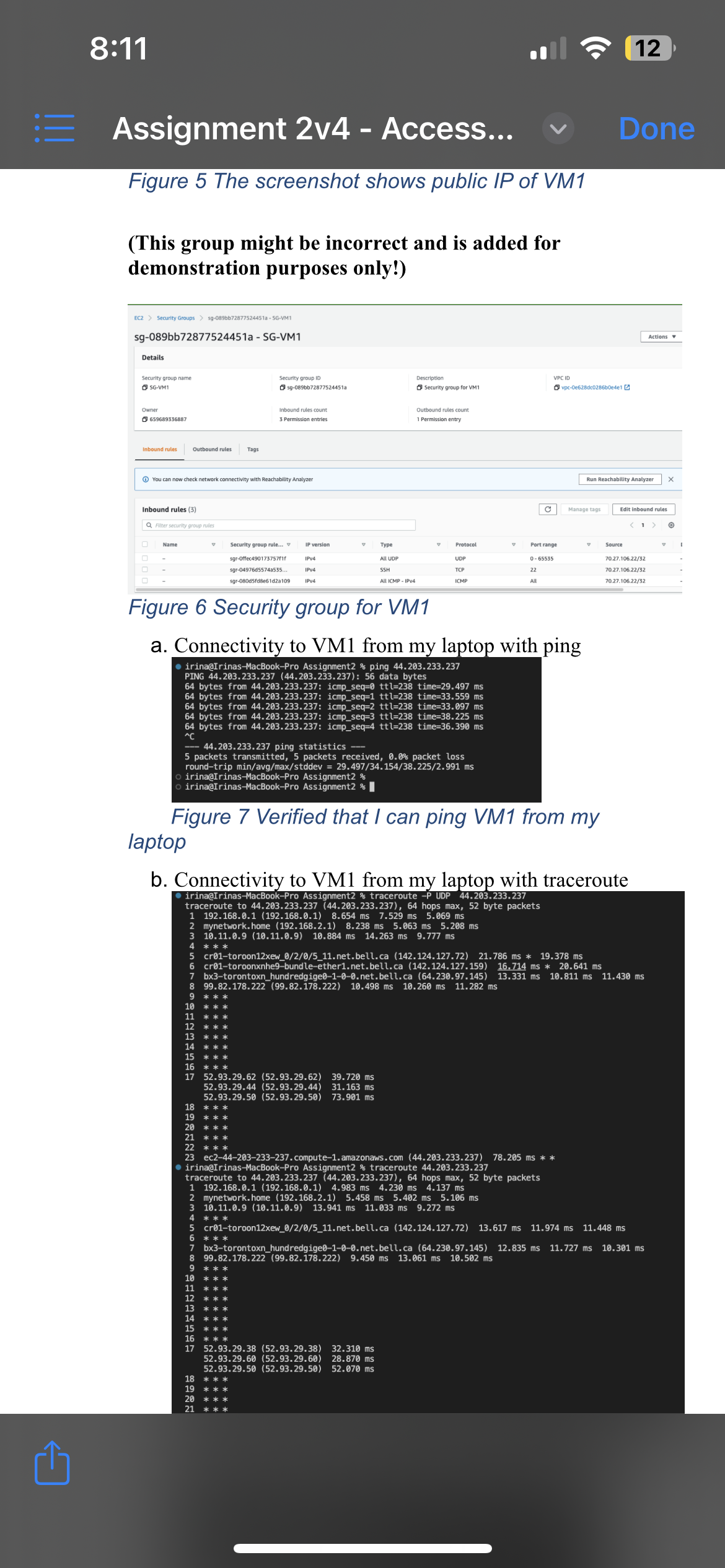
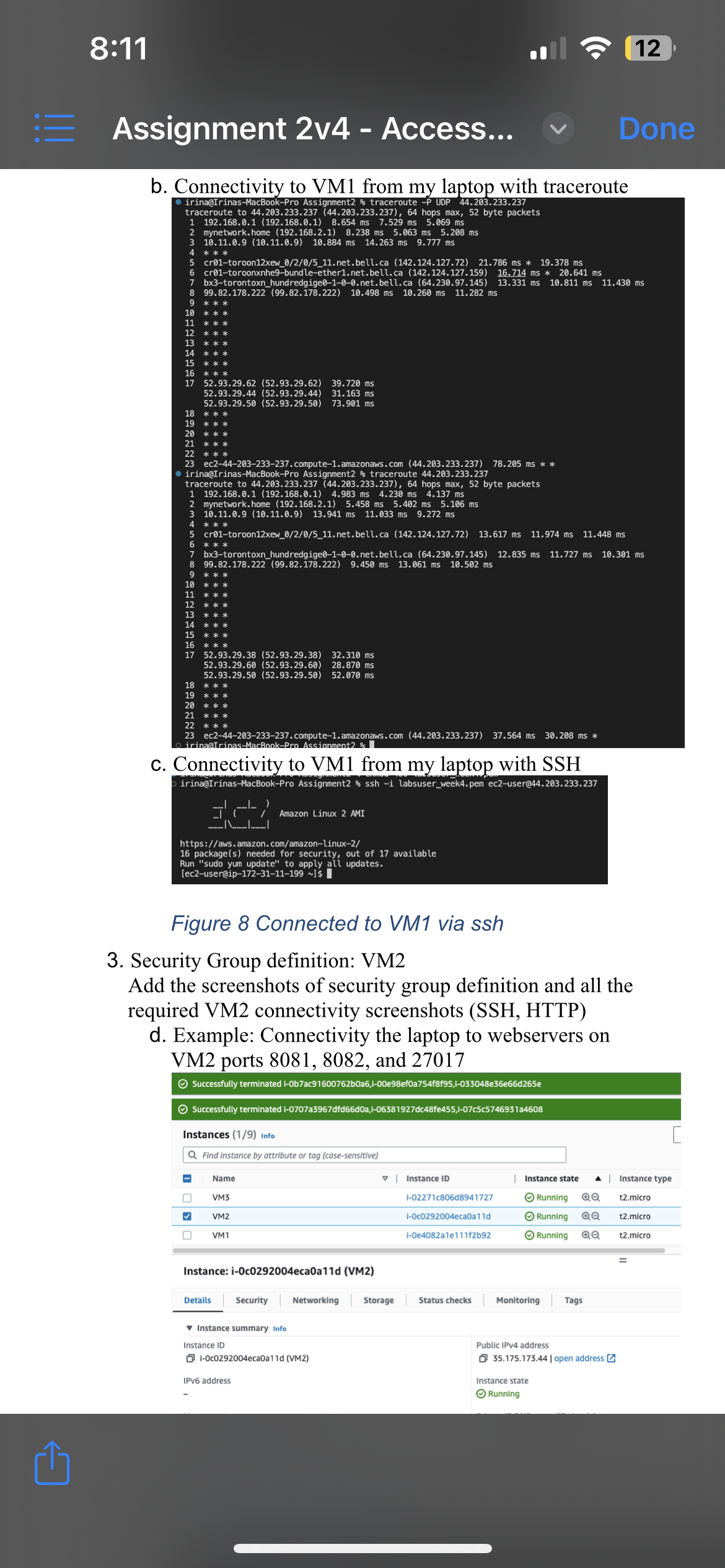
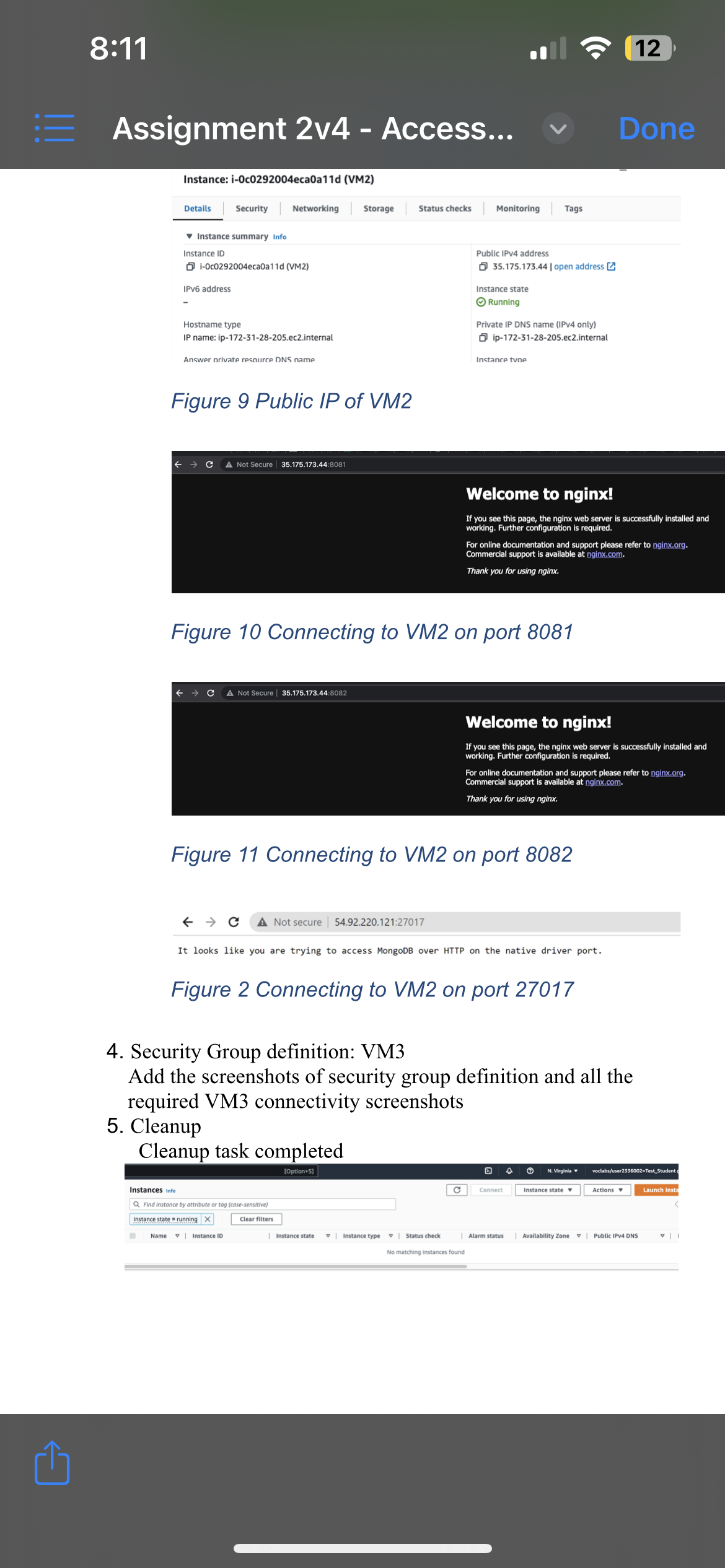
Assignment 2V4 - Access... Sheridan Lab 2: Access Control with Security Groups and TCP analysis Submission Team assignment with 2 members in each team, You may select you Instructions own partner. Only one report per team is to be submitted via SLATE. Full names of both partners should appear in the front page Value 12.5% of nal grade Due Date As indicated on Slate Learning Outcomes Covered in Assignment 1 . Analyze protocol encapsulation to implement secure access to resources. 2. Apply the concept of port and address control to congure security groups. 3. Congure and test network access control for elastic virtual computers. 4. Test security groups to control access to virtual machines. i | 1. Assignment Outline The objective of this assignment is to explore network security controls available in AWS, namely Security Groups and NACLs (network access control lists). The students will deploy 3 ECZ instances in the different subnets using AWS python boto3 and AWS Console. The instances will have different initialization scripts as described in the Assignment Details and Expected Outcomes section below and, as a result, will have different connectivity requirements. The students will dene respective security groups and NACLs and verify that the applications running in containers can be accessed successfully. 2. Assignment Details and Expected Outcomes In this assignment, the student is to perform the tasks below: ' Deploy VMl using AWS Console and VMZ and VM3 using python script and bot03 library. The instances should be deployed into different subnets as specied in Figure 1 below. ' Instances specication below should be reected in the user data scripts used by AWS to initialize the EC2 instances: 0 VMl is a plain EC2 instance with no applications installed. 8:11 12 E Assignment 2v4 - Access... V Done o VM2 and VM3 will be running three containerized applications using Docker. On each of VM2 and VM3, two containers are NGINX webservers, and one is a MongoDB (see in Figure 1 and in Figure 2 for details). . Create security groups that accomplish the communication specified in the in Figure 1 below and in the Table 1: aw VPC JILL VM2 VM3 http VM1 ing 6081 8082 37012 BORT 8082 27017 172.31.0.0/20 172.31.16.0/20 172.31.32.0/20 1) SSH, ping and traceroute 2) SSH to EC2, HTTP to containers 3) SSH to EC2, HTTP to containers Administrator Figure 1 Python script should create 3 EC2 instances in 3 different subnets. VM2 VM3 Container Container Container intainer Port 8081 Port 8082 Port 27017 Port 8083 Port 8084 Port 27017 Figure 2 Containerized applications deployed on VM2 and VM3 Sample user data for VM2. Modify accordingly to create VM3. #!/bin/bash yum update -y yum install docker -y systemctl start docker docker run -p 8081:80 -d nginx docker run -p 8082:80 -d nginx Thiskampis useandatariostalbathe application Docker and then it depday.2wol filch webserver containers and one MongoDB container. The application ports exposed are 8081, 8082, and 27017 (use the same sample data to create the VM3, just adjust the port numbers according to the instruction). Table 1 Inbound rules to be reflected in the security groups of VM1, VM2 and VM2 Source of the traffic Destination Admin's PC host address SSH to VMI's public address8:11 12 E Assignment 2v4 - Access... V Done groups Of ViviT, ViVIL and VIVIc Source of the traffic Destination Admin's PC host address SSH to VMI's public address Admin's PC host address Ping and traceroute to VMI public address Admin's PC host address SSH to VM2's public address Admin's PC host address SSH to VM3's public address Admin's PC host address HTTP to VM2's container 8081 Admin's PC host address HTTP to VM2's container 8082 Admin's PC host address HTTP to VM2's container 27017 Admin's PC host address HTTP to VM3's container 8083 Admin's PC host address HTTP to VM3's container 8084 Admin's PC host address HTTP to VM3's container 27017 From VMI HTTP (curl) to VM2's container 8081 From VM1 HTTP (curl) to VM2's container 8082 From VMI HTTP (curl) to VM2's container 27017 From VM1 HTTP (curl) to VM3's container 8083 From VM1 HTTP (curl) to VM3's container 8084 From VM1 HTTP (curl) to VM3's container 27017 From VMI Ping private address of VM2 From VMI Ping private address of VM3 0 3. Submission Requirements Your submission should include 2 separate files: 1. Python script named create_vms.py 2. Word document with the a. Screenshot of python code output b. Word document with the screenshots as demonstrated in the Appendix below - AWS Management console featuring security groups that are defined as per Table requirements and connectivity verifications for all 3 VMs. 3. Ensure that the report is organized in the same order as given in the Appendix, and proper subtitles are used for each screenshot. Write your name at the top of the report. [5% penalty for an improperly formatted report] 4. Assignment Grade Breakdown Task Task Description Points Implement python script with The script should deploy VM2 and VM3 into the subnets defined in 20 the requested functionality Figure 1. Note: - the specific CIDR ranges of the subnets. - specific names of the VMs differences in user data Create a Report Screenshot of Python script execution output showing: 10 Instance Id, Private IP, subnet Id, Subnet CIDR block Security group definition: VMI 20 VMI connectivity verification Note: you can define security group manually or via script Security group definition: VM2 20 VM2 connectivity verification Note: you can define security group manually or via script Security group definition: VM3 20 VM3 connectivity verification Note: you can define security group manually or via script Cleanup Demonstrate that all the EC2 instances are deleted and the EC2 10 console does not have any running instances. You can complete this step using python script, using AWS CLI or AWS Management Console Total: 100 Important Notes: . Cleanup of all the deployed infrastructure is crucial to8:11 12 E Assignment 2v4 - Access... V Done ensure the AWS Academy budget will last until the end of the course. 5. Suggested Implementation Steps 1. Deploy VMI using AWS Console and VM2 and VM3 using Python boto3. Make sure to specify different user data for each of VM1, VM2 and VM3 Note: you can use the command below to retrieve the latest AMI id in us-east-1 region You can use t2.micro instance type which is Free Tier eligible 2. Create security groups for VMI, VM2 and VM3 and open the inbound traffic based on the Table 1 specification. Verify all the connectivity protocols work as expected. 3. Bootstrap (User Data) these VMs so they show their hostname (which includes the IPv4 private address) and your name in their landing web page. 4. Cleanup the instances you created 5. 0 6. Appendix - Artifacts to be included into the report 1. Python script execution results irina@Irinas-MacBook-Pro Assignme Create EC2 Instances Instance ID is i-02271c806d894 Instance ID is i-0e4082ale111f2b a17feBe with CIDR 172.31.0.0/20 Instance ID is i-0c0292004eca0all Se9f3ce54467 with CIDR 172.31.16.0/20 irina@Irinas-MacBook-Pro Assignme Figure 4 Instances deployed wih python script in the required subnets 2. Security Group definition: example for VMI only Successfully terminated 1-0b7ac9160076260 faf95,1-033048e36e66d26Se Successfully terminated I-0707a3967drd6 6doa,1-06381927dc48fe455,1-07cSc574693124608 Instances (1/9) Info C Connect Instance state * Actions Launch instances Q Find Instance by attribute or tag (case-sensitive) Name | Instance ID Instance state Instance type . | Status check | Alarm status Availability Zone " | Public IPV4 DNS VM3 1-02271c80648941727 Running Q0 12.micro Initializing No alarms + us-east-la ec2-54-196-107-30.co... VMZ -0c0292004eca0a1 1d Running QQ 12.micr Initializing No alarms + us-east-1d ec2-35-175-173-44.co. VMI I-De4082a le 11 12692 Running QQ 12.micro Initializing No alarms + us-east-1b (2-44-203-233-237.co.. O VM3 1-0707a3967did66doa Terminated QQ 12.micro No alarms + us-east-la -0049Bef0a7541819 Terminated @.@ t2.micro No alarms + us-east-la Instance: i-0e4082ale111f2b92 (VM1) O Security Networking Storage Status checks Monitoring Tags Instance summary Info Instance ID Public IPv4 address Private IPV4 addresses 1-0e4082ale11 1/2b92 (VM1) 44.203.253.237 | open address [ 172.31.11.199 Pv6 address Instance state Public IPV4 DNS Running Dec2-44-203-233-237.compute s.com | open address [ Hostname type Private IP DNS name (IPV4 only) P name: Ip-172-31-11-199.ec2.internal 3 ip-172-31-11-199.ec2 internal8:11 12 E Assignment 2v4 - Access... V Done Figure 5 The screenshot shows public IP of VM1 (This group might be incorrect and is added for demonstration purposes only!) ECZ > Security Groups > sg-089bb7287 4451a - 56-VMI sg-089bb72877524451a - SG-VM1 Actions Details Security group name Security group ID Description VPC ID SG-VM1 5 59-089bb72877524451a Security group for VM1 vpc-0e628dc028660ese1 [ Owner Inbound rules count Outbound rules count 5 659689336887 Permission entries 1 Permission entry Inbound rules Outbound rules Tags You can now check network connectivity with Reachability Analyzer Run Reachability Analyzer X Inbound rules (3) C Manage tags Edit Inbound rules Q Filter security group rules Name Security group rule... IP version Type Protocol Port range Source gr-Offec490173757fif IPV4 All UDP UDP 0- 65535 0.27.106.22/32 gr-04976d55743535.. IPV4 SSH TCP 22 70.27.106.22/32 gr-080d5fdBe61d2a109 MIL ICMP - IPV4 ICMP 70.27.106.22/32 Figure 6 Security group for VM1 a. Connectivity to VMI from my laptop with ping irina@Irinas-MacBook-Pro Assignment2 % ping 44.203.233.237 PING 44.203.233.237 (44.203.233.237) : 56 data bytes 64 bytes from 44.203.233.237: icmp_seq=0 tt1=238 time=29.497 ms 64 bytes from 44. 203.233.237: icmp_seq=1 tt1=238 time=33.559 ms 64 bytes from 44.203.233.237: icmp_seq=2 tt1=238 time=33.097 ms 64 bytes from 44.203.233.237: icmp_seq=3 tt1=238 time=38.225 ms 64 bytes from 44.203.233.237: icmp_seq=4 tt1=238 time=36.390 ms 44.203.233.237 ping statistics - 5 packets transmitted, 5 packets received, 0.0% packet loss round-trip min/avg/max/stddev = 29.497/34. 154/38.225/2.991 ms irina@Irinas-MacBook-Pro Assignment2 % irina@Irinas-MacB Figure 7 Verified that I can ping VM1 from my laptop b. Connectivity to VMI from my laptop with traceroute irina@Irin o Assignment2 % e -P UDP 44.203.233.237 traceroute to 44.203.233.237 (44.203.233.237), 64 hops max, 52 byte packets 192. 168.0.1 (192. 168.0.1) 8.654 ms Is 5.069 ms mynetwork. home (192. 168.2.1) 8.238 ms 5.063 ms 5.208 ms AWNH 10.11.0.9 (10.11.0.9) 10.884 ms 14.263 ms 9.777 ms cr01-toroon12xew_0/2/0/5_11.net. bell.ca (142. 124. 127. 72) 21.786 ms * 19.378 ms cr01-toroonxnhe9-bundle-ether1. net.bell.ca (142. 124. 127. 159) 16.714 ms * 20.641 ms 7 bx3-torontoxn_hundredgige0-1-0-0. net. bell. ca (64.230.97. 145) 13.331 ms 10.811 ms 11.430 ms 99.82. 178.222 (99.82. 178.222) 10 10.498 ms 10.260 ms 11.282 ms 9 10 11 12 13 14 15 16 * * * 17 52.93.29.62 (52.93. 29.62) 39.720 ms 52.93.29.44 (52.93. 29. 44) 31. 163 ms 52.93.29.50 (52.93.29.50) 73.901 ms 18 * * * 19 20 * * * 21 22 ec2-44-203-233-237. compute-1. amazonaws. com (44.203.233.237) 78.205 ms * * irina@Irinas-MacBook-Pro Assignment2 % traceroute 44.203.233.237 traceroute to 44.203.233.237 (44.203.233.237), 64 hops max, 52 byte packets 192. 168.0.1 (192. 168.0.1) 4.983 ms 4.230 ms 4.137 ms 2 mynetwork. home (192. 168.2.1) 5.458 ms 5.402 ms 5.106 ms 10.11.0.9 (10. 11.0.9) 13.941 ms 11.033 ms 9.272 ms 4 * * * 5 cr01-toroon12xew_0/2/0/5_11. net. bell. ca (142. 124. 127.72) 13.617 ms 11.974 ms 11.448 ms 6 * * * 7 bx3-torontoxn_hundredgige0-1-0-0. net. bell. ca (64.230.97. 145) 12.835 ms 11.727 ms 10.301 ms 8 99.82. 178.222 (99.82. 178.222) 9. 450 ms 13.061 ms 10.502 ms 10 * * * 11 12 13 15 16 17 52.93.29.38 (52.93. 29. 38) 32.310 ms 52.93.29.60 (52.93.29.60) 28.870 ms 52.93.29.50 (52.93.29.50) 52.070 ms8:11 12 E Assignment 2v4 - Access... V Done b. Connectivity to VMI from my laptop with traceroute irina@Irinas-MacBook-Pro Assignment2 % traceroute -P UDP 44.203.233.237 traceroute to 44.203.233.237 (44.203.233.237), 64 hops max, 52 byte packets 192. 168.0.1 (192. 168.0.1) 8.654 ms 7.529 ms 5. 5.069 ms 2 mynetwork. home (192. 168.2.1) 8.238 ms 5.063 ms 5.208 ms 3 10.11.0.9 (10. 11.0.9) 10.884 ms 14.263 ms 9.777 ms * * * 5 cr01-toroon12xew_0/2/0/5_11.net. bell. ca (142. 124. 127.72) 21.786 ms * 19.378 ms cr01-toroonxnhe9-bundle-ether1. net. bell. ca (142. 124. 127. 159) 16.714 ms * 20.641 ms 7 bx3-torontoxn_hundredgige0-1-0-0. net. bell. ca (64.230.97.145) ) 13.331 ms 10.811 ms 11.430 ms 8 99.82. 178.222 (99. 82. 178.222) 10.498 ms 10.260 ms Is 11.282 ms 9 11 12 13 14 15 16 * * * 17 52.93.29.62 (52.93.29.62) 39.720 ms 52.93.29.44 (52.93. 29.44) 31. 163 ms 52.93.29.50 (52.93.29.50) 73.901 ms 18 * * * 19 20 21 * * * ec2-44-203-233-237. compute-1. amazonaws . com (44.203.233.237) 78.205 ms * * irina@Trinas-MacBook-Pro Assignment2 % traceroute 44.203.233.237 traceroute to 44.203.233.237 (44.203.233.237), 64 hops max, 52 byte packets 192. 168.0.1 (192. 168.0.1) 4.983 ms 4.230 ms 4.137 ms mynetwork. home (192. 168.2.1) 5.458 ms 5.402 ms 5.106 ms 10.11.0.9 (10.11.0.9) 13.941 ms 11.033 ms 9.272 ms 4 * * * cr01-toroon12xew_0/2/0/5_11.net.bell. ca (142. 124.127.72) 13.617 ms 11.974 ms 11.448 ms 6 * * * 7 bx3-torontoxn_hundredgige0-1-0-0. net. bell. ca (64.230.97.145) 12.835 ms 11.727 ms 10.301 ms 9 8 99.82. 178.222 (99.82. 178.222) 9. 450 ms 13.061 ms 10.502 ms * * * 10 * * * 11 12 13 14 15 16 17 52.93.29.38 (52.93.29.38) 32.310 ms 52.93.29.60 (52.93.29.60) 28.870 ms 52.93.29.50 (52.93.29.50) 52.070 ms 18 19 * * * 20 * * * 21 23 ec2-44-203-233-237. compute-1. amazonaws. com (44.203.233.237) 37.564 ms 30.208 ms * irinaGTrinas_MacBook-Pro Assign c. Connectivity to VMI from my laptop with SSH irina@Irinas-MacBook-Pro Assignment2 % ssh -i labsuser_week4. pem ec2-user@44.203.233.237 Amazon Linux 2 AMI https://aws. amazon. com/amazon-Linux-2/ 16 package(s) needed for security, out of 17 available Run "sudo yum update" to apply all updates. [ec2-user@ip-172-31-11-199 ~] $ Figure 8 Connected to VM1 via ssh 3. Security Group definition: VM2 Add the screenshots of security group definition and all the required VM2 connectivity screenshots (SSH, HTTP) d. Example: Connectivity the laptop to webservers on VM2 ports 8081, 8082, and 27017 Successfully terminated i-0b7ac9160076260a6,1-00e98ef0a754f8f95,1-033048e36e66d265e Successfully terminated I-0707a3967dfd66doa,1-06381927dc48fe455,1-07c5c5746931a4608 Instances (1/9) Info Q Find instance by attribute or tag (case-sensitive) Name | Instance ID Instance state | Instance type VM3 1-02271c806d8941727 Running QQ t2.micro VM2 -Oc0292004eca0a 11d Running t2.micro VM1 i-0e4082ale111f2692 Running QQ t2.micro Instance: i-0c0292004eca0a11d (VM2) Details Security Networking Storage Status checks Monitoring Tags Instance summary Info Instance ID Public IPV4 address 1-0c0292004eca0a11d (VM2) 35.175.173.44 | open address [ IPV6 address Instance state Running8:11 1 12 E Assignment 2v4 - Access... V Done Instance: i-0c0292004eca0a11d (VM2) Details Security Networking Storage Status checks Monitoring Tags Instance summary Info Instance ID Public IPV4 address 1-0c0292004eca0a11d (VM2) 5 35.175.173.44 | open address [ IPV6 address Instance state Running Hostname type Private IP DNS name (IPV4 only) IP name: ip-172-31-28-205.ec2.internal ip-172-31-28-205.ec2.internal Answer private resource DNS name Instance tune Figure 9 Public IP of VM2 + C A Not Secure | 35.175.173.44:8081 Welcome to nginx! If you see this page, the nginx web server is successfully installed and working. Further configuration is required. For online documentation and support please refer to nginx.org. Commercial support is available at nginx.com. Thank you for using nginx. Figure 10 Connecting to VM2 on port 8081 - - C A Not Secure | 35.175.173.44:8082 Welcome to nginx! If you see this page, the nginx web server is successfully installed and working. Further configuration is required. For online documentation and support please refer to nginx.org. Commercial support is available at nginx.com. Thank you for using nginx. Figure 11 Connecting to VM2 on port 8082 + -> C A Not secure | 54.92.220.121:27017 It looks like you are trying to access MongoDB over HTTP on the native driver port. Figure 2 Connecting to VM2 on port 27017 4. Security Group definition: VM3 Add the screenshots of security group definition and all the required VM3 connectivity screenshots 5. Cleanup Cleanup task completed 4 @ N. Virginia voclabs/user2336002-Test_Student Instances Info C Connect Instance state Actions Launch Inst Q Find instance by attribute or tog (case-sens Instance state .= running X Clear filters Name | Instance ID | Instance state | Instance type . | Status check | Alarm status | Availability Zone . | Public IPV4 DNS No matching instances found
Step by Step Solution
There are 3 Steps involved in it
1 Expert Approved Answer
Step: 1 Unlock
Question Has Been Solved by an Expert!
Get step-by-step solutions from verified subject matter experts
Step: 2 Unlock
Step: 3 Unlock
Students Have Also Explored These Related Finance Questions!









 Study Help