







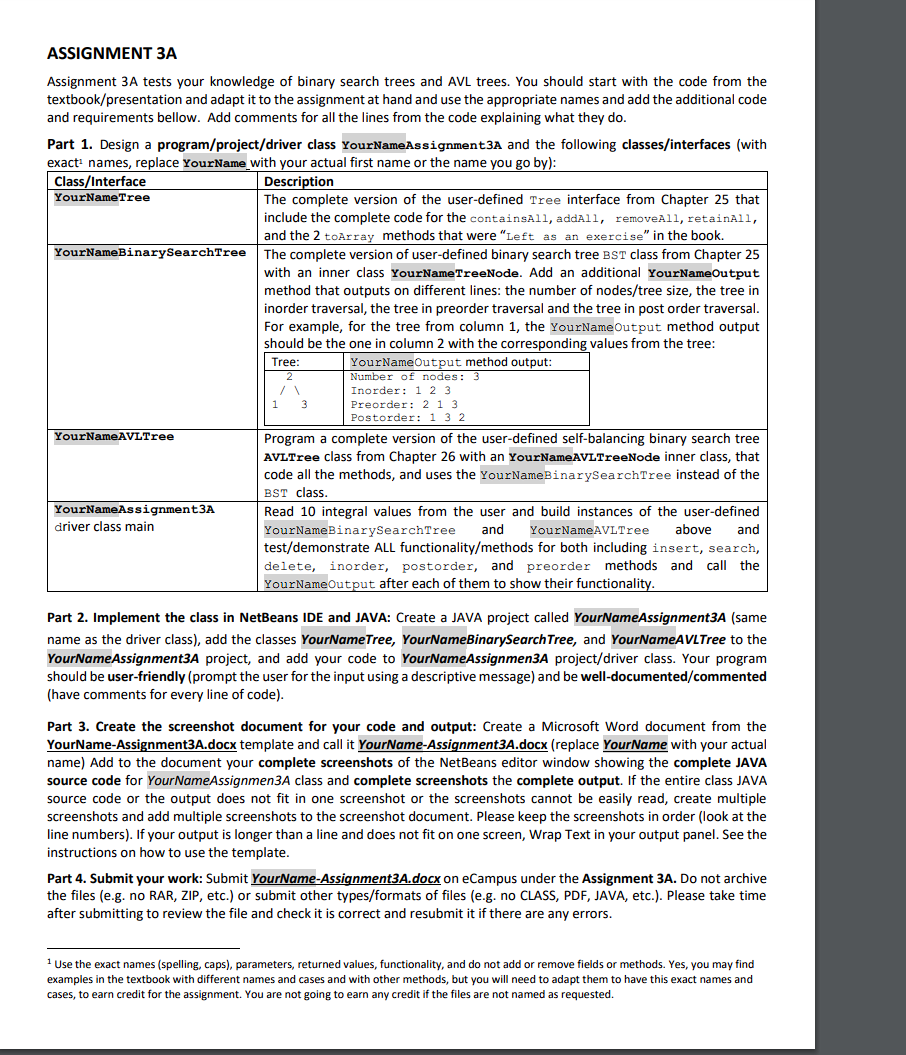
Question: ASSIGNMENT 3 A Assignment 3 A tests your knowledge of binary search trees and AVL trees. You should start with the code from the textbook
ASSIGNMENT A Assignment A tests your knowledge of binary search trees and AVL trees. You should start with the code from the textbookpresentation and adapt it to the assignment at hand and use the appropriate names and add the additional code and requirements bellow. Add comments for all the lines from the code explaining what they do Part Design a programprojectdriver class YourNameAssignmentA and the following classesinterfaces with exact names, replace YourName with your actual first name or the name you go by: ClassInterface Description YourNameTree The complete version of the userdefined Tree interface from Chapter that include the complete code for the containsAll, addAll, removeAll, retainAll, and the toArray methods that were Left as an exercise in the book. YourNameBinarySearchTree The complete version of userdefined binary search tree BST class from Chapter with an inner class YourNameTreeNode. Add an additional YourNameOutput method that outputs on different lines: the number of nodestree size, the tree in inorder traversal, the tree in preorder traversal and the tree in post order traversal. For example, for the tree from column the YourNameOutput method output should be the one in column with the corresponding values from the tree: Tree: YourNameOutput method output: Number of nodes: Inorder: Preorder: Postorder: YourNameAVLTree Program a complete version of the userdefined selfbalancing binary search tree AVLTree class from Chapter with an YourNameAVLTreeNode inner class, that code all the methods, and uses the YourNameBinarySearchTree instead of the BST class. YourNameAssignmentA driver class main Read integral values from the user and build instances of the userdefined YourNameBinarySearchTree and YourNameAVLTree above and testdemonstrate ALL functionalitymethods for both including insert, search, delete, inorder, postorder, and preorder methods and call the YourNameOutput after each of them to show their functionality. Part Implement the class in NetBeans IDE and JAVA: Create a JAVA project called YourNameAssignmentA same name as the driver class add the classes YourNameTree, YourNameBinarySearchTree, and YourNameAVLTree to the YourNameAssignmentA project, and add your code to YourNameAssignmenA projectdriver class. Your program should be userfriendly prompt the user for the input using a descriptive message and be welldocumentedcommented have comments for every line of code Part Create the screenshot document for your code and output: Create a Microsoft Word document from the YourNameAssignmentAdocx template and call it YourNameAssignmentAdocx replace YourName with your actual name Add to the document your complete screenshots of the NetBeans editor window showing the complete JAVA source code for YourNameAssignmenA class and complete screenshots the complete output. If the entire class JAVA source code or the output does not fit in one screenshot or the screenshots cannot be easily read, create multiple screenshots and add multiple screenshots to the screenshot document. Please keep the screenshots in order look at the line numbers If your output is longer than a line and does not fit on one screen, Wrap Text in your output panel. See the instructions on how to use the template. Part Submit your work: Submit YourNameAssignmentAdocx on eCampus under the Assignment A Do not archive the files eg no RAR, ZIP, etc. or submit other typesformats of files eg no CLASS, PDF JAVA, etc. Please take time after submitting to review the file and check it is correct and resubmit it if there are any errors. Use the exact names spelling caps parameters, returned values, functionality, and do not add or remove fields or methods. Yes, you may find examples in the textbook with different names and cases and with other methods, but you will need to adapt them to have this exact names and cases, to earn credit for the assignment. You are not going to earn any credit if the files are not named as requested.
Step by Step Solution
There are 3 Steps involved in it
1 Expert Approved Answer
Step: 1 Unlock

Question Has Been Solved by an Expert!
Get step-by-step solutions from verified subject matter experts
Step: 2 Unlock
Step: 3 Unlock
 Study Help