







Question: Assignment 4 - Mini Case for Practice Problems in Module 4/Lecture 4 This mini case study provides practice and preparation for the concepts that you
Assignment 4 - Mini Case for Practice Problems in Module 4/Lecture 4
This mini case study provides practice and preparation for the concepts that you learned in module 4. You will get to apply most of the concepts from module 3 and some of the concepts from module 3.
This mini case study contains two data sources with sample data along with a statement of business needs. Using the data sources and business needs, you will specify a dimensional model with dimensions, measures, and grain, create a schema design for the data warehouse that integrates the data sources, identify summarizability problems in the design, and populate data warehouse tables from sample rows in the data sources.
Data Sources
The case study involves two data sources for a retail firm. The Purchase database supports purchase transactions to replenish retail inventory. A purchase consists of a heading with the purchase number, date, payment method, delivery date, and seller. A purchase contains a collection of products with the quantity and unit cost recorded on a purchase line along with links to the product and purchase heading. Each product has one preferred seller. However, a purchase can use a non-preferred seller if necessary.
Individual stores of the retail firm also maintain an inventory of custom products ordered from local sellers. These products are ordered through the purchase spreadsheets for custom products. Inventory practices for custom products are informal. New products are typically purchased when the manager senses new demand for local items.
The ERD in Figure 1 supports the purchase database. Tables 1 to 4 show sample data for the tables in the purchases database. The seller purchase spreadsheet (Table 5) contains a sample of purchases of custom products from local sellers. The Stock column in the spreadsheet indicates the quantity in stock at the time of purchase.
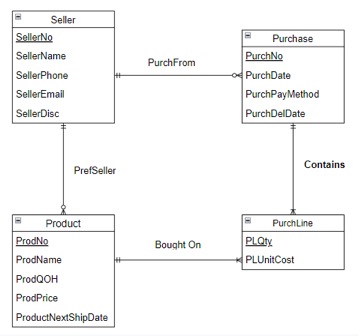
Figure 1: ERD for Retail Purchase Operations
Table 1: Sample Data for the Seller Table
| SellerNo | SellerName | SellerEmail | SellerPhone | SellerDisc |
| S2028827 | ColorMag, Inc. | custcare@colormag.com | (620) 433-9231 | 0.30 |
| S3365211 | Experian | help@experian.com | (186) 432-3142 | 0.32 |
| S4291304 | Ethlyte | ordering@ethlyte.com | (753) 217-4234 | 0.15 |
| S3597800 | Intersafety | orderdesk@intersafety.com | (412) 476-8215 | 0.20 |
| S1420748 | UV Systems | custserv@uvsystems.com | (903) 378-7432 | 0.18 |
| S8095242 | Malwarebytes | orderhelp@malwarebytes.com | (542) 398-4789 | 0.00 |
Table 2: Sample Data for the Product Table
| ProdNo | ProdName | SellerNo | ProdQOH | ProdPrice | ProdNextShipDate |
| P1134566 | 14 inch Color Monitor | S2028827 | 10 | $189.00 | 02/20/2018 |
| P1137877 | 20 inch Color Monitor | S2028827 | 14 | $349.00 | 02/20/2018 |
| P2214590 | R3000 Color Laser Printer | S3365211 | 7 | $679.00 | 01/22/2018 |
| P3412165 | 12 Foot Printer Cable | S4291304 | 110 | $22.00 | |
| P6745671 | 9-Outlet Surge Protector | S3597800 | 43 | $24.99 | |
| P2456678 | CVP Ink Jet Color Printer | S3365211 | 9 | $89.00 | 01/22/2018 |
| P7755443 | Color Ink Jet Cartridge | S3365211 | 34 | $48.00 | 01/22/2018 |
| P8966344 | 64-Bit Color Scanner | S8095242 | 26 | $169.99 | 01/29/2018 |
| P6507900 | Black Ink Jet Cartridge | S3365211 | 34 | $35.99 | |
| P7895676 | Battery Back-up System | S8095242 | 12 | $79.00 | 02/01/2018 |
Table 3: Sample Data for the Purchase Table
| PurchNo | PurchDate | SellerNo | PurchPayMethod | PurchDelDate |
| P2234040 | 02/03/2018 | S2028827 | Credit | 02/08/2013 |
| P2355877 | 02/03/2018 | S8095242 | PO | 02/11/2013 |
| P3299952 | 02/04/2018 | S3365211 | PO | 02/09/2013 |
| P3884432 | 02/03/2018 | S4291304 | PO | 02/08/2013 |
| P9835443 | 02/07/2018 | S1420748 | PO | 02/15/2013 |
Table 4: Sample Data for the PurchLine Table
| PurchNo | ProdNo | PLQty | PLUnitCost |
| P2234040 | P1134566 | 20 | $100.00 |
| P2234040 | P1134566 | 20 | $200.00 |
| P2355877 | P7895676 | 20 | $45.00 |
| P3299952 | P2214590 | 25 | $450.00 |
| P3299952 | P2456678 | 20 | $50.00 |
| P3299952 | P7755443 | 35 | $21.95 |
| P3299952 | P6507900 | 35 | $12.50 |
| P3884432 | P3412165 | 50 | $6.50 |
| P3884432 | P8966344 | 25 | $99.00 |
Table 5: Sample Spreadsheet Data for Custom Product Purchases
| ProdCode | ProdDesc | Seller | Qty | Stock | Unit Price | PurchDate | Amount |
| CPC1 | Souvenir 1 | Omart | 20 | 1 | $2.00 | 13-Feb-2019 | $40.00 |
| CPC2 | Souvenir 2 | Smart | 10 | 2 | $3.50 | 14-Feb-2019 | $35.00 |
| CPC3 | Souvenir 3 | Pmart | 20 | 0 | $1.50 | 11-Feb-2019 | $30.00 |
Data source size statistics
To compute grain size, you should use these estimates about cardinalities of tables and unique values of some columns.
- Product rows: 1,000
- Seller rows: 100
- Purchase rows: 100,000 per year
- PurchLine rows: 500,000 per year
- Spreadsheet rows: 1,000 per month; new spreadsheet each month
- Unique products in a spreadsheet for one year: 100
- Unique sellers in a spreadsheet for one year: 20
Business Needs
The main purpose of the data warehouse is to track inventory balances over time. Inventory balances are a type of snapshot. Snapshots are typical in applications in which balances are involved, such as account balances in financial services, enrollment in courses, reservations in hospitality and travel, and head count in personnel management. Snapshots cannot be aggregated over time correctly. Summing quantities and values over time is not meaningful.
The basic values for inventory tracking are quantity on hand and inventory value. Inventory valuation can be complex as many accounting methods exist to value inventory. For this case, the purchase price or unit cost of the inventory can be used for valuation. The data warehouse should support detailed tracking of inventory to the individual product, purchased by date, and seller.
Here are typical computations for analyzing and tracking inventory balances using the quantity on hand and inventory value:
- The average quantities and stock values in each time period
- The opening and closing balances for each time period
- The change in inventory levels between consecutive periods and parallel periods
- The minimum and maximum inventory levels in a time period
- The relative contribution of the stocked item to the overall stock value
Problems
- You should identify dimensions, map dimensions to data sources, and specify dimension hierarchies. For each dimension, you should identify its data sources and attributes in each data source. For hierarchical dimensions, you should indicate the levels from broad to narrow.
- You should specify measures, related data sources, and measure aggregation properties.
- Identify the grain in your dimensional design using the business needs as a guideline. You should then indicate relative storage requirements for the grain using the statistics for the data sources. Using the cardinality estimates provided, you should determine either the fact table size or sparsity and then compute the unknown grain size variable. For example, you should compute sparsity if the fact table size is given.
- Extend your analysis to design a star schema (or variation) to support inventory analysis. For each table, you should define the table name, primary key, and columns. You do not need to write complete CREATE TABLE statements.
- Identify summarizability problems in your star schema and indicate preferred resolutions of the summarizability problems. For incomplete dimension-fact relationships, you should also indicate if columns in a dimension table allow null values.
- You should populate your data warehouse tables based on the data in the sample tables and spreadsheet. You do not need to write SQL INSERT statements or insert the data into your tables. You can just show table listings in your solution. You should indicate mappings from data sources into tables. For example, a mapping may involve generating new primary key values for a data warehouse table or using a default value for a missing value.
\begin{tabular}{|c|c|c|c|c|} \hline E & Seller & & & \\ \hline & & & & Purchase \\ \hline & Name & PurchFrom & & \\ \hline & Shone & & & Date \\ \hline & Email & & & PayMethod \\ \hline & Disc & & & DelDate \\ \hline & PrefSeller & & & Contains \\ \hline & 8 & & & \\ \hline & Product & & & PurchLine \\ \hline & \begin{tabular}{l} 0 \\ ame \end{tabular} & Bought On & PLPL & itCost \\ \hline & & & & \\ \hline & & & & \\ \hline & tNextShipDate & & & \\ \hline \end{tabular}
Step by Step Solution
There are 3 Steps involved in it

Get step-by-step solutions from verified subject matter experts
 Study Help