







Question: Assignment 6 Graphical User Interface Design a class called MyJFrame to reproduce Figures 1 and 2 Design a class called MyJButton that reproduces Figure 3.
Assignment 6 Graphical User Interface
Design a class called MyJFrame to reproduce Figures 1 and 2 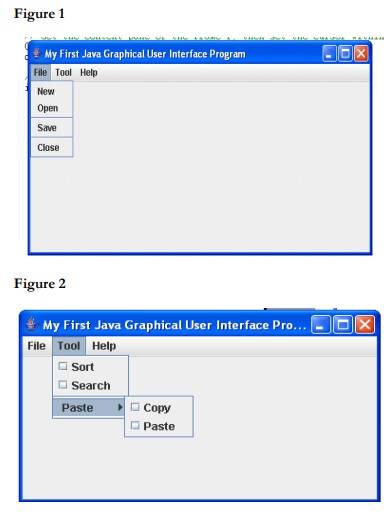 Design a class called MyJButton that reproduces Figure 3. Notice that the image icon is changed.
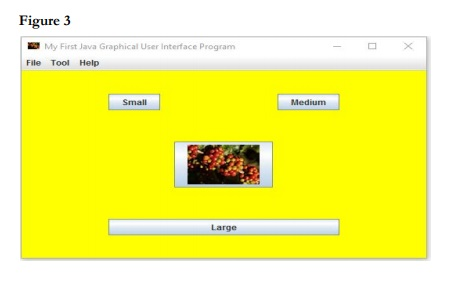 Part II Add Functionality Add functionality to the image button, such that when the mouse clicks the button, a frame similar to the one below appears.
 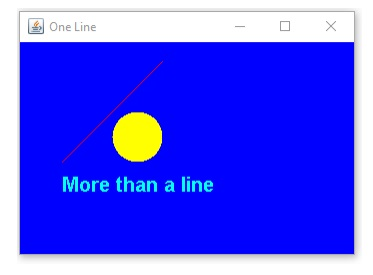 Use the program code below to create this frame. However, you are responsible for defining the event that will cause this to happen.
// Import the basic graphics classes. import java.awt.Color; import java.awt.Font; import java.awt.Graphics; import javax.swing.JFrame;
public class MyBasicFrame extends JFrame { // Create a constructor method public MyBasicFrame() { // All we do is call JFrame's constructor. // We don't need anything special for this program. super("One Line"); setBackground(Color.blue); } /* The following methods are instance methods. Create a paint() method to override the one in JFrame. This is where the drawing happens. We don't have to call it in our program, it gets called automatically whenever the frame needs to be redrawn, like when it it made visible or moved or whatever. */ public void paint(Graphics g) { g.setColor(Color.red); g.drawLine(50,150,150,50); // Draw a line g.setColor(Color.YELLOW); g.fillOval(100, 100, 50, 50);
g.setColor(Color.CYAN); g.setFont(new Font("Times Roman", Font.BOLD, 20)); g.drawString("More than a line", 50, 180); } }
ALL SO MAKE IT SO IT CAN HANDLE MENU EVENT SUCH AS IMAGES LIKE THE FRUIT IMAGE SHOWN ABOVE PLEASE.
Figure 1 My First Java Graphical User Interface Progranm File Tool Help New Open Save Close Figure 2 My First Java Graphical User Interface Pro File Tool Help Sort Search PasteCopy d Paste
Step by Step Solution
There are 3 Steps involved in it

Get step-by-step solutions from verified subject matter experts
 Study Help