







Question: Assignment 6 Use a python script on ubuntu1 to configure single area OSPF on the routers in the topology given in Fig1. Also include
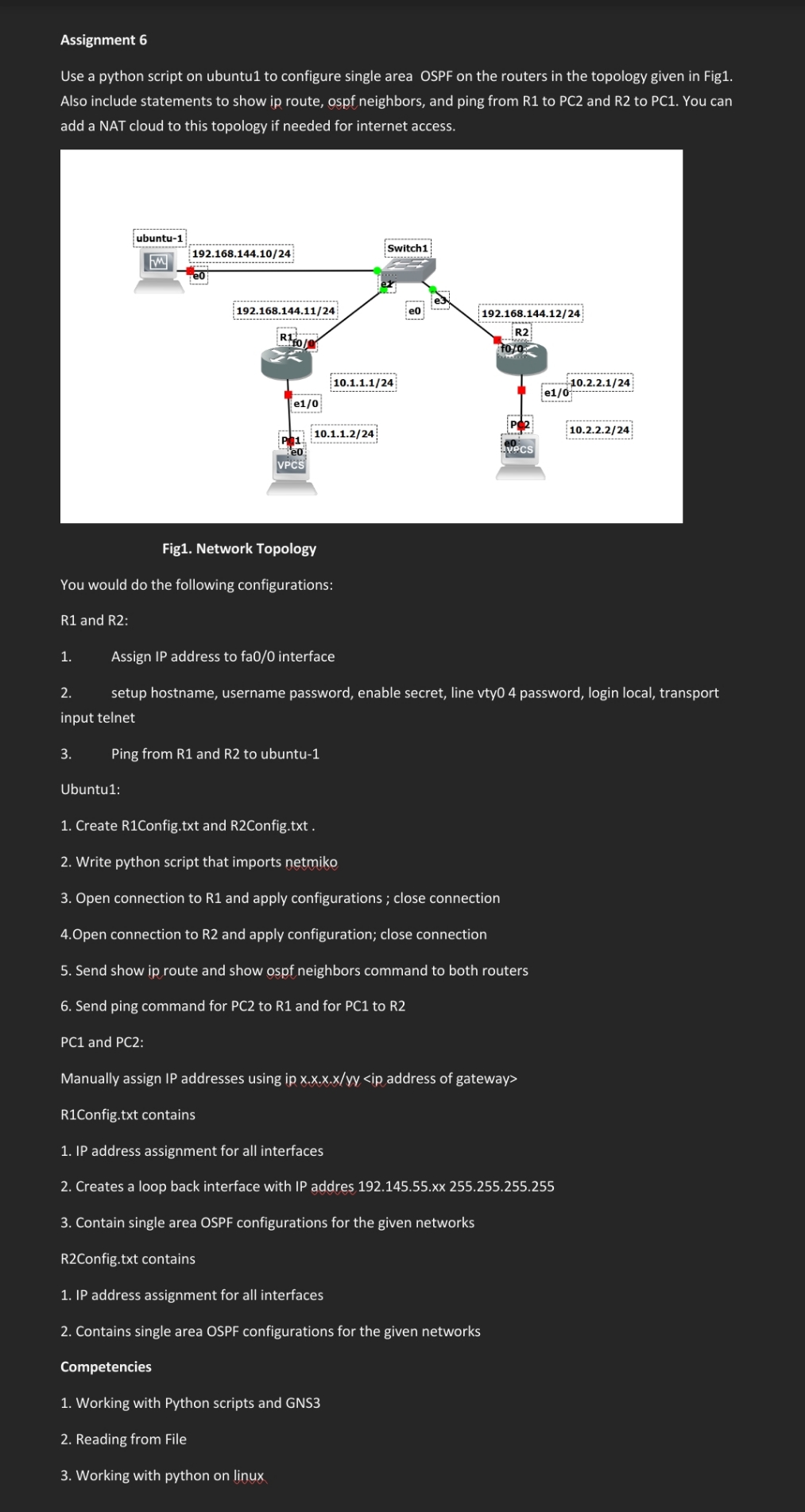
Assignment 6 Use a python script on ubuntu1 to configure single area OSPF on the routers in the topology given in Fig1. Also include statements to show ip route, ospf neighbors, and ping from R1 to PC2 and R2 to PC1. You can add a NAT cloud to this topology if needed for internet access. R1 and R2: 1. ubuntu-1 M 3. 192.168.144.10/24 Ubuntu 1: 192.168.144.11/24 R10 Fig1. Network Topology You would do the following configurations: e1/0 PC1 and PC2: VPCS 10.1.1.2/24 Ping from R1 and R2 to ubuntu-1 10.1.1.1/24 Switch1 e0 Assign IP address to fa0/0 interface 2. setup hostname, username password, enable secret, line vty0 4 password, login local, transport input telnet 192.168.144.12/24 R2 fo/0 VPCS 1. Create R1Config.txt and R2Config.txt. 2. Write python script that imports netmiko 3. Open connection to R1 and apply configurations; close connection 4.Open connection to R2 and apply configuration; close connection 5. Send show ip route and show ospf neighbors command to both routers 6. Send ping command for PC2 to R1 and for PC1 to R2 1. IP address assignment for all interfaces 2. Contains single area OSPF configurations for the given networks Competencies 1. Working with Python scripts and GNS3 2. Reading from File 3. Working with python on linux 10.2.2.1/24 e1/0! Manually assign IP addresses using ip x.x.x.x/yy R1Config.txt contains 1. IP address assignment for all interfaces 2. Creates a loop back interface with IP addres 192.145.55.xx 255.255.255.255 3. Contain single area OSPF configurations for the given networks R2Config.txt contains 10.2.2.2/24
Step by Step Solution
There are 3 Steps involved in it

Get step-by-step solutions from verified subject matter experts
 Study Help