







Question: ASSIGNMENT 8 Part 1 . Design a driver class called YourNameAssignment 8 ( replace YourName with your actual name, no spaces ) with the following
ASSIGNMENT
Part Design a driver class called YourNameAssignmentreplace YourName with your actual name, no
spaces with the following exact functionality and names replace YourName with your actual name or the
name you go by no spaces:
Read lines from the AssingmentData.txt file and split them into tokens. In the file, the tokens are delimited
by whitespaces, punctuation marks comma perioddot colon, semicolon, slash quotation marks,
exclamation marks, and parentheses Do not use as delimiter symbols like plus, hashtag, hyphen, or other
characters that can be part of wordsconcepts like C C# ObjectiveC etc.
Add the tokens you read from the file into an ArrayList called YourNameArrayList Do not add any empty
strings to your array list.
Print all the words from the YourNameArrayList, one word per line.
For every token in the YourNameArrayList count the followings and print them out in a user
friendlymeaningful way:
Number of tokens with letters in them eg COSC
Number of tokens with numbers in them eg COSC
Number of tokens with symbols in them eg C C#
Number of tokens with upper cases in them eg Java
Number of tokens with lower cases in them eg Java
Number of tokens that starts with a letter eg Java
Number of tokens with only letters in them eg programming
Number of tokens with only numbers in them eg
Number of tokens with both and only letters and numbers in them eg COSC
Part Implement the class in NetBeans IDE and JAVA: Create a JAVA project called YourNameAssignment
same name as the driver class and add your code to the YourNameAssignment driver class. Use only
concepts learned in class so far Chapters to Your program should be userfriendly and well
documentedcommented have comments for every line of code You can lose additional points for not
documenting your code, for naming the programs, files, classes, fields, and methods as requested, not submitting the
correct files, cheating, hardcoding the results, and using concepts we did not learn in class yet.
Part Create the screenshot document for your code and output: Create a Microsoft Word document from
the YourNameAssignment.docx template and call it YourNameAssignmentdocx replace YourName with
your actual name Add to the document your complete screenshots of the NetBeans editor window showing
the complete JAVA source code for YourNameAssignment class to the DRIVER CLASS section, and complete
screenshots of the complete output for the attached AssignmentDataFile.txt to the OUTPUT section. If the
entire class JAVA source code or the output does not fit in one screenshot or the screenshots cannot be easily
read, create multiple screenshots and add multiple screenshots to the screenshot document. Please keep the
screenshots in order look at the line numbers
Part Submit your work: Submit YourNameAssignmentdocx on eCampus under the Assignment Do not
archive the files eg no RAR, ZIP, etc. or submit other typesformats of files eg no CLASS, PDF JAVA, JAR,
TXT etc.
Use the exact names spelling caps You are not going to earn any credit if the classes and methods do not contain your actual name
and have the exactprecise names and functionality.
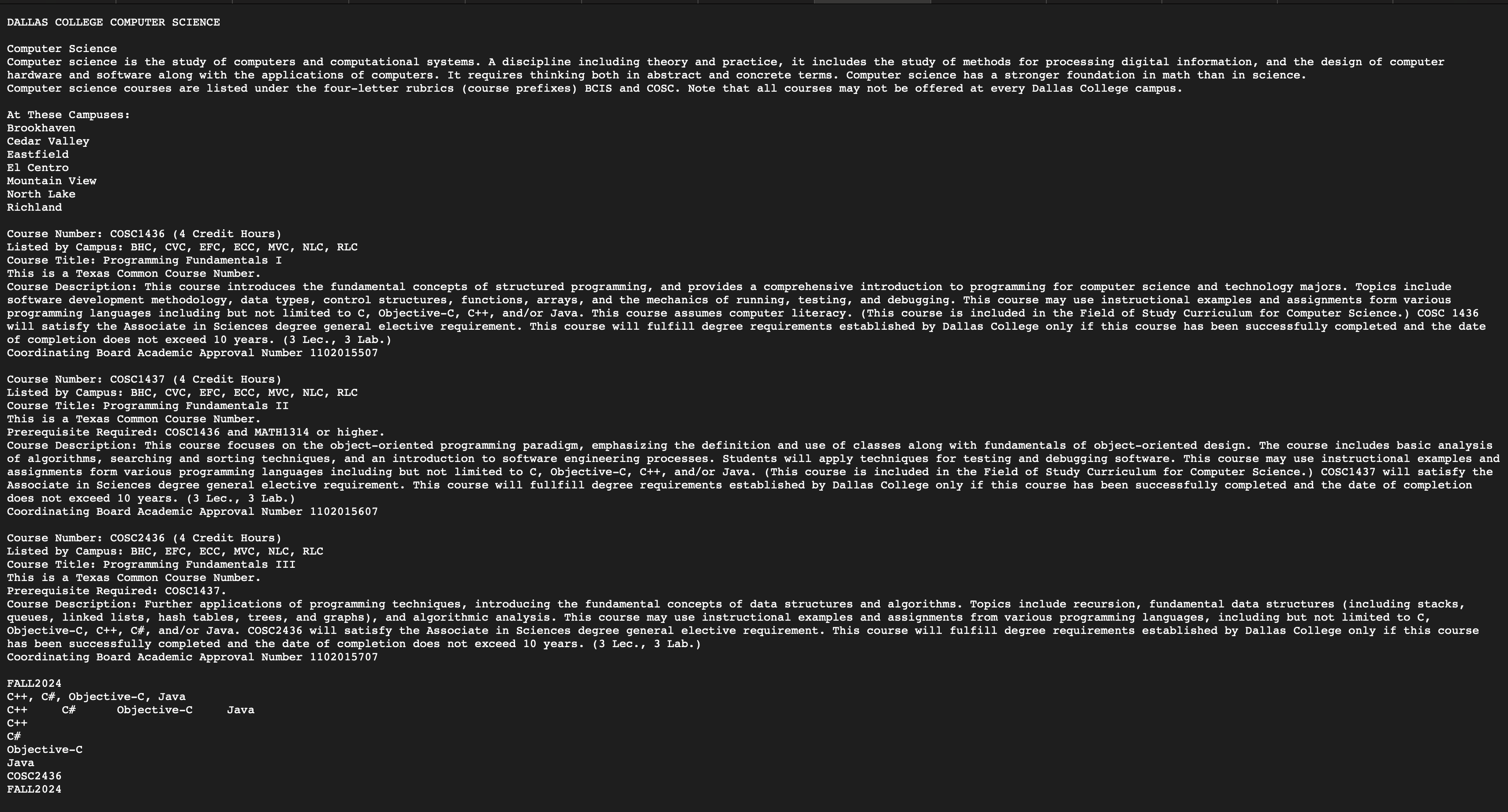
Symbols like $ have special meanings in regular expressions and should be escaped use backslash I have also attached the data textfile
Step by Step Solution
There are 3 Steps involved in it
1 Expert Approved Answer
Step: 1 Unlock

Question Has Been Solved by an Expert!
Get step-by-step solutions from verified subject matter experts
Step: 2 Unlock
Step: 3 Unlock
 Study Help