







Question: Assignment In the table below, there are exam scores from a class of students. The first exam was worth 150 points and the second exam
Assignment
In the table below, there are exam scores from a class of students. The first exam was worth 150 points and the second exam was worth 180 points and the scores in the table are the points scored. Letter grades will be assigned using the standard grade boundaries given on the right, below...
Please help, thank you
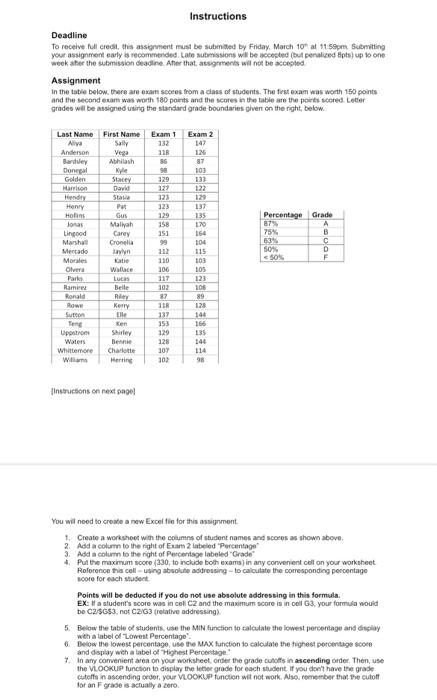
Deadline To receive ful credi, this assignment must be submated by Friday. March 10n at 11.590m. suemiting your assignment early b recommended. Late submissions wh be accepted (but penaliced Bpts) up b one weok aher the submision deadine Afer that, atsigrrenens will not be accepled Assignment in the tatie below. there are exam socees from a class of sudents. The firs exam was woth 150 points and the second euam was worth 180 points and the scores in the labie are the poirs scored. Loter grades will be assigned using the standard grade boundaries ghen on the right, below. fintructions on next pagel You wil need to create a new Excel fion for this assignment. 1. Create a worksheot with the columns of student names and scoees as thown above. 2. Add a colum to the right of Earm 2 labeled 'Percentage" 3. Add a colum bo the right of Percentsge labeled "Grade" 4. Pul the maximum soore ( 330 , to include both exams) in any converient cell on your workaheet. Roforonce tha cell - using aboolute addrossing - to calculate the corresponding percentage voore for wach swusent. Points will be deducted if you do not use absolute addressing in this formuls. EX: Z a students score was ia cel C2 and the maximum score is in ool G3, your formula would be C2/5G\$3, not C2G3 (retatice addressing) 5. Pevow the table of itudentis use the MiN funcion to calculate the lowest percentage and disllay wht a tabel of 'Lowest Percentage'. 6. Betoo the lowest percentage, use the MAX function to caiculate the thighes percentage sose and display weh a label of Highest Peroentage. 7. In ary comenient area on your warksteet, onter the grade culots in ascending otder. Then, use the vLookup funcson to display the leter grade for each shusent. If you dont have the grade cetoff in ascending ordot, yeur viookup function wit not work. Aso, remember that ve cutotf for an F grade is achually a zoro
Step by Step Solution
There are 3 Steps involved in it

Get step-by-step solutions from verified subject matter experts
 Study Help