







Question: Assignment Part 2 : File Handling with CSV and Pandas Objective: This assignment is designed to help you practice using the pandas library for file
Assignment Part : File Handling with CSV and Pandas
Objective:
This assignment is designed to help you practice using the pandas library for file handling and manipulation, specifically working with CSV files. By the end of this assignment, you will be able to read, write, and manipulate CSV files using Python and Pandas.
Question : Creating and Saving a CSV File
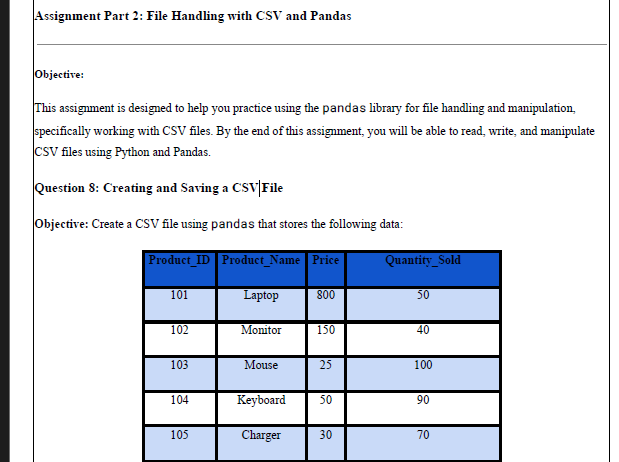
Objective: Create a CSV file using pandas that stores the following data:
ProductID ProductName Price QuantitySold Laptop Monitor Mouse Keyboard Charger
Instructions:
Create a Pandas DataFrame with the above data.
Save the DataFrame to a CSV file named products.csv using DataFrame.tocsv
Ensure the CSV file does not include an index column in the output file.
Step by Step Solution
There are 3 Steps involved in it
1 Expert Approved Answer
Step: 1 Unlock

Question Has Been Solved by an Expert!
Get step-by-step solutions from verified subject matter experts
Step: 2 Unlock
Step: 3 Unlock
 Study Help