







Question: Assignment: S 3 Name: YOUR NAME Section: YOUR COURSE AND SECTION Task 1 - ERD Model Based on the specification received create a ERD in
Assignment: S
Name: YOUR NAME
Section: YOUR COURSE AND SECTION
Task ERD Model
Based on the specification received create a ERD in MySQL Workbench.
Sign the ERD by writing your name in a text object.
Take a picture of your ERD.
Include in the report file the following:
A heading: Task ERD Model
The signed screenshot image of the ERD
Task Create database
Start writing the SQL script in MySQL Workbench to perform the following operations:
Include a comment: Task Create database by your name
If there is a database with the provided name, delete that database.
Add a database with that name.
Mark the created database as the default database for the following operations.
Show all the databases, find the created one in the list
Execute and debug the script in MySQL Workbench until runs without error and performs the above operations.
Include in the report file the following:
A heading: Task Create database
A screenshot image of the source code for this task only crop the image if necessary top of the screen
A screenshot image of the results for the performed operations bottom of the screen
Task Create tables
Continue writing the SQL script in MySQL Workbench, adding the following operations:
Include a comment: Task Create tables by your name
List all the tables in the database no table expected
Create the tables with the required specification.
List all the tables in the database again the new table must appear
Show the structure of the created tables.
Execute and debug the script in MySQL Workbench until runs without error and performs the above operations.snow the structure or the createa tables.
Execute and debug the script in MySQL Workbench until runs without error and performs the above operations.
Include in the report file the following:
A heading: Task Create tables
A screenshot image of the source code for this task only crop the image if necessary top of the screen
A screenshot image of the results for the performed operations bottom of the screen
Screenshots with the generated tables by the above commands, included in the order of the commands middle of the screen in different tabs
Task Add data
Continue writing the SQL script in MySQL Workbench, adding the following operations:
Include a comment: Task Add data by your name
Show all the data in your tables no data expected
Add at least rows of data in each of the tables, start with the provided data items in the order they are provided, and imagine new data for the other ones. Be sure you follow the constraints in your problem.
Show all the data in your tables at least five rows expected in each table
Execute and debug the script in MYSQL Workbench until runs without error and performs the above operations.
Include in the report file the following:
A heading: Task Add data
A screenshot image of the source code for this task only crop the image if necessary top of the screen
A screenshot image of the results for the performed operations bottom of the screen
Screenshots with the generated tables by the above commands, included in the order of the commands middle of the screen in different tabs
Task Query the data
Continue writing the SQL script in MySQL Workbench, adding the following operations:
Include a comment: Task Query the data by your name
Perform the queries from your specification.
Execute and debug the script in MySQL Workbench until runs without error and performs the above operations.
Include in the report file the following:
A heading: Task Query the data
A screenshot image of the source code for this task only crop the image if necessary top of the screen
A screenshot image of the results for the performed operations bottom of the screen
Screenshots with the generated tables by the above commands, included in the order of the commands middle of the screen in different tabs
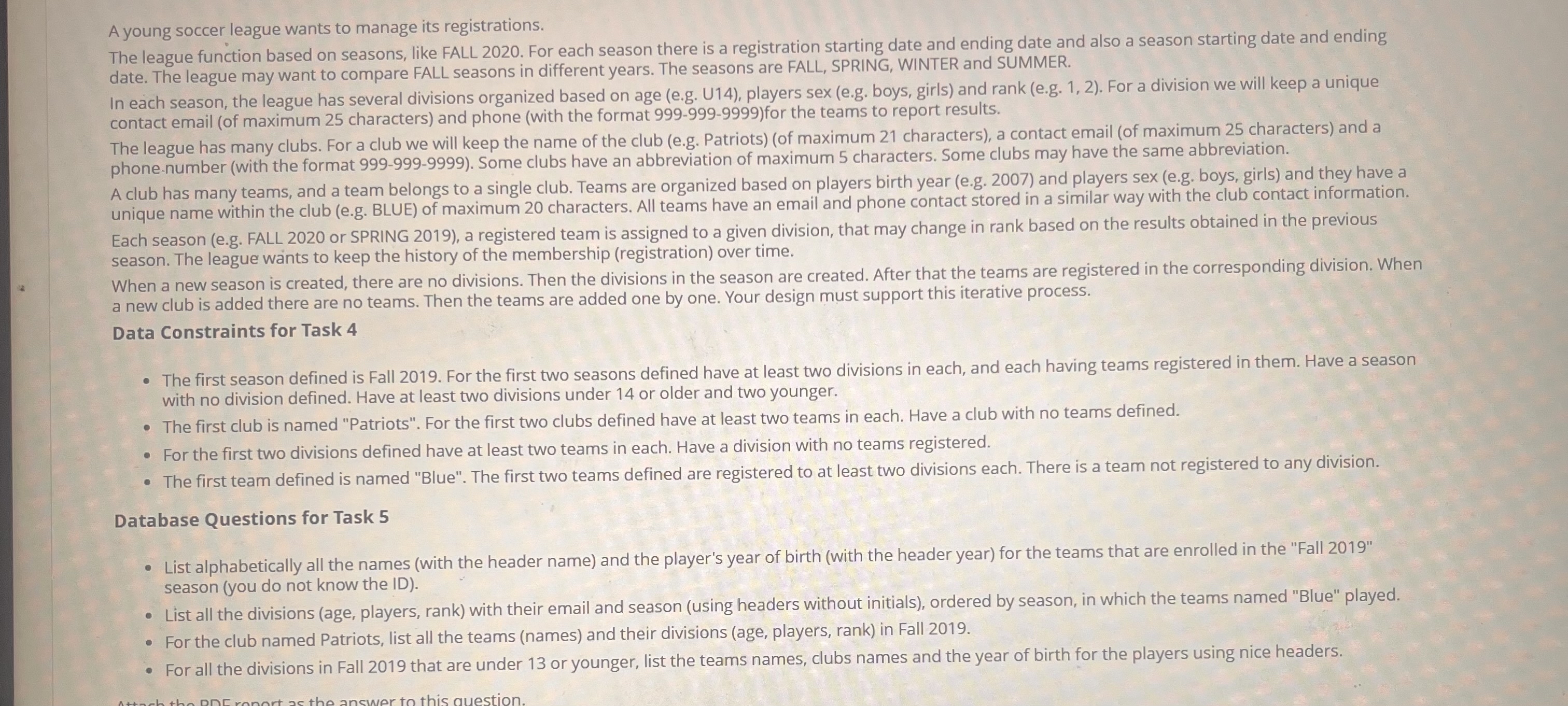
What to submitA young soccer league wants to manage its registrations.
The league function based on seasons, like FALL For each season there is a registration starting date and ending date and also a season starting date and ending date. The league may want to compare FALL seasons in different years. The seasons are FALL, SPRING, WINTER and SUMMER.
In each season, the league has several divisions organized based on age eg U players sex eg boys, girls and rank eg For a division we will keep a unique contact email of maximum characters and phone with the format for the teams to report results.
The league has many clubs. For a club we will keep the name of the club eg Patriotsof maximum characters a contact email of maximum characters and a phonenumber with the format Some clubs have an abbreviation of maximum characters. Some clubs may have the same abbreviation.
A club has many teams, and a team belongs to a single club. Teams are organized based on play
Step by Step Solution
There are 3 Steps involved in it
1 Expert Approved Answer
Step: 1 Unlock

Question Has Been Solved by an Expert!
Get step-by-step solutions from verified subject matter experts
Step: 2 Unlock
Step: 3 Unlock
 Study Help