







Question: Assignment4A: Let's Play Bunco! Now that we are able to repeat actions easily with loops, we can program a wide variety of traditional games
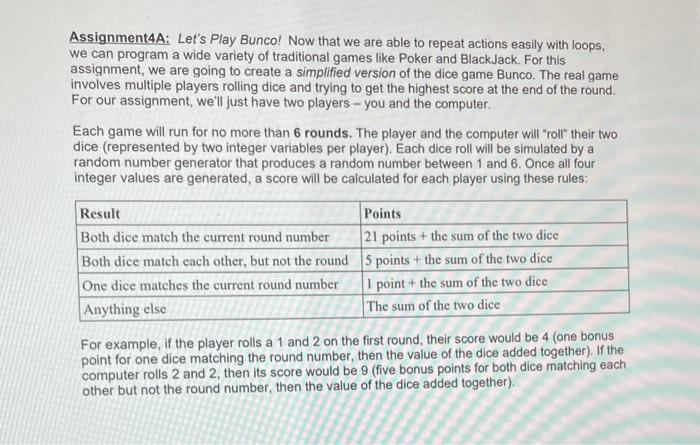
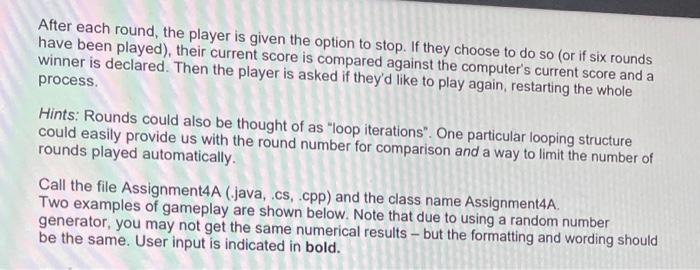
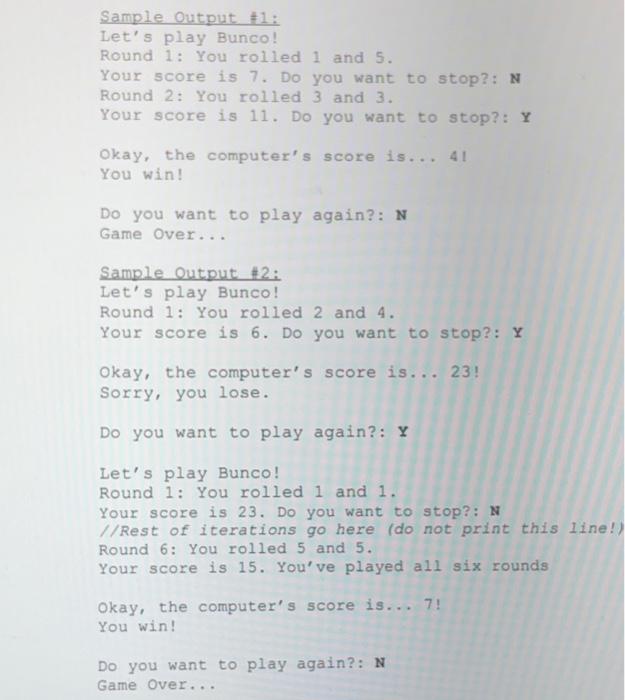
Assignment4A: Let's Play Bunco! Now that we are able to repeat actions easily with loops, we can program a wide variety of traditional games like Poker and BlackJack. For this assignment, we are going to create a simplified version of the dice game Bunco. The real game involves multiple players rolling dice and trying to get the highest score at the end of the round. For our assignment, we'll just have two players - you and the computer. Each game will run for no more than 6 rounds. The player and the computer will "roll" their two dice (represented by two integer variables per player). Each dice roll will be simulated by a random number generator that produces a random number between 1 and 6. Once all four integer values are generated, a score will be calculated for each player using these rules: Result Both dice match the current round number Both dice match each other, but not the round One dice matches the current round number Anything else Points 21 points + the sum of the two dice 5 points + the sum of the two dice 1 point + the sum of the two dice The sum of the two dice For example, if the player rolls a 1 and 2 on the first round, their score would be 4 (one bonus point for one dice matching the round number, then the value of the dice added together). If the computer rolls 2 and 2, then its score would be 9 (five bonus points for both dice matching each other but not the round number, then the value of the dice added together). After each round, the player is given the option to stop. If they choose to do so (or if six rounds have been played), their current score is compared against the computer's current score and a winner is declared. Then the player is asked if they'd like to play again, restarting the whole process. Hints: Rounds could also be thought of as "loop iterations". One particular looping structure could easily provide us with the round number for comparison and a way to limit the number of rounds played automatically. Call the file Assignment4A (.java, .cs, .cpp) and the class name Assignment4A. Two examples of gameplay are shown below. Note that due to using a random number generator, you may not get the same numerical results - but the formatting and wording should be the same. User input is indicated in bold. Sample Output #1: Let's play Bunco! Round 1: You rolled 1 and 5. Your score is 7. Do you want to stop?: N Round 2: You rolled 3 and 3. Your score is 11. Do you want to stop?: Y Okay, the computer's score is... 41 You win! Do you want to play again?: N Game Over... Sample Output #2: Let's play Bunco! Round 1: You rolled 2 and 4. Your score is 6. Do you want to stop?: Y Okay, the computer's score is... 23! Sorry, you lose. Do you want to play again?: Y Let's play Bunco! Round 1: You rolled 1 and 1. Your score is 23. Do you want to stop?: N //Rest of iterations go here (do not print this line!) Round 6: You rolled 5 and 5. Your score is 15. You've played all six rounds Okay, the computer's score is... 7! You win! Do you want to play again?: N Game Over...
Step by Step Solution
3.53 Rating (174 Votes )
There are 3 Steps involved in it
Before diving into the coding part lets discuss some prerequisite concepts that will help in underst... View full answer

Get step-by-step solutions from verified subject matter experts
 Study Help