







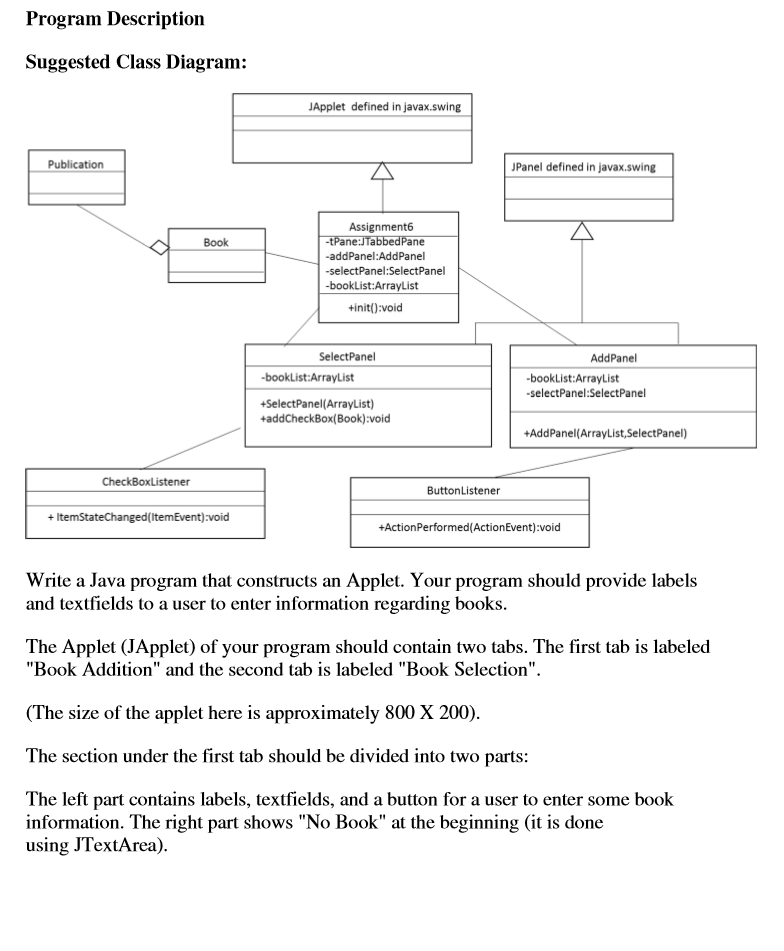
Question: --------Assignment6.java---------- import javax.swing.*; import java.util.*; public class Assignment6 extends JApplet { private int APPLET_WIDTH = 800, APPLET_HEIGHT = 300; private JTabbedPane tPane; private AddPanel addPanel;
--------Assignment6.java----------
import javax.swing.*; import java.util.*;
public class Assignment6 extends JApplet {
private int APPLET_WIDTH = 800, APPLET_HEIGHT = 300;
private JTabbedPane tPane; private AddPanel addPanel; private SelectPanel selectPanel; private ArrayList bookList;
//The method init initializes the Applet with a Pane with two tabs public void init() { //list of books to be used in every panel bookList = new ArrayList();
//customer selection panel uses the list of books selectPanel = new SelectPanel(bookList);
addPanel = new AddPanel(bookList, selectPanel);
//create a tabbed pane with two tabs tPane = new JTabbedPane(); tPane.addTab("Book Addition", addPanel); tPane.addTab("Book Selection", selectPanel);
getContentPane().add(tPane); setSize (APPLET_WIDTH, APPLET_HEIGHT); //set Applet size } }
--------Book----------
import java.text.NumberFormat;
public class Book { private String title; private String author; private Publication pub; /************************************************************************ Constructor method to initialize each variable. ************************************************************************/ public Book() { title = "?"; author = "?"; pub = new Publication(); }
/************************************************************************ Accessor method: This method returns the title of a book ************************************************************************/ public String getTitle() { return title; }
/************************************************************************ Accessor method: This method returns the author of a book ************************************************************************/ public String getAuthor() { return author; } /************************************************************************ Accessor method: This method returns the publication info of a book ************************************************************************/ public Publication getPublication() { return pub; } /************************************************************************ Mutator method: This method sets the title of a book ************************************************************************/ public void setTitle(String newTitle) { title = newTitle; }
/************************************************************************ Mutator method: This method sets the author of a book ************************************************************************/ public void setAuthor(String newAuthor) { author = newAuthor; }
/************************************************************************ Mutator method: This method sets the publication info of a book ************************************************************************/ public void setPublication(int newVersion, String newISBN, double newPrice) { pub.setVersion(newVersion); pub.setISBN(newISBN); pub.setPrice(newPrice); }
/************************************************************************ This method returns a String containing attribute(variable) values of a book. ************************************************************************/ public String toString() { String result = " Title: \t" + getTitle()+" " + "Author: \t"+getAuthor()+" " + pub.toString()+" ";
return result; } }//end of book class
--------publication----------
import java.text.NumberFormat;
public class Publication { private String ISBN; private int version; private double price; /************************************************************************ Constructor is used to initialize instance variables. ************************************************************************/ public Publication() { ISBN = new String("?"); version = 1; price = 0.0; }
/************************************************************************ Accessor method: This method returns the price of a book. ************************************************************************/ public double getPrice() { return price; }
/************************************************************************ Accessor method: This method returns the version of a book. ************************************************************************/ public int getVersion() { return version; }
/************************************************************************ Accessor method: This method returns the ISBN of a book. ************************************************************************/ public String getISBN() { return ISBN; }
/************************************************************************ Modifier method: This method sets the price of a book. ************************************************************************/ public void setPrice(double newPrice) { price = newPrice; }
/************************************************************************ Modifier method: This method sets the new version of a book. ************************************************************************/ public void setVersion(int newVersion) { version = newVersion; }
/************************************************************************ Modifier method: This method sets the ISBN of a book. ************************************************************************/ public void setISBN(String newISBN) { ISBN = newISBN; }
/***************************************************************************** This method return a string containing the publication information of a book. *****************************************************************************/ public String toString() { String result; NumberFormat money = NumberFormat.getCurrencyInstance(); result = "Edition: \t" + version + " ISBN: \t" + ISBN + " Price: \t" + money.format(price); return result; }
}
--------AddPanel----------
import java.awt.*; import java.awt.event.*; import javax.swing.*; import java.util.*;
public class AddPanel extends JPanel { private ArrayList bookList; private JButton button1; private SelectPanel selectPanel;
//Constructor initializes components and organize them using certain layouts public AddPanel(ArrayList bookList, SelectPanel selectPanel) { this.bookList = bookList; this.selectPanel = selectPanel;
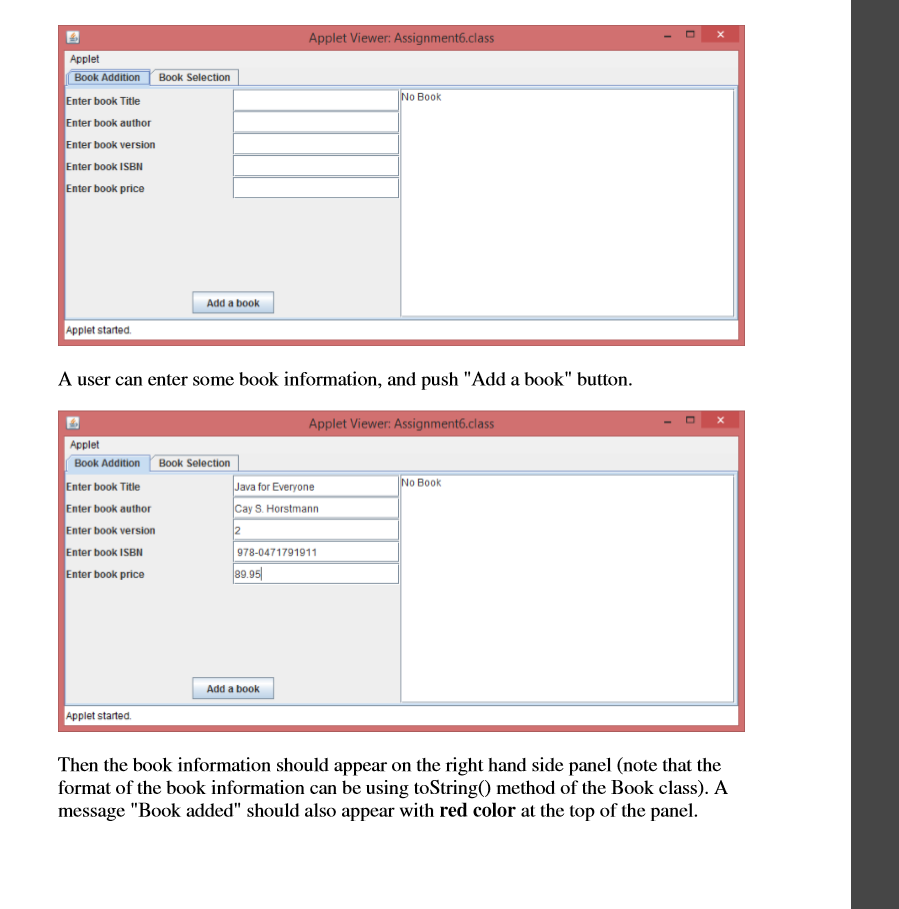
//organize components here button1 = new JButton("Add a book"); add(button1); }
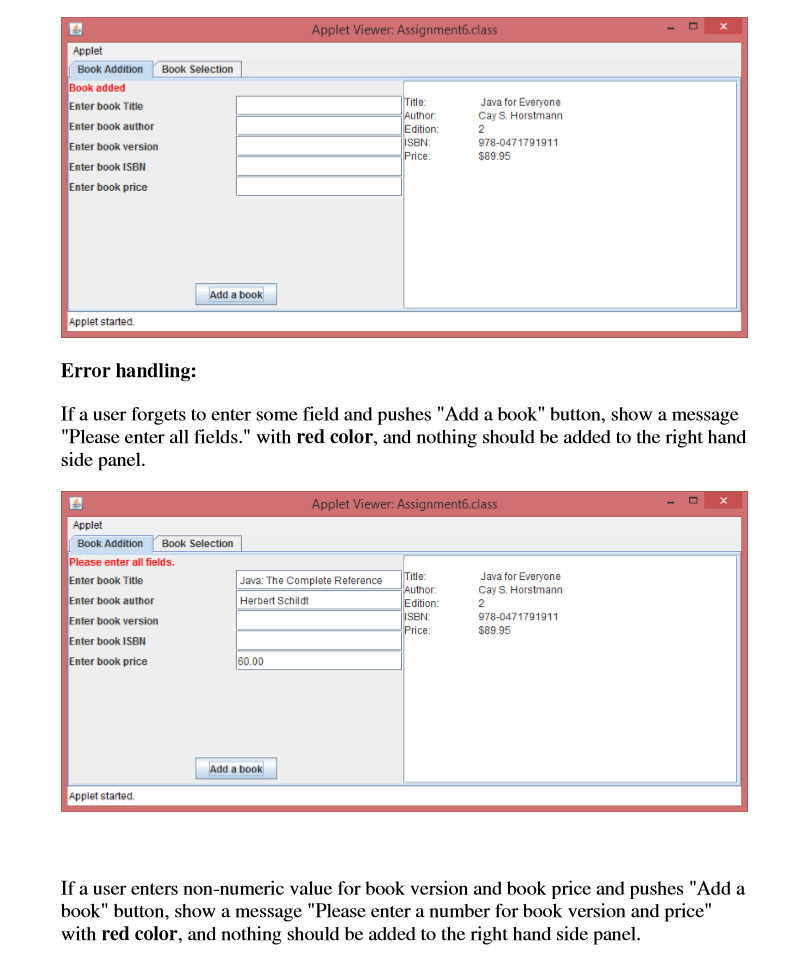
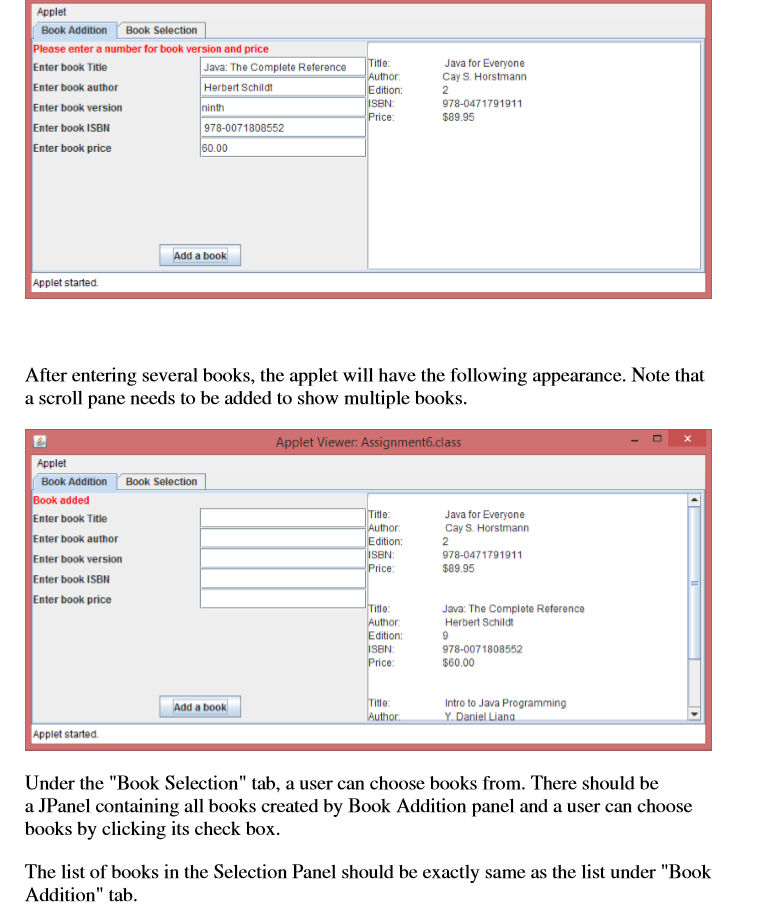
//ButtonListener is a listener class that listens to //see if the button "Add a book" is pushed. //When the event occurs, it adds a book using the information //entered by a user. //It also performs error checking. private class ButtonListener implements ActionListener { public void actionPerformed(ActionEvent event) { //TO BE COMPLETED } //end of actionPerformed method } //end of ButtonListener class }
--------SelectPanel--------
import java.awt.*; import java.awt.event.*; import javax.swing.*; import java.util.ArrayList; import java.text.NumberFormat;
public class SelectPanel extends JPanel { private ArrayList bookList; private JPanel panelList; private ArrayList checkBoxes; private JTextField textField;
public SelectPanel(ArrayList bookList) { this.bookList = bookList;
// orgranize components for purchase panel
} //end of constructor
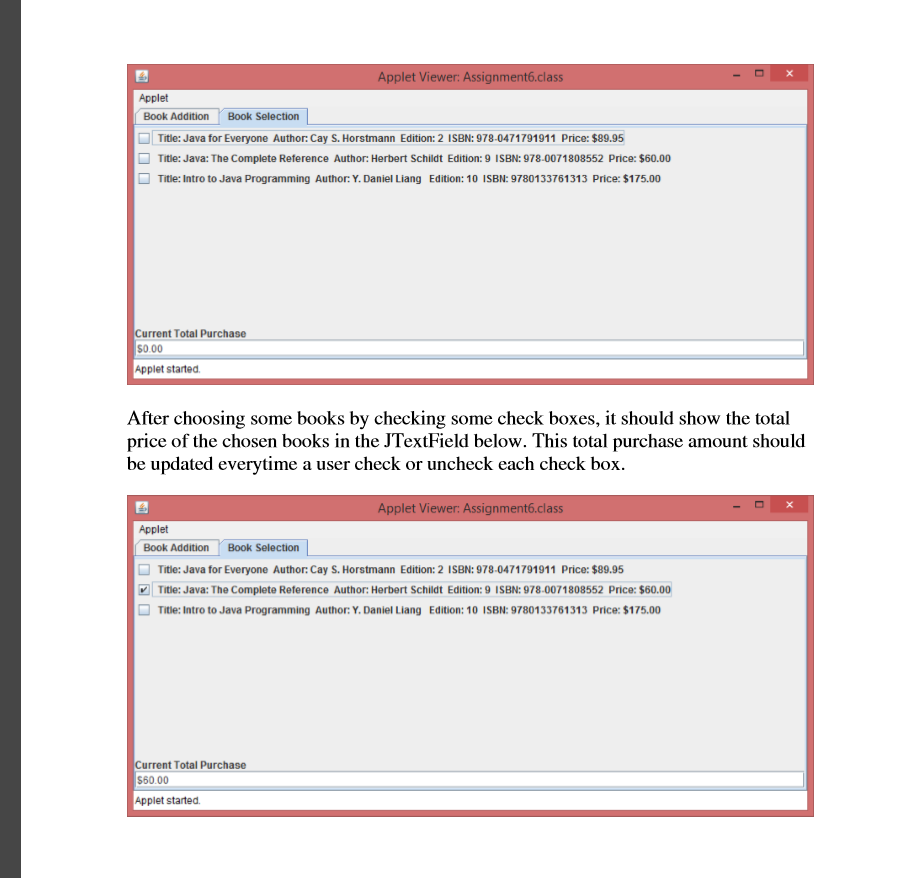
/** This method add checkBox for a given book object to the **/ /** left panel. It also creates a check box listener and **/ /** add it to the checkbox **/ public void addCheckBox(Book book1) { //TO BE COMPLETED }
/** CheckBoxListener defines an action when a checkbox is **/ /** selected or un-selected. It computes the total purchase **/ /** amount based on the new selection **/ private class CheckBoxListener implements ItemListener { public void itemStateChanged(ItemEvent event) { // compute the total purchase amount when a check box is // checked or unchecked. } } }
please hep me finish this assignment little bit faster.
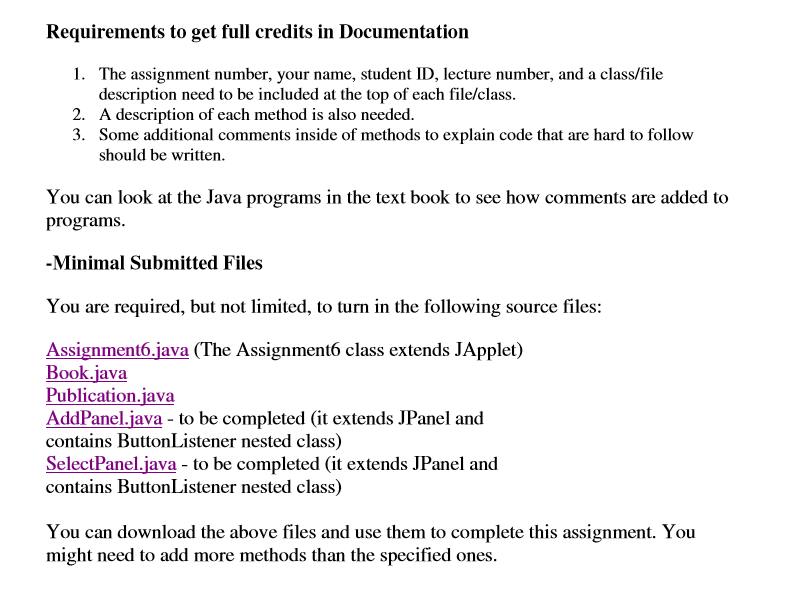
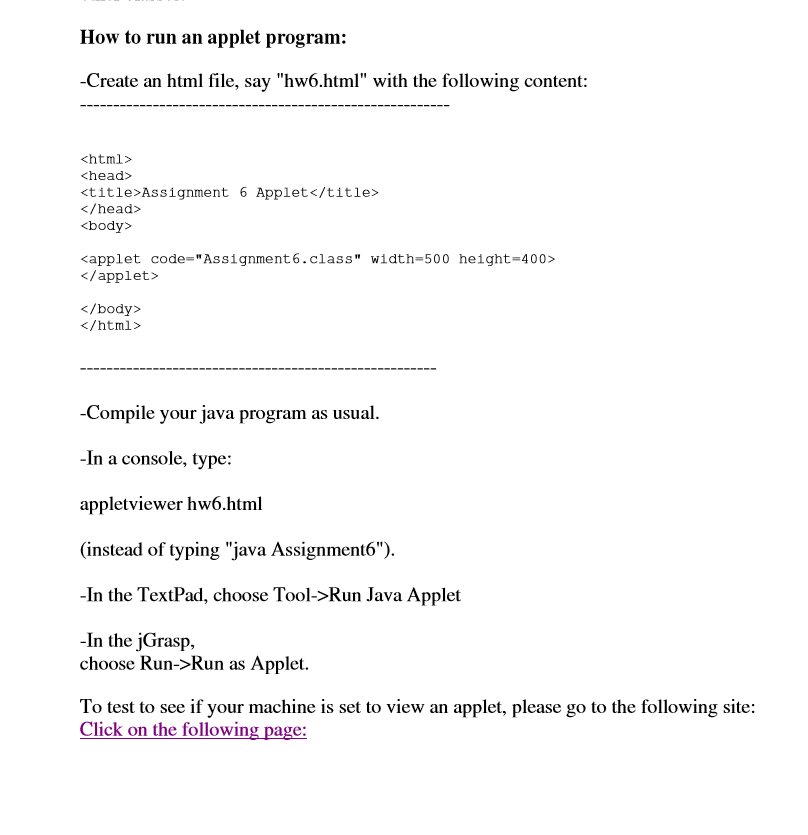
Requirements to get full credits in Docun 1. The assignment number, your name, student ID, lecture number, and a class/file description need to be included at the top of each file/class 2. A description of each method is also needed. 3. Some additional comments inside of methods to explain code that are hard to follow should be written. You can look at the Java programs in the text book to see how comments are added to programs -Minimal Submitted Files You are resqwined, hut no limted, o tum in the foling oreies Assignment6.java (The Assignment6 class extends JApplet) Book.java Publication.java AddPanel.java - to be completed (it extends JPanel and contains ButtonListener nested class) SelectPanel.java to be completed (it extends JPanel and contains ButtonListener nested class) You can download the above files and use them to complete this assignment. You might need to add more methods than the specified ones. Requirements to get full credits in Docun 1. The assignment number, your name, student ID, lecture number, and a class/file description need to be included at the top of each file/class 2. A description of each method is also needed. 3. Some additional comments inside of methods to explain code that are hard to follow should be written. You can look at the Java programs in the text book to see how comments are added to programs -Minimal Submitted Files You are resqwined, hut no limted, o tum in the foling oreies Assignment6.java (The Assignment6 class extends JApplet) Book.java Publication.java AddPanel.java - to be completed (it extends JPanel and contains ButtonListener nested class) SelectPanel.java to be completed (it extends JPanel and contains ButtonListener nested class) You can download the above files and use them to complete this assignment. You might need to add more methods than the specified ones
Step by Step Solution
There are 3 Steps involved in it

Get step-by-step solutions from verified subject matter experts
 Study Help