







Question: AsteroidField: Inheritance In Action For this program, you will use inheritance to develop an Asteroid class that satisfies certain requirements. You will also develop a
AsteroidField: Inheritance In Action
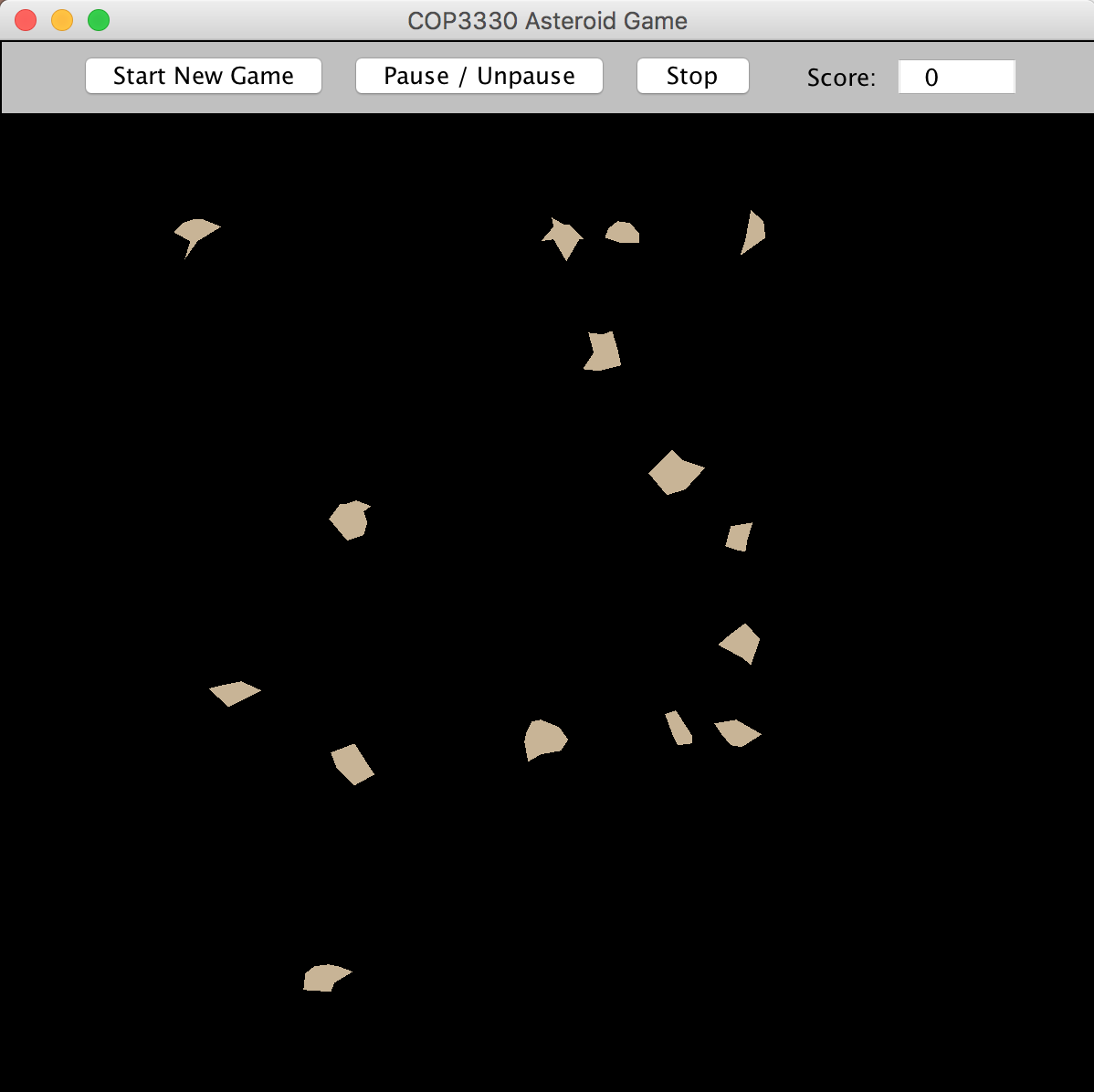
For this program, you will use inheritance to develop an Asteroid class that satisfies certain requirements. You will also develop a separate AsteroidField test driver class to create a field of asteroids. The number of asteroids to create will be determined by the value of a command-line argument, as further described below and in lecture. Your test driver will use the "Blobz.jar" external JAR file discussed in lecture to display your asteroid field in a dynamic simulation context. The output of the program should appear as shown below, with the asteroids all flowing across the field of view in all directions. When the asteroids move offscreen, they will reappear near the opposite corners as described for the "flow" mode discussed in lecture.
To run the simulation, press the "Start New Game" button. The "Pause/Unpause" button will pause and unpause the motion of the objects. Press "Stop" to end the simulation. You can press "Start New Game" to start over while the simulation is running or after the "Stop" button has been pressed, but you must unpause first if the simulation has been paused.
Test Folder Setup
1. Download the AsteroidsTest.zip file and place it on your desktop.
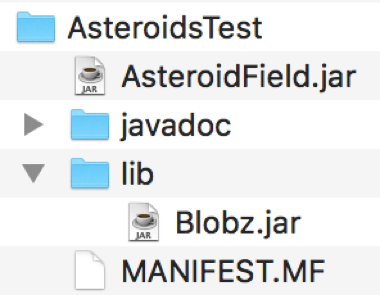
2. Unzip the file. This will create an AsteroidsTest folder with the following structure:
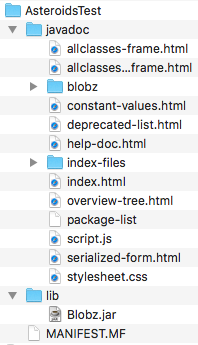
The javadoc subfolder contains the Java API documentation for the classes in Blobz.jar. This documentation will be useful to you as you build the various parts of your Asteroids game. To view the javadocs, simply use a browser open the index.html file in this subfolder. Bookmark the page so it is easy to find later. From this page, you will be able to view the Javadocs for all classes in the Blobz package.
The AsteroidsTest folder also contains two other important components
a "lib" subfolder that contains the Blobz.jar simulation engine; and
a "MANIFEST.MF" file that you will use for building an executable JAR file that uses the simulation engine as an external library.
Eclipse Project Setup
1. Create a Java application project called "Asteroids" in Eclipse.
2. Right-click on the project name in the Package Explorer and select Properties. In the dialog that appears,select "java Build Path", then the "Libraries" tab, then the "Classpath" item, and then choose "Add External JARs". In the file chooser that appears, navigate to the Blobz.jar file in the test folder on your desktop and select it. Your Libraries tab should now look like this:
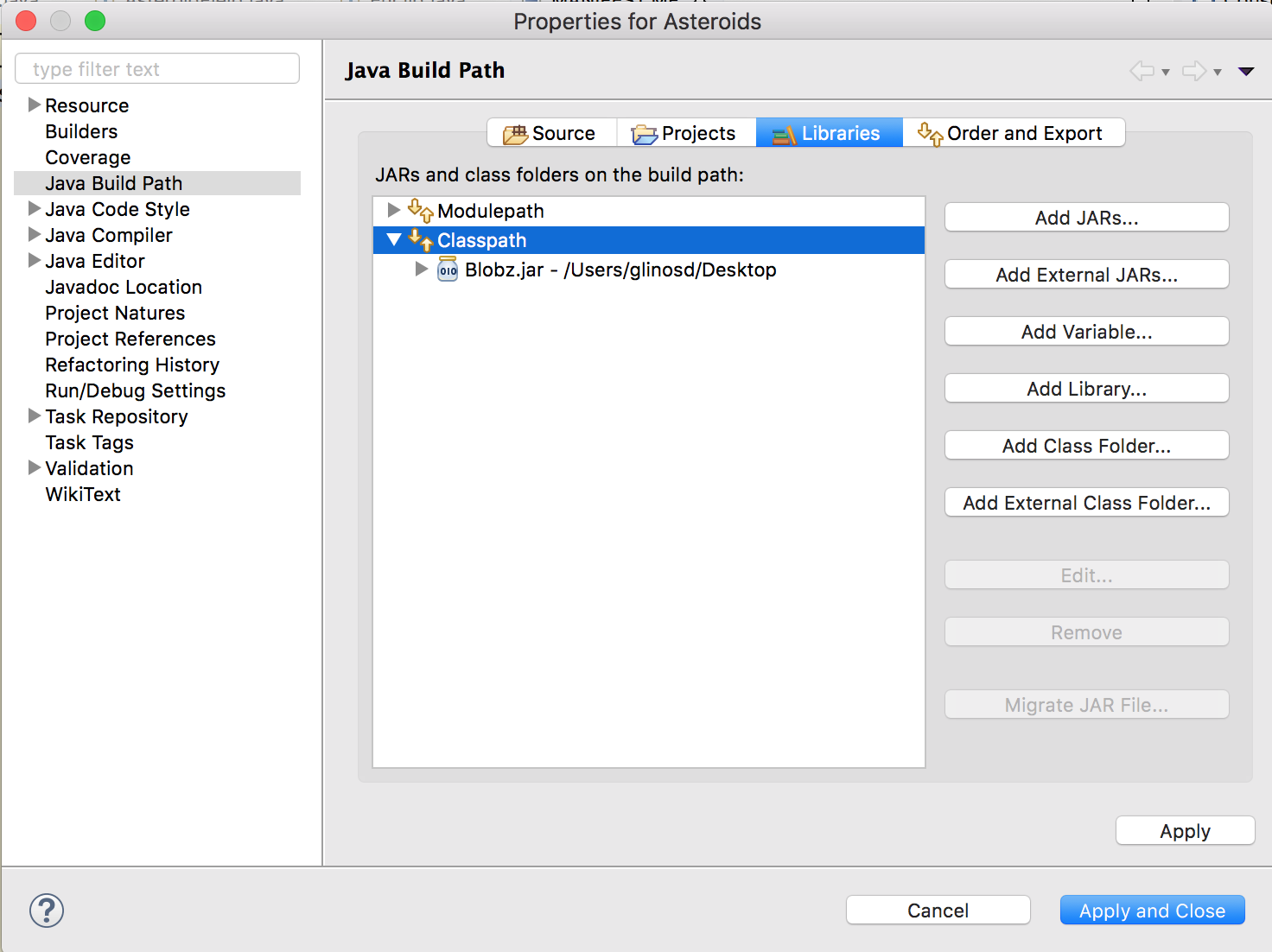
Choose "Apply and Close" to accept the above configuration. Your project is now configured to use the simulation engine for compiling and running your program within Eclipse.
3. In the Package Explorer, select the "src" subfolder of the Asteroids project, right-click, choose "New" and then "File". Enter "MANIFEST.MF" as the file name. Please note that this file name must be all upper case.
4. Edit the MANIFEST.MF file to appear exactly like what you see in the MANIFEST.MF file that is in the AsteroidsTest folder. Within Eclipse, the file should look like this:
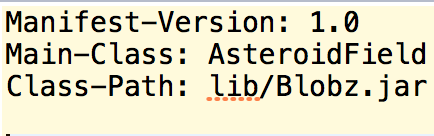
Please note that there are four (4) lines in this text file. The last line is empty. You will use this manifest file when you build your executable JAR file.
Program Development
1. Create an Asteroid.java class file in the default package of your Asteroids project. This class must satisfy the following requirements:
(a) it must extend the PolyBlob class so that it inherits from PolyBlob, which in turn inherits from Blob. The class will will have only a constructor and no other methods.
(b) the constructor must take these three input parameters as arguments: (i) an int that represents the x-component of the asteroid's velocity vector; (ii) an int that represents the y-component of the asteroid's velocity vector; and (iii) a double that represents the asteroid's angular rotation rate.
(c) the constructor must set the asteroid to start at the offscreen location (-100, -100), since we will be using "flow" mode, as discussed in the assignment preview lecture.
(d) the constructor must also initialize the asteroid's velocity vector with the velocity component values that the constructor receives as input.
(e) the constructor must create a random simple polygon (no lines crossing) shape for the asteroid that has between 5 and 9 sides and is between 10 and 30 pixels in diameter, as discussed in lecture. When displayed, the shape must not have any lines that cross.
2. Create a separate AsteroidField.java test driver class in the default package to create a field of asteroids. This class must satisfy the following requirements:
(a) it must implement the BlobGUI interface, as explained in lecture.
(b) it must have a one-line main() method that instantiates the class, as follows:

As you can see, the main method takes one (1) command line argument, interprets it as an integer, and passes that integer to the constructor for the class.
(c) the constructor for the class must perform the following actions:
(i) save the input integer in a static variable; this number determines how many asteroids will be created by the program.;
(ii) create a sandbox object;
(iii) set the sandbox to "flow" mode;
(iv) set the sandbox to run at 15 frames per second; and
(v) initialize the sandbox by passing "this" (the AsteroidField object) to the sandbox's init() method.
(d) the class must contain a generate() method, which is required by the BlobGUI interface. The generate() method must perform the following actions:
(i) it must create as many asteroids as are specified by the number that was input to the constructor for the class; each of the asteroids must have velocity components and rotational values as described below;
(ii) it must randomly choose x and y velocity components for each asteroid, where the x and y components are chosen independently of each other and where each of these values is an integer that may range from -3 to +3, but where zero values are disallowed, as discussed in lecture;
(iii) it must randomly choose a rotation value of either -.1 or +.1 for each asteroid, with equal probability. Values in between -.1 and +.1 are not permitted; and
(iv) it must add each asteroid to the sandbox.
3. Run and debug your program in Eclipse until you are satisfied with it.
4. Export an executable JAR file to the AsteroidsTest folder as follows:
Highlight the project (Asteroids) in the Package Explorer
Choose File Export and select "JAR file" (not "Runnable JAR file"), then Next
Choose the project (Asteroids) as the resource to export; check the box to "Export Java source files and resources"; and use the Browse button and text field to choose the name you want for the JAR file and be sure that it will be inside the AsteroidsTest folder on your Desktop; then choose Next
Make no choices on the "JAR Packaging Options" dialog and choose Next
On the "JAR Export" dialog, do not choose a main class. Instead, check the box to "Use existing manifest from workspace" and use the "Browse" button to select the MANIFEST.MF file that you created in your project. After you select the manifest file, the "JAR Export" dialog should look like this:
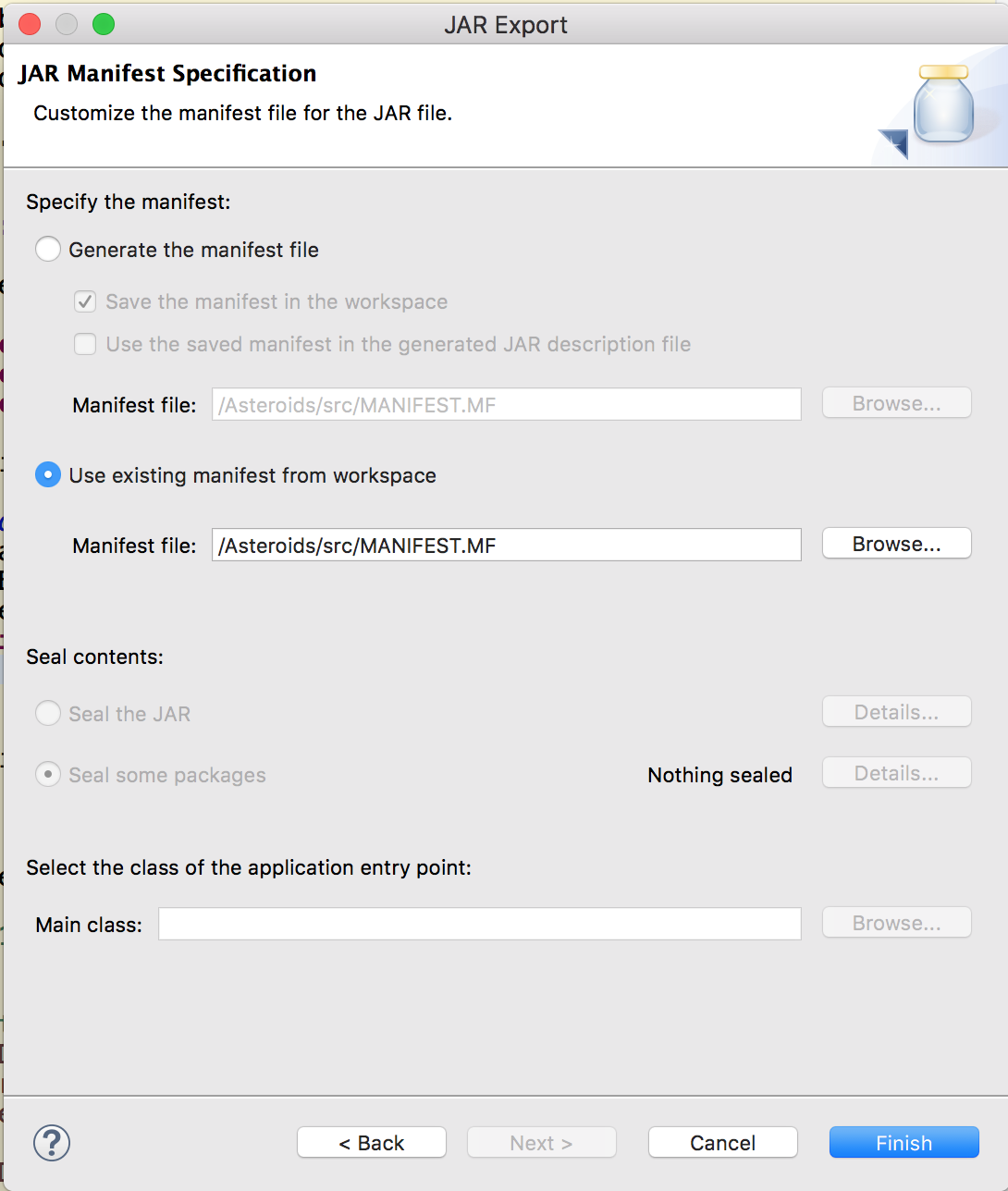
Choose "Finish" to complete the export of the JAR file. Your test folder should contain your JAR file at the top level, as shown below, where the javadoc and lib folders have been collapsed and the JAR file is named AsteroidField.jar:
Program Testing
Open a command window and navigate to the AsteroidsTest folder on your desktop. For most systems, you should be able to get there by entering: "cd Desktop\AsteroidsTest" (Windows) or "cd Desktop/AsteroidsTest" (Mac/Linux).
Now, run your program using the command: "java -jar AsteroidField.jar 15", assuming that you have named your JAR file "AsteroidField.jar". Your program should run and when you press the "Start New Game" button, it should produce a field of 15 asteroids as shown in the sample output at the top of these instructions . If it does not, fix the problem and keep testing until you meet with success.
What to Submit
For this assignment, you must submit an executable JAR file that contains your Java source files (".java" extension) as well as the bytecode files (".class") for running the program.
You should test your JAR file from the command line as described above before submitting it, as also discussed in lecture and in the Programming Resources section of this Webcourse.
Grading
Your program will be graded according to the grading rubric below. Additional penalties will be applied as necessary for:
late submissions
failure to include the source files
failure to include proper source file headers
failure for one teammate to submit
teaming submission errors
The penalties for the above items are described in the course Syllabus.
Please note that this assignment has 2 required source files and there is a 20-point deduction for a missing file header for each file.
Rubric
COP3330-AsteroidField
COP3330-AsteroidField
Criteria Ratings Pts This criterion is linked to a Learning Outcome File submitted is an executable JAR file that runs and produces the Bobz sandbox GUI. 20.0 pts Full Marks 0.0 pts No Marks 20.0 pts This criterion is linked to a Learning Outcome The program creates the required number of asteroids that start from the boundaries of the sandbox and flow across the sandbox at 15 frames per second. The direction of motion and velocity should appear random. 20.0 pts Full Marks 0.0 pts No Marks 20.0 pts This criterion is linked to a Learning Outcome The asteroids are simple polygons (no "bowties" or other degenerate shapes) between 10 and 30 pixels in diameter 15.0 pts Full Marks 0.0 pts No Marks 15.0 pts This criterion is linked to a Learning Outcome The asteroids have between 5 and 9 sides (vertices), both values inclusive. 15.0 pts Full Marks 0.0 pts No Marks 15.0 pts This criterion is linked to a Learning Outcome All asteroids move and they each have integer velocity components that independently range from -3 to +3, with no zero values allowed 15.0 pts Full Marks 0.0 pts No Marks 15.0 pts This criterion is linked to a Learning Outcome As they move, the asteroids rotate both clockwise and counterclockwise at an angular rate of +.1 or -.1, respectively, with equal probability 15.0 pts Full Marks 0.0 pts No Marks 15.0 pts Total Points: 100.0 COP3330 Asteroid Game Start New Game Pause Unpause Stop Score: 0 COP3330 Asteroid Game Start New Game Pause Unpause Stop Score: 0
Step by Step Solution
There are 3 Steps involved in it

Get step-by-step solutions from verified subject matter experts
 Study Help