







Question: At the command prompt, type vi dirbackup.sh and press Enter to open a new file for editing called dirbackup.sh in your home directory. 7. Enter
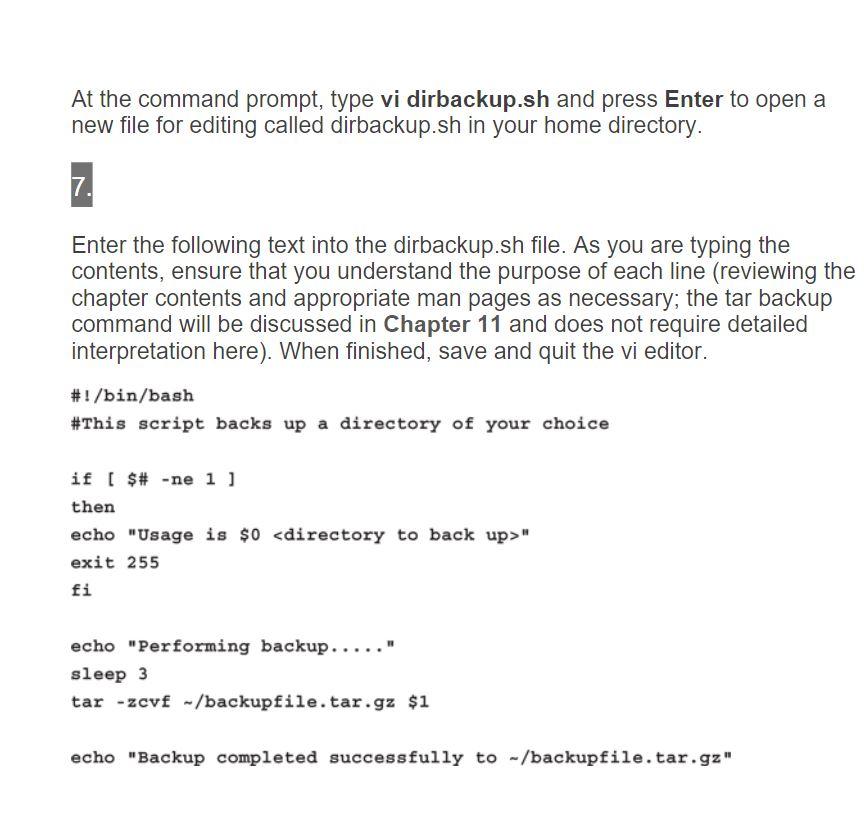
At the command prompt, type vi dirbackup.sh and press Enter to open a new file for editing called dirbackup.sh in your home directory. 7. Enter the following text into the dirbackup.sh file. As you are typing the contents, ensure that you understand the purpose of each line (reviewing the chapter contents and appropriate man pages as necessary; the tar backup command will be discussed in Chapter 11 and does not require detailed interpretation here). When finished, save and quit the vi editor. #!/bin/bash #This script backs up a directory of your choice if [ $# -ne 1] then echo "Usage is $0
Step by Step Solution
There are 3 Steps involved in it

Get step-by-step solutions from verified subject matter experts
 Study Help