







Question: Autodesk AutoCAD 2 D Drafting, Editing Dimension Multiple Choice questions Please solve and justify it . Question 1 out of 5 Common edit tools like
Autodesk AutoCAD D Drafting, Editing Dimension
Multiple Choice questions
Please solve and justify it
Question out of
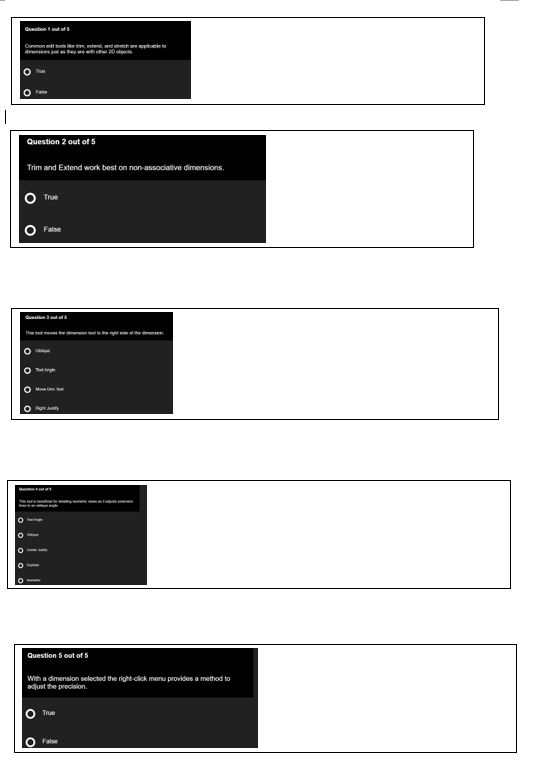
Common edit tools like trim, extend, and stretch are applicable to dimensions just as they are with other D objects.
o True
o False
Question out of
Trim and Extend work best on nonassociative dimensions.
o True
o False
Question out of
This tool moves the dimension text to the right side of the dimension.
o Oblique
o Text angle
o Move Dim Text
o Right Justify
Question out of
This tool is beneficial for detailing isometric views as it adjusts extension lines to an oblique angle.
o Text Angle
o Obliques
o Centre Justify
o Explode
o Isometric
Question out of
With a dimension selected the rightclick menu provides a method to adjust the precision.
o True
o False
Step by Step Solution
There are 3 Steps involved in it
1 Expert Approved Answer
Step: 1 Unlock

Question Has Been Solved by an Expert!
Get step-by-step solutions from verified subject matter experts
Step: 2 Unlock
Step: 3 Unlock
 Study Help