







Question: A.Write SQL statements that answer each of the requests for data in the resto.txt tables: 1.For each expert and their specialisms, list the experts name,
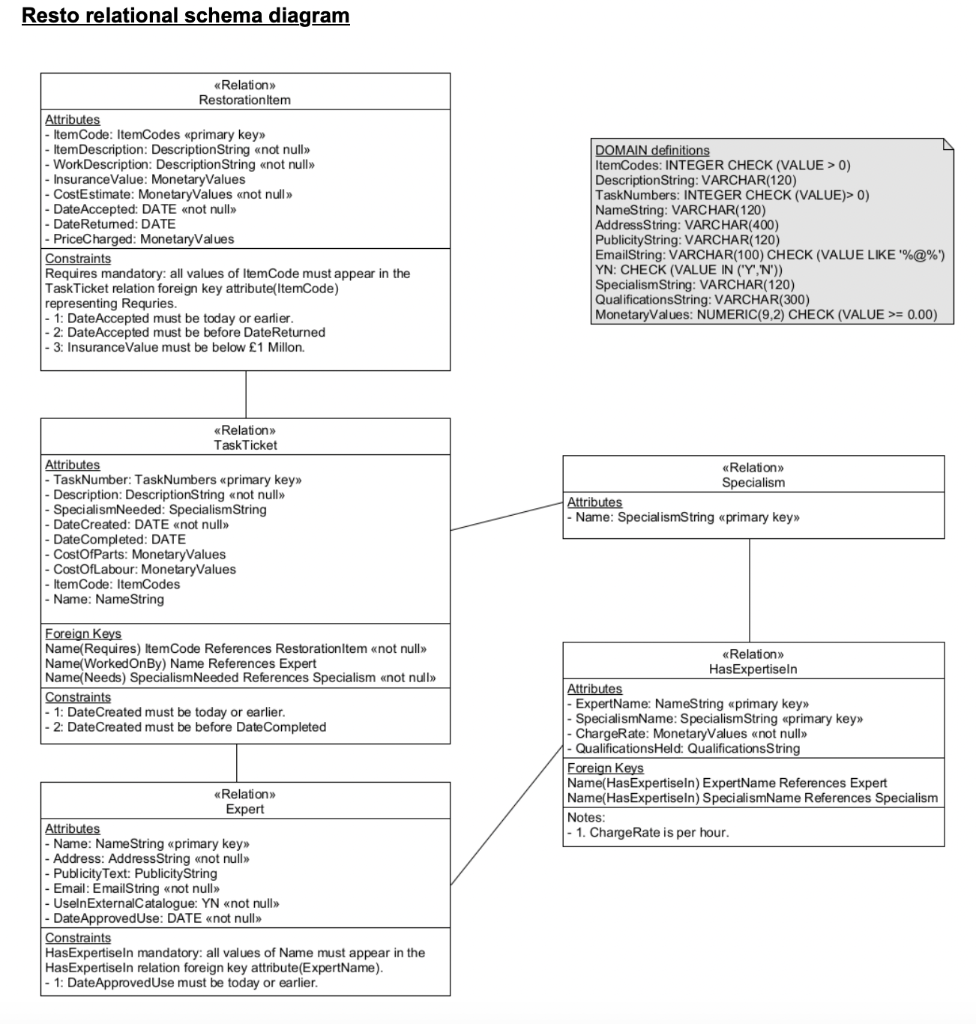
A.Write SQL statements that answer each of the requests for data in the resto.txt tables:
1.For each expert and their specialisms, list the experts name, email, the specialism and their charge-rate for that specialism. Sort the output by specialism and then by charge-rate (descending order in each case).
2.For each expert and their specialisms, if they have given permission for their details to appear in the catalogue, list the experts name, email, the specialism and their charge-rate for that specialism. Sort the output by specialism and then by charge-rate (descending order in each case).
3.For each restoration item that has an insurance value of over 300.00, and has a task ticket that was worked on by an expert called Benjamin, give the item code, item description, and insurance value. The list should be in order of item code.
PLEASE USE THE RELATIONAL SCHEMA DIAGRAM TO COMPLETE QUESTIONS A)1), A)2), AND A)3)
Resto relational schema diagram \begin{tabular}{l} \hline DOMAIN definitions \\ ItemCodes: INTEGER CHECK (VALUE > 0) \\ DescriptionString: VARCHAR(120) \\ TaskNumbers: INTEGER CHECK (VALUE)> 0) \\ NameString: VARCHAR(120) \\ AddressString: VARCHAR(400) \\ PublicityString: VARCHAR(120) \\ EmailString: VARCHAR(100) CHECK (VALUE LIKE '\%@\%') \\ YN: CHECK (VALUE IN ('Y','N')) \\ SpecialismString: VARCHAR(120) \\ QualificationsString: VARCHAR(300) \\ MonetaryValues: NUMERIC (9,2) CHECK (VALUE >= 0.00) \\ \hline \end{tabular} \begin{tabular}{|l|} \hline \multicolumn{2}{|c|}{ Relation } \\ Specialism \\ \hline Attributes \\ - Name: SpecialismString primary key \\ \hline \end{tabular}
Step by Step Solution
There are 3 Steps involved in it

Get step-by-step solutions from verified subject matter experts
 Study Help