Question: B C D E G H 1 In Major Assignment 1, you created a monthly budget, which included a recurring cost for utilities. Here, you'll
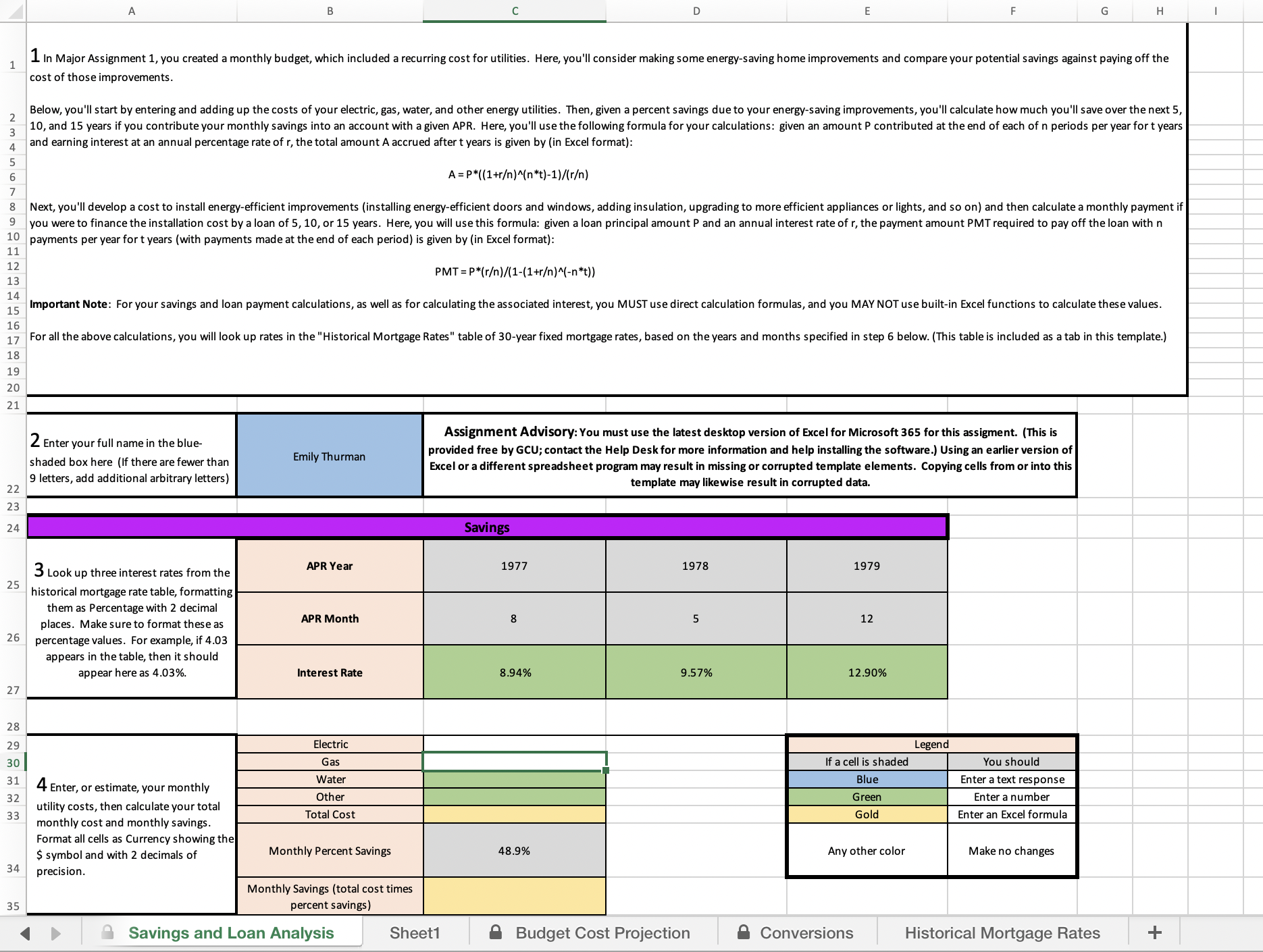
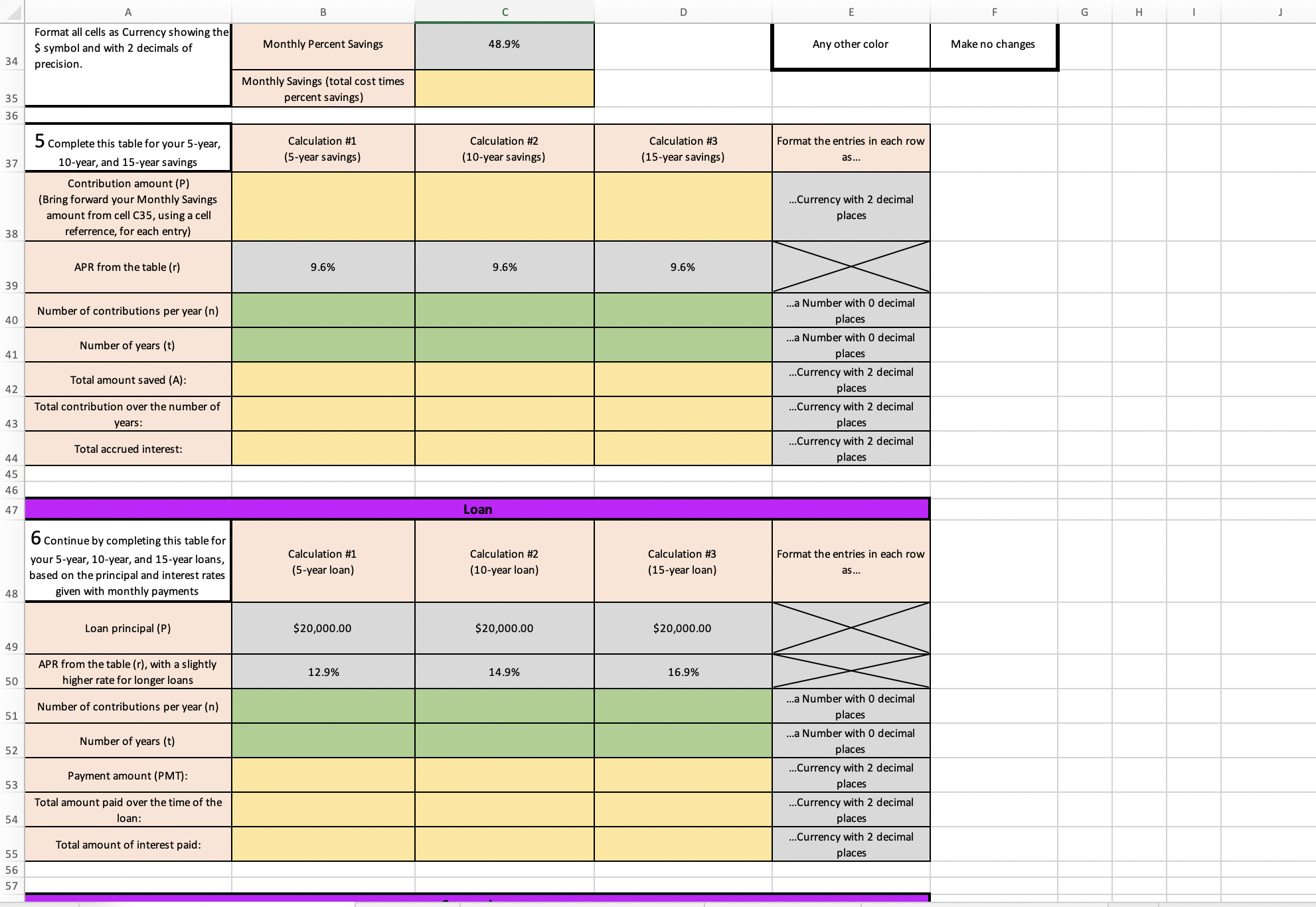
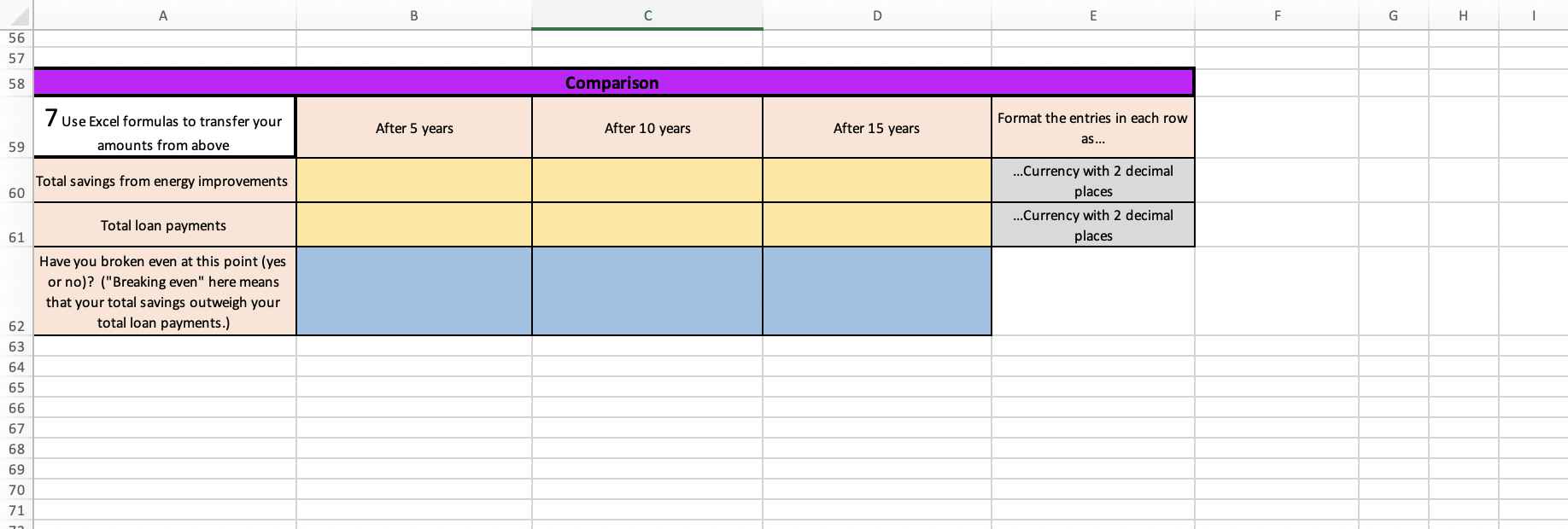
B C D E G H 1 In Major Assignment 1, you created a monthly budget, which included a recurring cost for utilities. Here, you'll consider making some energy-saving home improvements and compare your potential savings against paying off the cost of those improvements. Below, you'll start by entering and adding up the costs of your electric, gas, water, and other energy utilities. Then, given a percent savings due to your energy-saving improvements, you'll calculate how much you'll save over the next 5, 10, and 15 years if you contribute your monthly savings into an account with a given APR. Here, you'll use the following formula for your calculations: given an amount P contributed at the end of each of n periods per year for t years and earning interest at an annual percentage rate of r, the total amount A accrued after t years is given by (in Excel format): A = P*((1+r)^(n*t)-1)/(r) 8 Next, you'll develop a cost to install energy-efficient improvements (installing energy-efficient doors and windows, adding insulation, upgrading to more efficient appliances or lights, and so on) and then calculate a monthly payment if 9 you were to finance the installation cost by a loan of 5, 10, or 15 years. Here, you will use this formula: given a loan principal amount P and an annual interest rate of r, the payment amount PMT required to pay off the loan with n 10 payments per year for t years (with payments made at the end of each period) is given by (in Excel format): 11 12 PMT = P*(r)/(1-(1+r)^(-n*t)) 15 Important Note: For your savings and loan payment calculations, as well as for calculating the associated interest, you MUST use direct calculation formulas, and you MAY NOT use built-in Excel functions to calculate these values. 16 7 For all the above calculations, you will look up rates in the "Historical Mortgage Rates" table of 30-year fixed mortgage rates, based on the years and months specified in step 6 below. (This table is included as a tab in this template.) 18 19 20 21 2 Enter your full name in the blue- Assignment Advisory: You must use the latest desktop version of Excel for Microsoft 365 for this assigment. (This is shaded box here (If there are fewer than Emily Thurman provided free by GCU; contact the Help Desk for more information and help installing the software.) Using an earlier version of Excel or a different spreadsheet program may result in missing or corrupted template elements. Copying cells from or into this 9 letters, add additional arbitrary letters) 22 template may likewise result in corrupted data. 23 24 Savings 3 Look up three interest rates from the APR Year 1977 1978 1979 25 historical mortgage rate table, formatting them as Percentage with 2 decimal 5 places. Make sure to format these as APR Month 12 26 percentage values. For example, if 4.03 appears in the table, then it should appear here as 4.03% Interest Rate 8.94% 9.57% 12.90% 27 28 29 Electric Legend 30 Gas f a cell is shaded You should 31 4 Enter, or estimate, your monthly Water Blue Enter a text response 32 Other Green Enter a number 33 utility costs, then calculate your total Total Cost Gold monthly cost and monthly savings. Enter an Excel formula Format all cells as Currency showing the $ symbol and with 2 decimals of Monthly Percent Savings 48.9% Any other color Make no changes 34 precision. Monthly Savings (total cost times 35 percent savings Savings and Loan Analysis Sheet1 Budget Cost Projection & Conversions Historical Mortgage Rates +B D E G H Format all cells as Currency showing the $ symbol and with 2 decimals of Monthly Percent Savings 48.9% Any other color Make no changes 34 precision Monthly Savings (total cost times 35 percent savings) 36 5 Complete this table for your 5-year, Calculation #1 Calculation #2 Calculation #3 Format the entries in each row 37 10-year, and 15-year savings 5-year savings) (10-year savings) (15-year savings) as... Contribution amount (P) (Bring forward your Monthly Savings ..Currency with 2 decimal amount from cell C35, using a cell places 38 referrence, for each entry) APR from the table (r) 9.6% 9.6% 9.6% 39 contributions per year (n) ...a Number with 0 decimal 40 places Number of years (t) ..a Number with 0 decimal 41 place Currency with 2 decimal Total amount saved (A): 42 place Total contribution over the number of ..Currency with 2 decimal 43 years: places Total accrued interest: ..Currency with 2 decimal 44 places 45 46 47 Loan 6 Continue by completing this table for your 5-year, 10-year, and 15-year loans, Calculation #1 Calculation #2 Calculation #3 Format the entries in each row based on the principal and interest rates (5-year loan) (10-year loan) (15-year loan) as... 48 given with monthly payments Loan principal (P) $20,000.00 $20,000.00 $20,000.00 APR from the table (r), with a slightly 12.9% 14.9% 16.9% 50 higher rate for longer loans Number of contributions per year (n) ..a Number with 0 decimal 51 place Jumber of years (t) ..a Number with 0 decimal 52 places Payment amount (PMT): .Currency with 2 decimal 53 place Total amount paid over the time of the ..Currency with 2 decimal 54 loan: lace Total amount of interest paid: ..Currency with 2 decimal 55 places 56 5756 57 58 Format the entries in each row 7 USE Excel formulas to transfer your After 5 years After 10 years After 15 years 59 amounts from above ...Currency with 2 decimal Total savings from en ergy improvements 60 places ...Currency with 2 decimal Total loan payments 6 1 places Have you broken even at this point (yes or no)? ("Breaking even " here means that your total savings outweigh your 52 total loan payments] 63 64 65 66 67 68 69 70 71
Step by Step Solution
There are 3 Steps involved in it
1 Expert Approved Answer
Step: 1 Unlock
Question Has Been Solved by an Expert!
Get step-by-step solutions from verified subject matter experts
Step: 2 Unlock
Step: 3 Unlock
Students Have Also Explored These Related Finance Questions!









 Study Help