







Question: B6. Complete the following Java code segment: Change circle-Color 10 import javafx.event.ActionEvent: import javax.event.EventHandler; import javax.scene.control.Button: import javax.scene.paint.color: import javax.scene.shape.Circle: Mke de Ger a. Create
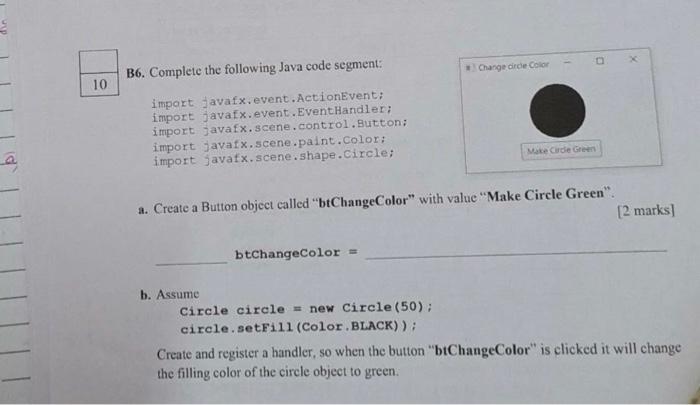
B6. Complete the following Java code segment: Change circle-Color 10 import javafx.event.ActionEvent: import javax.event.EventHandler; import javax.scene.control.Button: import javax.scene.paint.color: import javax.scene.shape.Circle: Mke de Ger a. Create a Button object called "btChangeColor" with value "Make Circle Green". [2 marks] btChangeColor = b. Assume Circle circle = new Circle (50); circle. setFill (Color.BLACK)): Create and register a handler, so when the button "btChangeColor" is clicked it will change the filling color of the circle object to green
Step by Step Solution
There are 3 Steps involved in it
1 Expert Approved Answer
Step: 1 Unlock

Question Has Been Solved by an Expert!
Get step-by-step solutions from verified subject matter experts
Step: 2 Unlock
Step: 3 Unlock
 Study Help