



Question: BADM 3000 - Term Assignment (20% of final grade) Attached are a set of Financial Statements (Balance Sheet and Income Statement) for a sample corporation.
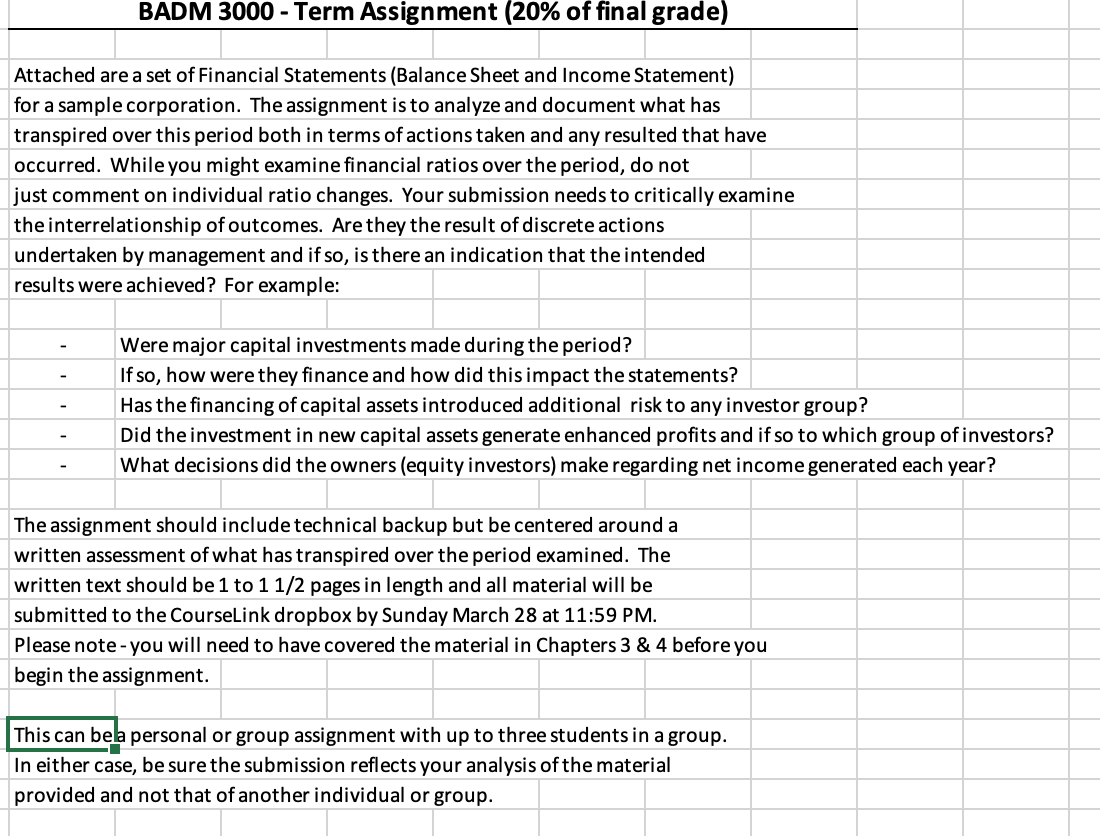
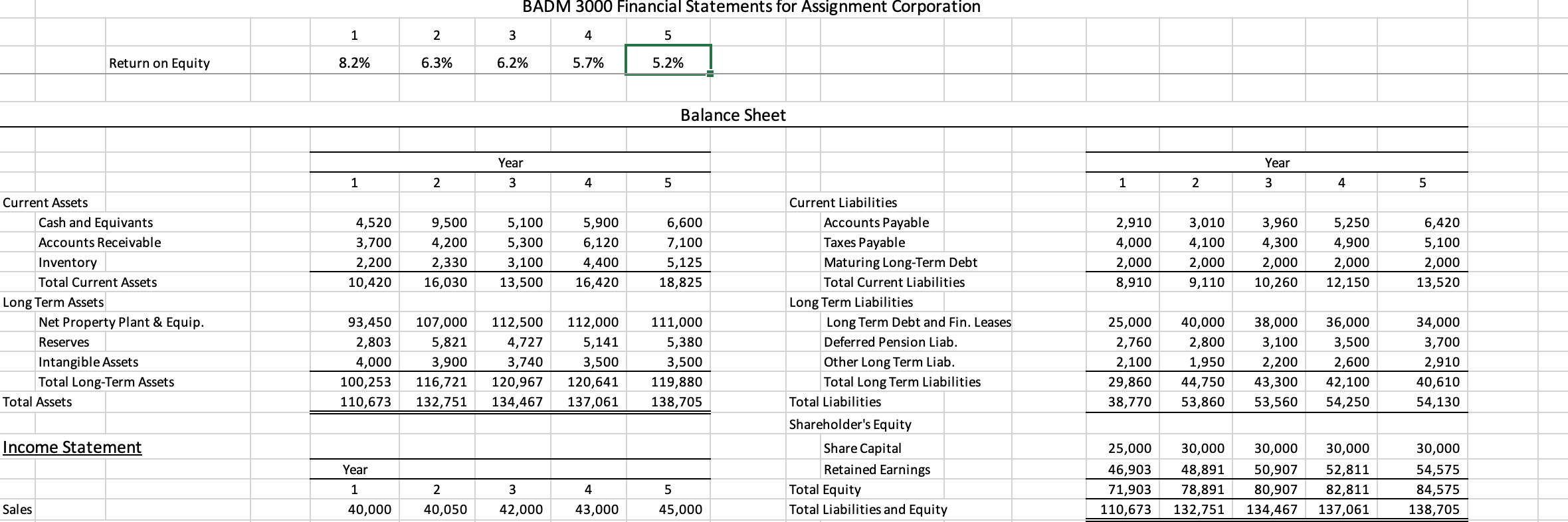
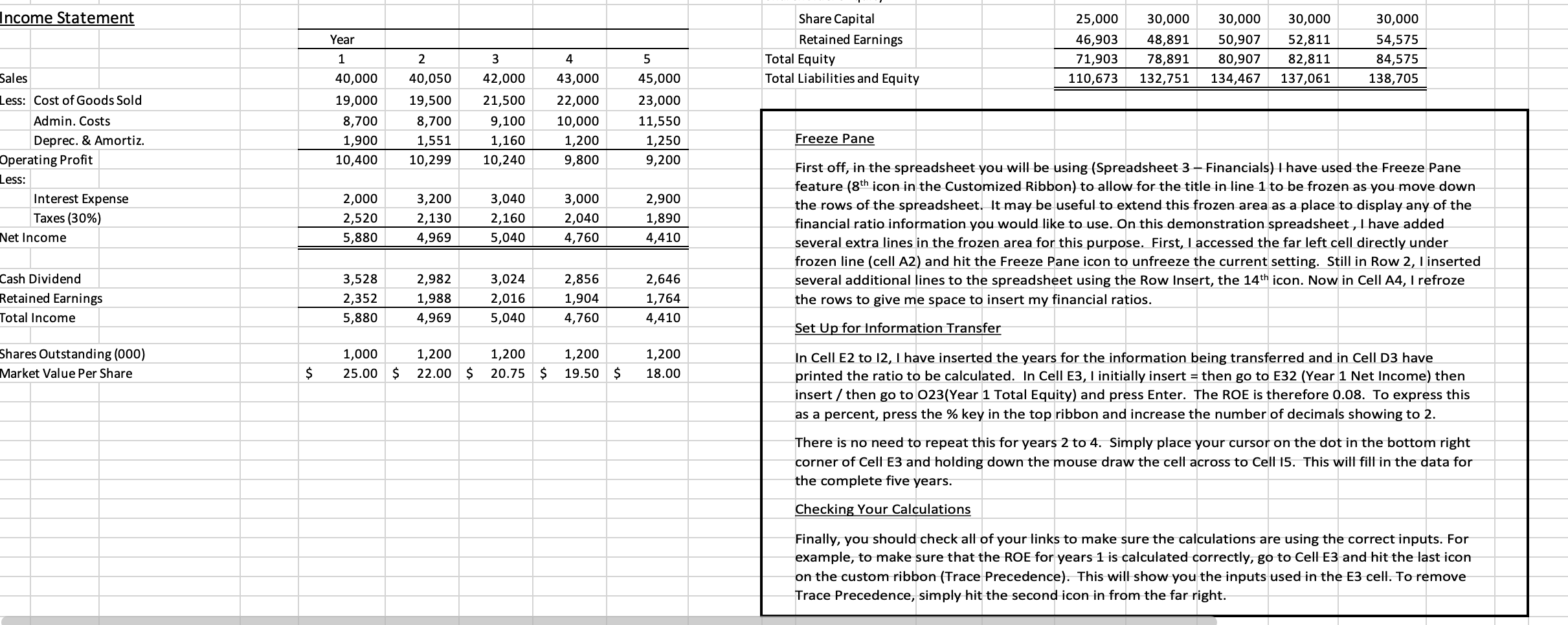
BADM 3000 - Term Assignment (20% of final grade) Attached are a set of Financial Statements (Balance Sheet and Income Statement) for a sample corporation. The assignment is to analyze and document what has transpired over this period both in terms of actions taken and any resulted that have occurred. While you might examine financial ratios over the period, do not just comment on individual ratio changes. Your submission needs to critically examine the interrelationship of outcomes. Are they the result of discrete actions undertaken by management and if so, is there an indication that the intended results were achieved? For example: Were major capital investments made during the period? If so, how were they finance and how did this impact the statements? Has the financing of capital assets introduced additional risk to any investor group? Did the investment in new capital assets generate enhanced profits and if so to which group of investors? What decisions did the owners (equity investors) make regarding net income generated each year? The assignment should include technical backup but be centered around a written assessment of what has transpired over the period examined. The written text should be 1 to 1 1/2 pages in length and all material will be submitted to the CourseLink dropbox by Sunday March 28 at 11:59 PM. Please note - you will need to have covered the material in Chapters 3 & 4 before you begin the assignment. This can bela personal or group assignment with up to three students in a group. In either case, be sure the submission reflects your analysis of the material provided and not that of another individual or group.BADM 3000 Financial Statements for Assignment Corporation 1 2 3 5 Return on Equity 8.2% 6.3% 6.2% 5.7% 5.2% Balance Sheet Year Year 1 2 3 4 5 1 2 3 4 5 Current Assets Current Liabilities Cash and Equivants 4,520 9,500 5,100 5,900 6,600 Accounts Payable 2,910 3,010 3,960 5,250 6,420 Accounts Receivable 3,700 4,200 5,300 6,120 7,100 Taxes Payable 4,000 4,100 4,300 4,900 5,100 Inventory 2,200 2,330 3,100 4,400 5,125 Maturing Long-Term Debt 2,000 2,000 2,000 2,000 2,000 Total Current Assets 10,420 16,030 13,500 16,420 18,825 Total Current Liabilities 8,910 9,110 10,260 12,150 13,520 Long Term Assets Long Term Liabilities Net Property Plant & Equip. 93,450 107,000 112,500 112,000 111,000 Long Term Debt and Fin. Leases 25,000 40,000 38,000 36,000 34,000 Reserves 2,803 5,821 4,727 5,141 5,380 Deferred Pension Liab. 2,760 2,800 3,100 3,500 3,700 Intangible Assets 4,000 3,900 3,740 3,500 3,500 Other Long Term Liab. 2,100 1.950 2,200 2,600 2,910 Total Long-Term Assets 100,253 116,721 120,967 120,641 119,880 Total Long Term Liabilities 29,860 44,750 43,300 42,100 40,610 Total Assets 110,673 132,751 134,467 137,061 138,705 Total Liabilities 38,770 53,860 53,560 54,250 54,130 Shareholder's Equity Income Statement Share Capital 25,000 30,000 30,000 30,000 30,000 Year Retained Earnings 46,903 48,891 50,907 52,811 54,575 1 2 3 4 5 Total Equity 71,903 78,891 80,907 82,811 84,575 Sales 40,000 40,050 42,000 43,000 45,000 Total Liabilities and Equity 110,673 132,751 134,467 137,061 138,705Income Statement Sales L35: Cost ofGoods Sold Admin. Costs Deprec. & Amortiz. Operating Prot L55: Interest Expense Taxes (30%) Net Income Cash Dividend Retained Earnings Total Income Shares Outstanding (000) Market Value Per Share Year 1 2 3 4 5 40,000 40,050 42,000 43,000 45,000 19,000 19,500 21,500 22,000 23,000 8,700 8,700 9,100 10,000 11,550 1,900 1,551 1,160 1,200 1,250 10,400 10,299 10,240 5,800 9,200 2,000 3,200 3,040 3,000 2,900 2,520 2,130 2,160 2,040 1,390 5,880 4,969 5,040 4,760 4,410 3,523 2,982 3,024 2,856 2,646 2,352 1,988 2,016 1,904 1,764 5,880 4,969 5,040 4,760 4,410 1,000 1,200 1,200 1,200 1,200 25.00 5 22.00 5 20.75 5 19.50 5 18.00 Share Capital 25,000 30,000 30,000 30,000 30,000 Retained Earnings 46,903 48,891 50,907 52,811 54,575 Total Equity 71,903 78,891 80,907 82,811 84,575 Total Llabllltlesand Equity 110,673 132,751 134,467 137,061 138,705 Freeze Pane First off, in the spreadsheet you will be using (Spreadsheet 3 Financials) I have used the Freeze Pane feature (8\" icon in the Customized Ribbon) to allow for the title in line 1 to be frozen as you move down the rows of the spreadsheet. It may be useful to extend this frozen area as a place to display any of the nancial ratio information you would like to use. On this demonstration spreadsheet , I have added several extra lines In the frozen area for this purpose. First, I accessed the far left cell directly under frozen line (cell A2) and hit the Freeze Pane icon to unfreeze the current setting. Still in Row 2, I inserted several additional lines to the spreadsheet using the Row Insert, the 14'h icon. Now in Cell A4, I refroze the rows to give me space to insert my financial ratios. Set Up for Information Transfer In Cell E2 to 12, I have inserted the years for the information being transferred and In Cell D3 have printed the ratio to be calculated. In Cell E3, I initially insert =then go to E32 (Year 1 Net Income) then insert / then go to 023(Vear 1 Total Equity) and press Enter. The ROE is therefore 0.08. To express this as a percent, press the % key in the top ribbon and increase the number of decimals showing to 2. There Is no need to repeat this for years 2 to 4. Simply place your cursor on the dot In the bottom right corner of Cell E3 and holding down the mouse draw the cell across to Cell I5. This will ll in the data for the complete ve years. Che g Your Calculations Finally, you should check all of your links to make sure the calculations are using the correct inputs. For example, to make sure that the ROE for years 1 is calculated correctly, go to Cell E3 and hit the last icon on the custom ribbon (Trace Precedence). This will show you the inputs used in the E3 cell. To remove Trace Precedence, simply hit the second icon in from the far right
Step by Step Solution
There are 3 Steps involved in it

Get step-by-step solutions from verified subject matter experts