







Question: based on the prev code: package labexperiment 1 ; import javax.swing. * ; import java.awt. * ; import java.awt.geom.AffineTransform;; class MyFrame extends JFrame { MyFrame
based on the prev code:
package labexperiment;
import javax.swing.;
import java.awt.;
import java.awt.geom.AffineTransform;;
class MyFrame extends JFrame
MyFrame
MyPanel Panel new MyPanel;
this.setDefaultCloseOperationJFrameEXITONCLOSE;
this.setSize;
this.addPanel;
this.setLocationRelativeTonull;
this.setVisibletrue;
class MyPanel extends JPanel
MyPanel
this.setSizenew Dimension;
private void doDrawingGraphics G
GraphicsD GD GraphicsD Gcreate;
GDsetPaintnew Color;
GDfillRect;
GDtranslate;
GDfillRect;
Rotation
GDfillRect;
GDtranslate;
GDrotateMathPI ;
GDfillRect;
Scaling
GDfillRect;
AffineTransform TX new AffineTransform;
TXtranslate;
TXscale;
GDsetTransformTX;
GDfillRect;
Shearing
AffineTransform TX new AffineTransform;
TXtranslate;
GDsetTransformTX;
GDsetPaintColorgreen;
GDdrawRect;
AffineTransform TX new AffineTransform;
TXtranslate;
TXshear;
GDsetTransformTX;
GDsetPaintColorblue;
GDdrawnew Rectangle;
AffineTransform TX new AffineTransform;
TXtranslate;
TXshear;
GDsetTransformTX;
GDsetPaintColorred;
GDdrawRect;
GDdispose;
@Override
public void paintComponentGraphics G
super.paintComponentG;
doDrawingG;
public class LabExperiment extends JComponent
public static void mainString args
MyFrame Frame new MyFrame;
Q:
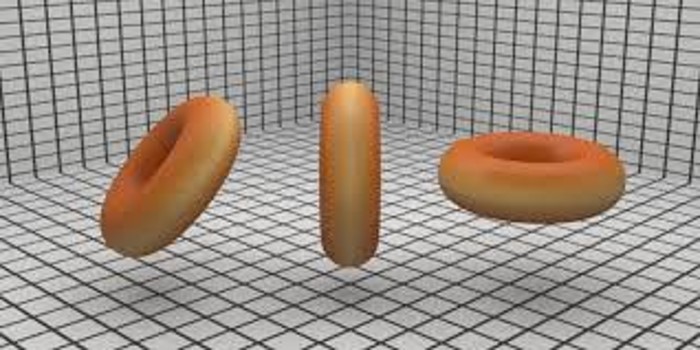
Write a program to create, translate, and rotate an ellipse, shape of Donut
Modify the above program create variants of Donuts with different colors
Q: Write a program to create, translate and rotate a sequence of Star shape objects as displayed below.
Step by Step Solution
There are 3 Steps involved in it
1 Expert Approved Answer
Step: 1 Unlock

Question Has Been Solved by an Expert!
Get step-by-step solutions from verified subject matter experts
Step: 2 Unlock
Step: 3 Unlock
 Study Help