



Question: ** Be sure to follow the instructions below. There should be a .HTML file and .JS file ** ** Utiize the book as neccesary which
** Be sure to follow the instructions below. There should be a .HTML file and .JS file **
** Utiize the book as neccesary which can be found online @ http://www.veidas.lt/wp-content/files_flutter/1331098013JavaScriptTheWebTechnologiesSeries5thEdition.pdf **
** include comments **
** Validate the file using ~~ https://validator.w3.org/
** Fix any errors that appear
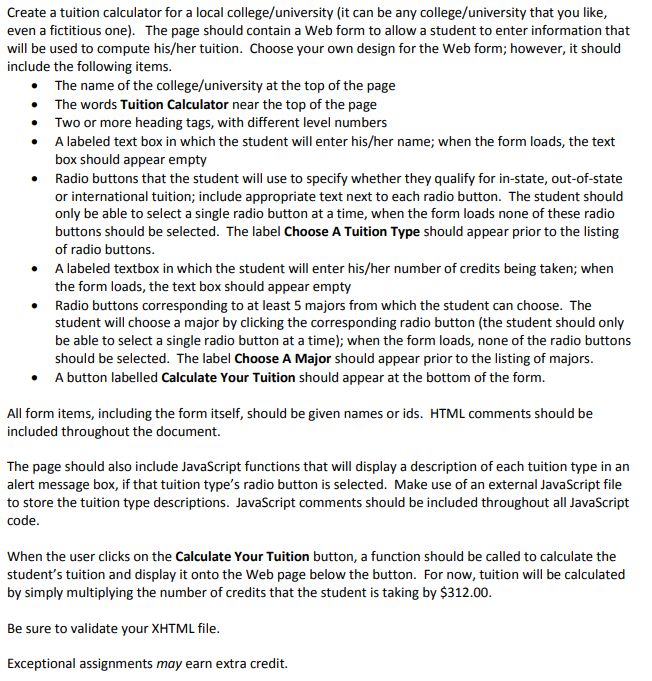
Create a tuition calculator for a local college/university (it can be any college/university that you like even a fictitious one). The page should contain a Web form to allow a student to enter information that will be used to compute his/her tuition. Choose your own design for the Web form; however, it should include the following items . The name of the college/university at the top of the page The words Tuition Calculator near the top of the page Two or more heading tags, with different level numbers A labeled text box in which the student will enter his/her name; when the form loads, the text box should appear empty Radio buttons that the student will use to specify whether they qualify for in-state, out-of-state or international tuition; include appropriate text next to each radio button. The student should only be able to select a single radio button at a time, when the form loads none of these radio buttons should be selected. The label Choose A Tuition Type should appear prior to the listing of radio buttons A labeled textbox in which the student will enter his/her number of credits being taken; when the form loads, the text box should appear empty Radio buttons corresponding to at least 5 majors from which the student can choose. The student will choose a major by clicking the corresponding radio button (the student should only be able to select a single radio button at a time); when the form loads, none of the radio buttons should be selected. The label Choose A Major should appear prior to the listing of majors. A button labelled Calculate Your Tuition should appear at the bottom of the form . All form items, including the form itself, should be given names or ids. HTML comments should be included throughout the document. The page should also include JavaScript functions that will display a description of each tuition type in an alert message box, if that tuition type's radio button is selected. Make use of an external JavaScript file to store the tuition type descriptions. JavaScript comments should be included throughout all JavaScript code When the user clicks on the Calculate Your Tuition button, a function should be called to calculate the student's tuition and display it onto the Web page below the button. For now, tuition will be calculated by simply multiplying the number of credits that the student is taking by $312.00 Be sure to validate your XHTML file Exceptional assignments may earn extra credit
Step by Step Solution
There are 3 Steps involved in it

Get step-by-step solutions from verified subject matter experts