







Question: Before attempting the exercise, click hereopens in a new tab to watch a short video. Celebrity determines inventory levels by forecasting demand based on Part
Before attempting the exercise, click hereopens in a new tab to watch a short video.
Celebrity determines inventory levels by forecasting demand based on
Part
A
the history of food and beverage consumption adjusted for cruise length.
B
adjusting the standard inventory level by subtracting the excess inventory from the prior cruise.
C
the EOQ model.
D
a combination of the exact number of passengers and a history of food and beverage consumption.
E
the exact number of passengers adjusted upward for meals each.
Read scenario and approach.
In Activity fill out the blank calculator using the values you were given. You can roll over the variables to get more information to help keep in mind you may need to do some calculations for some! The results of the equations would typically tell you what to order and when.
Use the to collapse the Activity calculator, because you have a new autopopulated calculator to use for Activity
In Activity begin managing inventory. Note that you have inventory on hand as indicated for day Remember to use your new new autopopulated calculator in Activity
Click on Next Day to proceed to the next day to view the demand, inventory, and other parameters to decide whether to place an order.
When you decide to place an order, enter the quantity in the Ordered field for that day, and the tool will automatically calculate your total costs, revenue, profitloss and update the inventory once the inventory is received keep an eye on the lead time, the time it takes you to receive the items in your inventory Click Next Day to place the order. Keep in mind that it takes time lead time to receive the order!
Continue this inventory management process for the whole month. Your goals are to not run out of stock, reach your sales target, and maintain a healthy profit margin as in the Targets section. You can keep an eye on
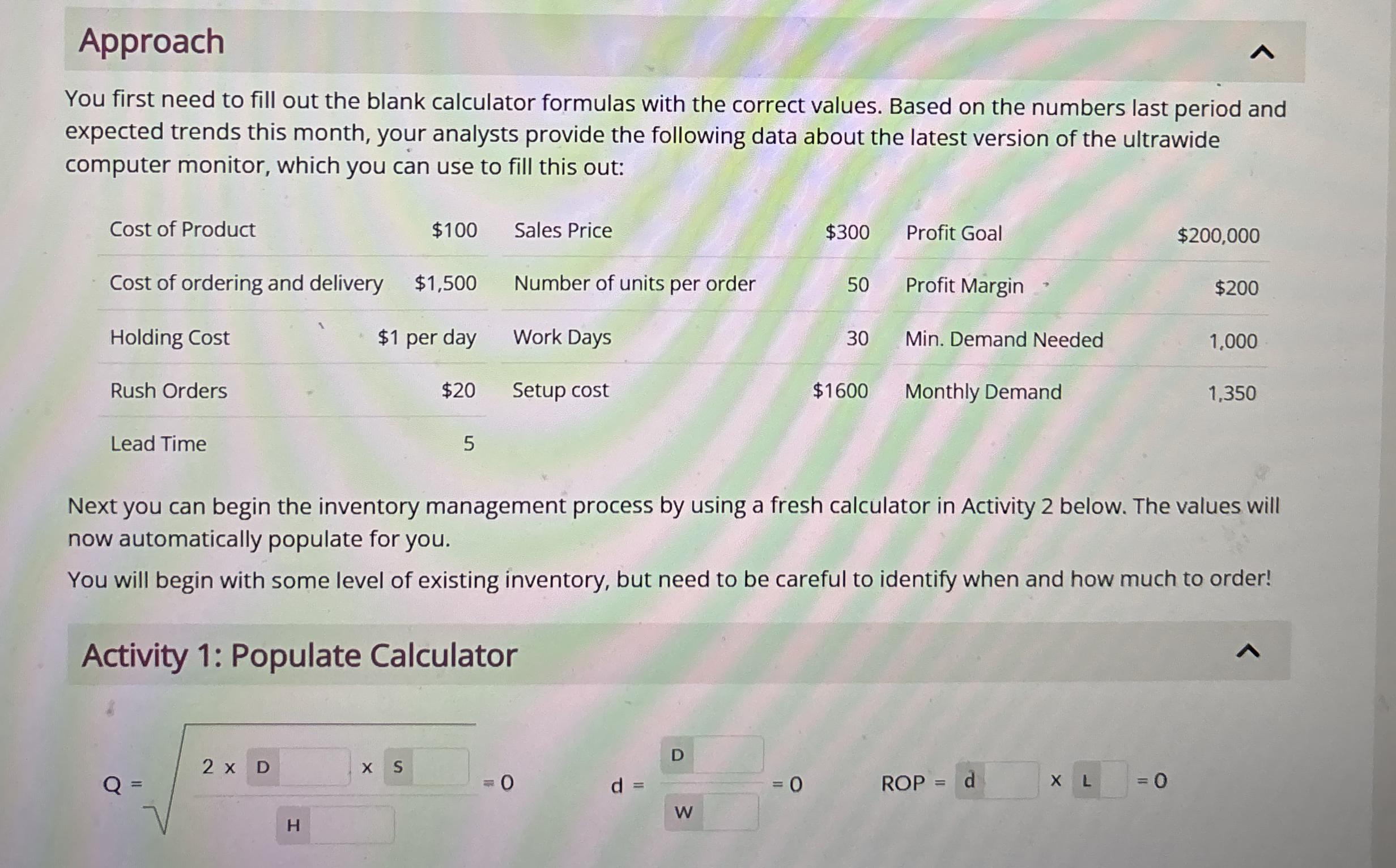
You first need to fill out the blank calculator formulas with the correct values. Based on the numbers last period and expected trends this month, your analysts provide the following data about the latest version of the ultrawide computer monitor, which you can use to fill this out:
tableCost of Product,$Sales Price,$Profit GoalCost of ordering and delivery,$Number of units per order,Profit Margin,Holding Cost,$ per day,Work Days,Rush Orders,$Setup cost,$Min. Demand NeededLead Time,
Next you can begin the inventory management process by using a fresh calculator in Activity below. The values will now automatically populate for you.
You will begin with some level of existing inventory, but need to be careful to identify when and how much to order!
Activity : Populate Calculator
ROP
Approach
You first need to fill out the blank calculator formulas with the correct values. Based on the numbers last period and expected trends this month, your analysts provide the following data about the latest version of the ultrawide computer monitor, which you can use to fill this out:
tableCost of Product,$Sales Price,$Profit GoalCost of ordering and delivery,$Number of units per order,Profit MarginHolding Cost,$ per day,Work Days,Rush Orders,$Setup cost,$Min. Demand NeededLead Time,
Next you can begin the inventory management process by using a fresh calculator in Activity below. The values will now automatically populate for you.
You will begin with some level of existing inventory, but need to be careful to identify when and how much to order!
Activity : Populate Calculator
ROP
Step by Step Solution
There are 3 Steps involved in it
1 Expert Approved Answer
Step: 1 Unlock

Question Has Been Solved by an Expert!
Get step-by-step solutions from verified subject matter experts
Step: 2 Unlock
Step: 3 Unlock
 Study Help