







Question: begin{tabular}{|c|c|c|} hline Step & Instructions & begin{tabular}{l} Points Possible end{tabular} hline 6 & begin{tabular}{l} Open the Relationships window and add the table tblPayments.
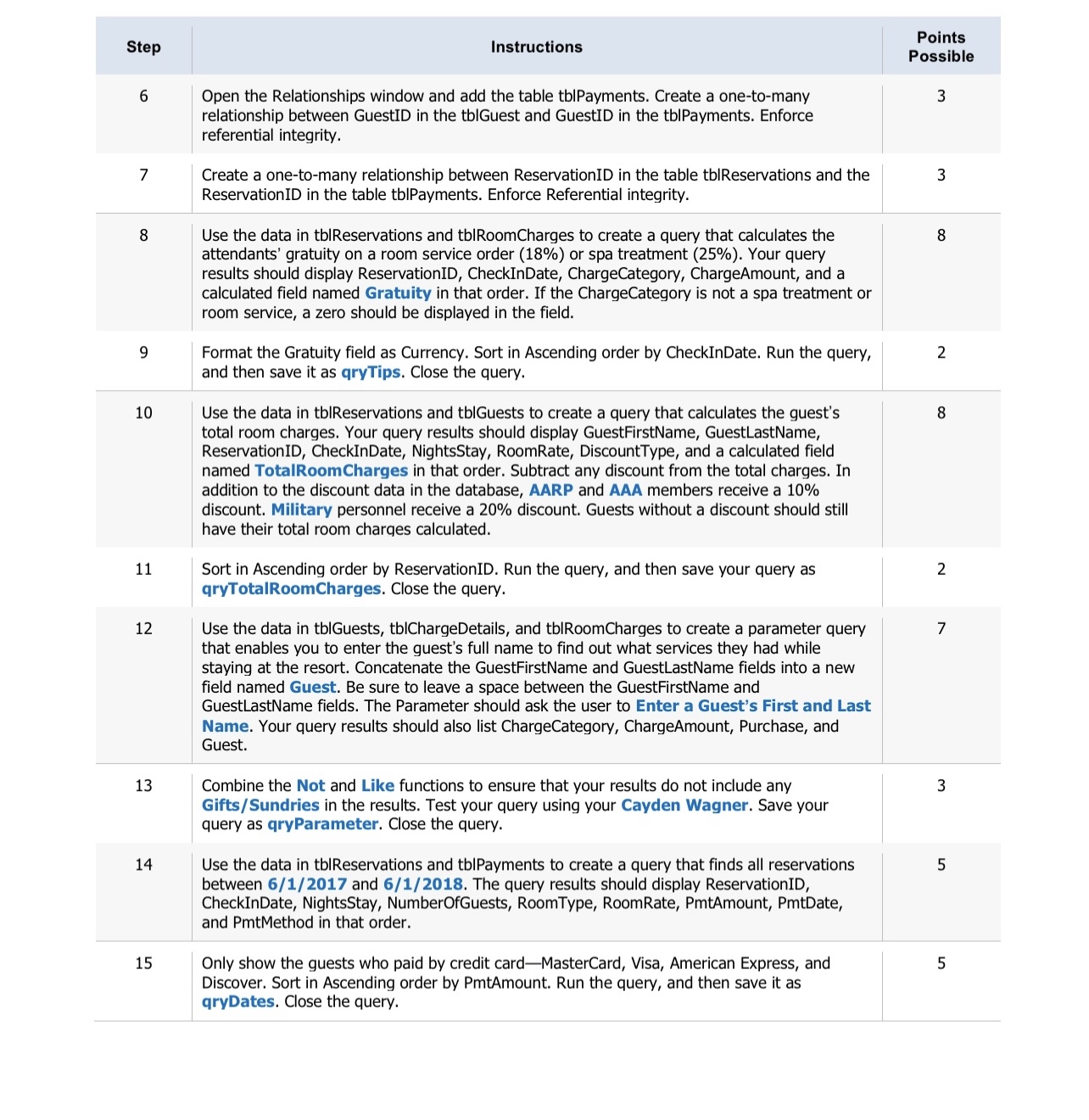
\begin{tabular}{|c|c|c|} \hline Step & Instructions & \begin{tabular}{l} Points \\ Possible \end{tabular} \\ \hline 6 & \begin{tabular}{l} Open the Relationships window and add the table tblPayments. Create a one-to-many \\ relationship between GuestID in the tblGuest and GuestID in the tbIPayments. Enforce \\ referential integrity. \end{tabular} & 3 \\ \hline 7 & \begin{tabular}{l} Create a one-to-many relationship between ReservationID in the table tblReservations and the \\ ReservationID in the table tbIPayments. Enforce Referential integrity. \end{tabular} & 3 \\ \hline 8 & \begin{tabular}{l} Use the data in tblReservations and tblRoomCharges to create a query that calculates the \\ attendants' gratuity on a room service order ( 18%) or spa treatment (25%). Your query \\ results should display ReservationID, CheckInDate, ChargeCategory, ChargeAmount, and a \\ calculated field named Gratuity in that order. If the ChargeCategory is not a spa treatment or \\ room service, a zero should be displayed in the field. \end{tabular} & 8 \\ \hline 9 & \begin{tabular}{l} Format the Gratuity field as Currency. Sort in Ascending order by CheckInDate. Run the query, \\ and then save it as qryTips. Close the query. \end{tabular} & 2 \\ \hline 10 & \begin{tabular}{l} Use the data in tbIReservations and tblGuests to create a query that calculates the guest's \\ total room charges. Your query results should display GuestFirstName, GuestLastName, \\ ReservationID, CheckInDate, NightsStay, RoomRate, DiscountType, and a calculated field \\ named TotaIRoom Charges in that order. Subtract any discount from the total charges. In \\ addition to the discount data in the database, AARP and AAA members receive a 10% \\ discount. Military personnel receive a 20% discount. Guests without a discount should still \\ have their total room charges calculated. \end{tabular} & 8 \\ \hline 11 & \begin{tabular}{l} Sort in Ascending order by ReservationID. Run the query, and then save your query as \\ qryTotalRoomCharges. Close the query. \end{tabular} & 2 \\ \hline 12 & \begin{tabular}{l} Use the data in tblGuests, tblChargeDetails, and tblRoomCharges to create a parameter query \\ that enables you to enter the guest's full name to find out what services they had while \\ staying at the resort. Concatenate the GuestFirstName and GuestLastName fields into a new \\ field named Guest. Be sure to leave a space between the GuestFirstName and \\ GuestLastName fields. The Parameter should ask the user to Enter a Guest's First and Last \\ Name. Your query results should also list ChargeCategory, ChargeAmount, Purchase, and \\ Guest. \end{tabular} & 7 \\ \hline 13 & \begin{tabular}{l} Combine the Not and Like functions to ensure that your results do not include any \\ Gifts/Sundries in the results. Test your query using your Cayden Wagner. Save your \\ query as qryParameter. Close the query. \end{tabular} & 3 \\ \hline 14 & \begin{tabular}{l} Use the data in tblReservations and tblPayments to create a query that finds all reservations \\ between 6/1/2017 and 6/1/2018. The query results should display ReservationID, \\ CheckInDate, NightsStay, NumberOfGuests, RoomType, RoomRate, PmtAmount, PmtDate, \\ and PmtMethod in that order. \end{tabular} & 5 \\ \hline 15 & \begin{tabular}{l} Only show the guests who paid by credit card-MasterCard, Visa, American Express, and \\ Discover. Sort in Ascending order by PmtAmount. Run the query, and then save it as \\ qryDates. Close the query. \end{tabular} & 5 \\ \hline \end{tabular}
Step by Step Solution
There are 3 Steps involved in it

Get step-by-step solutions from verified subject matter experts
 Study Help