







Question: begin{tabular}{|c|c|c|c|c|} hline & & & & hline A & A & B & C & D hline 1 & ProductiD & Product Name
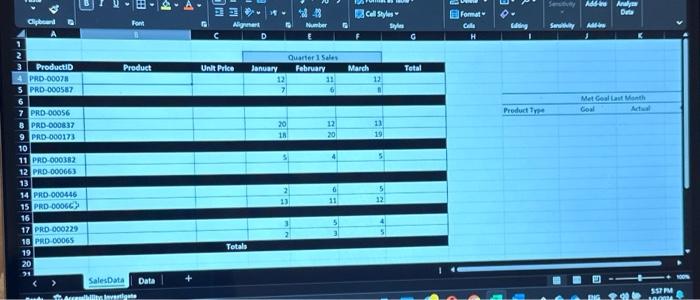
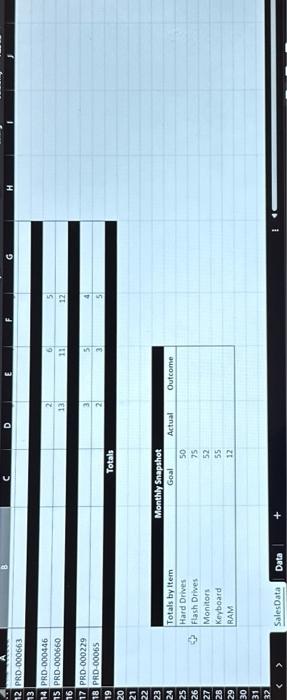
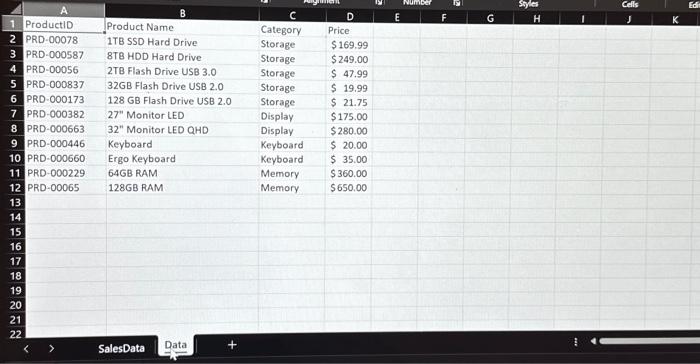
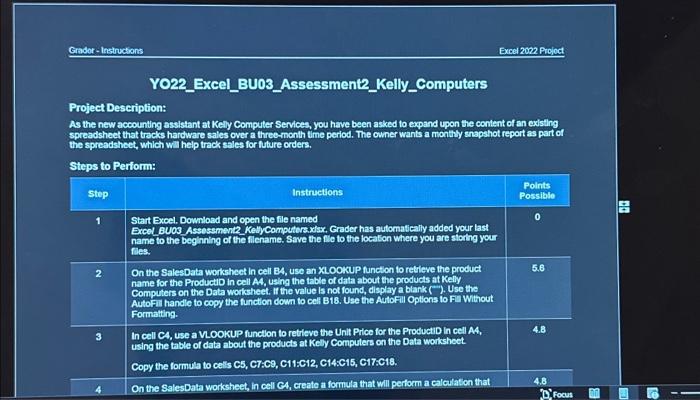
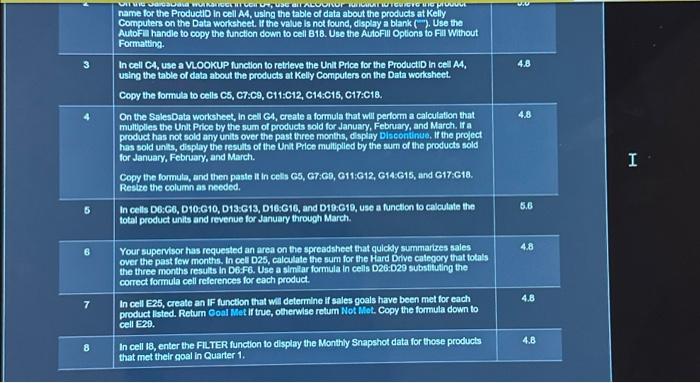
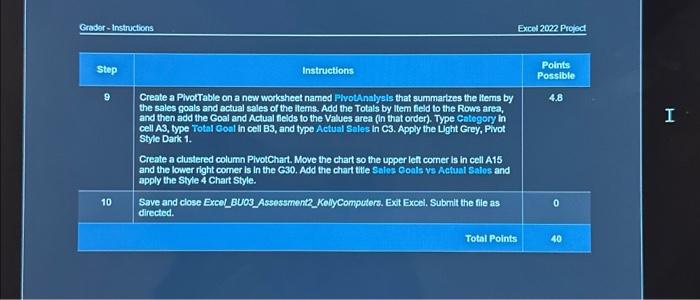
\begin{tabular}{|c|c|c|c|c|} \hline & & & & \\ \hline A & A & B & C & D \\ \hline 1 & ProductiD & Product Name & Category & Price \\ \hline 2 & PRD-00078 & 1TB SSD Hard Drive & Storage & $169.99 \\ \hline 3 & PRD-000587 & 8TB HDD Hard Drive & Storage & $249.00 \\ \hline 4 & PRD-00056 & 2TB Flash Drive USB 3.0 & Storage & $47.99 \\ \hline 5 & PRD-000837 & 32GB Flash Drive USB 2.0 & Storage & \$ 19.99 \\ \hline 6 & PRD-000173 & 128 GB Flash Drive USB 2.0 & Storage & $21.75 \\ \hline 7 & PRD-000382 & 27 Monitor LED & Display & $175.00 \\ \hline 8 & PRD-000663 & 32" Monitor LED QHD & Display & $280.00 \\ \hline 9 & PRD-000446 & Keyboard & Keyboard & $20.00 \\ \hline 10 & PR.D-000660 & Ergo Keyboard & Keyboard & $35.00 \\ \hline 11 & PRD-000229 & 64GB RAM & Memory & $360.00 \\ \hline 12 & PRD-00065 & 128GB RAM & Memory & $650.00 \\ \hline \end{tabular} Grodor-Instructions Excel 2002 Projoct Y022_Excel_BU03_Assessment2_Kelly_Computers Project Description: As the new accounting assistant at Kelly Computer Services, you have been asked to expand upon the content of an existing spreadsheet that trecks hardware sales over a three-month time period. The owner wants a monthy snapshot report as part of the spreadsheet, which will help track seles for tuture orders. Steps to Perform: \begin{tabular}{|c|c|c|} \hline step & Instructions & \begin{tabular}{l} Points \\ Possible \end{tabular} \\ \hline 1 & \begin{tabular}{l} Start Bxoel. Download and open the file named \\ Excet BU03 Assessment2 Ketlycomputers. xlax, Grader has automatically added your last \\ name to the beghining of the fliename. Save the flio to the location where you are storthg your \\ fles. \end{tabular} & 0 \\ \hline 2 & & 5.6 \\ \hline 3 & & 4.8 \\ \hline 4 & On the SalesData worksheet, in cell CA, creato a formula that will perform a calculation that & 4.8 \\ \hline \end{tabular} \begin{tabular}{|c|c|c|} \hline 2 & \begin{tabular}{l} name for the Productio in cell A4, using the table of data about the products at Kelly \\ Computers on the Data worksheet. If the value is not found, display a blank (-). Use tha \\ Autofa handle to copy the function down to cell B18. Uso the Autofill Options to Fill Without \\ Formatting. \end{tabular} & \\ \hline 3 & \begin{tabular}{l} In cell C4, use a VookuP function to retrieve the Unit Price for the ProductiD in cel A4, \\ using the table of data about the products at Kelly Computers on the Data worksheet. \\ Copy the formita to cells C5, C7:C9, C11:C12, C14.C15, C17:C18. \end{tabular} & 4.8 \\ \hline 4 & & 48 \\ \hline 5 & \begin{tabular}{l} In cells D6:G6, D10.G10, D13.613, D10:G10, and D10.G19, use a function to calculate the \\ total product units and revenue for January through March. \end{tabular} & 5.6 \\ \hline 6 & & 4.8 \\ \hline 7 & \begin{tabular}{l} In cell E25, create an IF function that wit determine if sales goals have been met for each \\ product listed. Retum Coal Met if tuc, otherwise retum Not Mot. Copy the formula down to \\ cell E20. \end{tabular} & 4.8 \\ \hline 8 & \begin{tabular}{l} In cell 18, enter the FILTER function to display the Monthly Snapshot data for those products \\ that met their coal in Quarter 1 . \end{tabular} & 4.8 \\ \hline \end{tabular} Groder-Instructions Excel 2002 Prejat \begin{tabular}{|c|c|c|} \hline step & Instructions & \begin{tabular}{l} Polnts \\ Possible \end{tabular} \\ \hline 9 & & 4.8 \\ \hline 10 & \begin{tabular}{l} Save and close Excel_BUOS_Assestment2_KollyComputers. Ext Excel, Submit the file as \\ directed. \end{tabular} & 0 \\ \hline & Total Points & 40 \\ \hline \end{tabular} \begin{tabular}{|c|c|c|c|c|} \hline & & & & \\ \hline A & A & B & C & D \\ \hline 1 & ProductiD & Product Name & Category & Price \\ \hline 2 & PRD-00078 & 1TB SSD Hard Drive & Storage & $169.99 \\ \hline 3 & PRD-000587 & 8TB HDD Hard Drive & Storage & $249.00 \\ \hline 4 & PRD-00056 & 2TB Flash Drive USB 3.0 & Storage & $47.99 \\ \hline 5 & PRD-000837 & 32GB Flash Drive USB 2.0 & Storage & \$ 19.99 \\ \hline 6 & PRD-000173 & 128 GB Flash Drive USB 2.0 & Storage & $21.75 \\ \hline 7 & PRD-000382 & 27 Monitor LED & Display & $175.00 \\ \hline 8 & PRD-000663 & 32" Monitor LED QHD & Display & $280.00 \\ \hline 9 & PRD-000446 & Keyboard & Keyboard & $20.00 \\ \hline 10 & PR.D-000660 & Ergo Keyboard & Keyboard & $35.00 \\ \hline 11 & PRD-000229 & 64GB RAM & Memory & $360.00 \\ \hline 12 & PRD-00065 & 128GB RAM & Memory & $650.00 \\ \hline \end{tabular} Grodor-Instructions Excel 2002 Projoct Y022_Excel_BU03_Assessment2_Kelly_Computers Project Description: As the new accounting assistant at Kelly Computer Services, you have been asked to expand upon the content of an existing spreadsheet that trecks hardware sales over a three-month time period. The owner wants a monthy snapshot report as part of the spreadsheet, which will help track seles for tuture orders. Steps to Perform: \begin{tabular}{|c|c|c|} \hline step & Instructions & \begin{tabular}{l} Points \\ Possible \end{tabular} \\ \hline 1 & \begin{tabular}{l} Start Bxoel. Download and open the file named \\ Excet BU03 Assessment2 Ketlycomputers. xlax, Grader has automatically added your last \\ name to the beghining of the fliename. Save the flio to the location where you are storthg your \\ fles. \end{tabular} & 0 \\ \hline 2 & & 5.6 \\ \hline 3 & & 4.8 \\ \hline 4 & On the SalesData worksheet, in cell CA, creato a formula that will perform a calculation that & 4.8 \\ \hline \end{tabular} \begin{tabular}{|c|c|c|} \hline 2 & \begin{tabular}{l} name for the Productio in cell A4, using the table of data about the products at Kelly \\ Computers on the Data worksheet. If the value is not found, display a blank (-). Use tha \\ Autofa handle to copy the function down to cell B18. Uso the Autofill Options to Fill Without \\ Formatting. \end{tabular} & \\ \hline 3 & \begin{tabular}{l} In cell C4, use a VookuP function to retrieve the Unit Price for the ProductiD in cel A4, \\ using the table of data about the products at Kelly Computers on the Data worksheet. \\ Copy the formita to cells C5, C7:C9, C11:C12, C14.C15, C17:C18. \end{tabular} & 4.8 \\ \hline 4 & & 48 \\ \hline 5 & \begin{tabular}{l} In cells D6:G6, D10.G10, D13.613, D10:G10, and D10.G19, use a function to calculate the \\ total product units and revenue for January through March. \end{tabular} & 5.6 \\ \hline 6 & & 4.8 \\ \hline 7 & \begin{tabular}{l} In cell E25, create an IF function that wit determine if sales goals have been met for each \\ product listed. Retum Coal Met if tuc, otherwise retum Not Mot. Copy the formula down to \\ cell E20. \end{tabular} & 4.8 \\ \hline 8 & \begin{tabular}{l} In cell 18, enter the FILTER function to display the Monthly Snapshot data for those products \\ that met their coal in Quarter 1 . \end{tabular} & 4.8 \\ \hline \end{tabular} Groder-Instructions Excel 2002 Prejat \begin{tabular}{|c|c|c|} \hline step & Instructions & \begin{tabular}{l} Polnts \\ Possible \end{tabular} \\ \hline 9 & & 4.8 \\ \hline 10 & \begin{tabular}{l} Save and close Excel_BUOS_Assestment2_KollyComputers. Ext Excel, Submit the file as \\ directed. \end{tabular} & 0 \\ \hline & Total Points & 40 \\ \hline \end{tabular}
Step by Step Solution
There are 3 Steps involved in it

Get step-by-step solutions from verified subject matter experts
 Study Help