





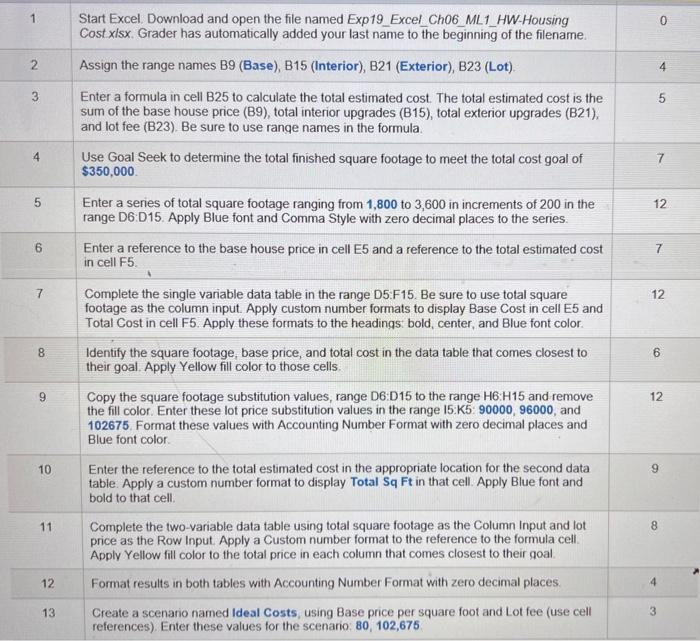
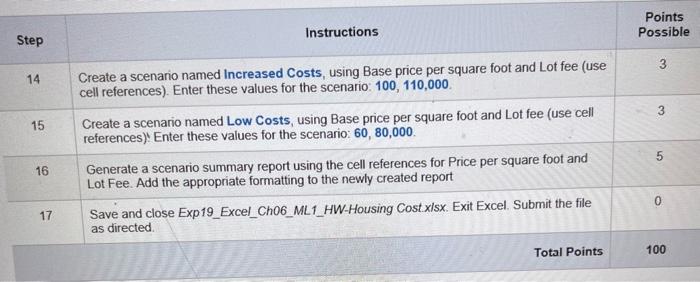
Question: begin{tabular}{|c|l|c|c|} hline multicolumn{1}{|c|}{ Step } & multicolumn{1}{c}{ Instructions } & Points Possible hline 14 & Create a scenario named Increased Costs, using Base price
\begin{tabular}{|c|l|c|c|} \hline
\begin{tabular}{|c|l|c|c|} \hline \multicolumn{1}{|c|}{ Step } & \multicolumn{1}{c}{ Instructions } & Points Possible \\ \hline 14 & Create a scenario named Increased Costs, using Base price per square foot and Lot fee (use cell references). Enter these values for the scenario: 100,110,000 & 3 \\ \hline 15 & Create a scenario named Low Costs, using Base price per square foot and Lot fee (use cell references)! Enter these values for the scenario: 60,80,000 & 3 \\ \hline 16 & Generate a scenario summary report using the cell references for Price per square foot and Lot Fee. Add the appropriate formatting to the newly created report & 5 \\ \hline 17 & Save and close Exp19_Excel_Ch06_ML1_HW-Housing Cost.xlsx. Exit Excel. Submit the file as directed. & 0 \\ \hline \end{tabular} \begin{tabular}{|c|l|c|c|} \hline \multicolumn{1}{|c|}{ Step } & \multicolumn{1}{c}{ Instructions } & Points Possible \\ \hline 14 & Create a scenario named Increased Costs, using Base price per square foot and Lot fee (use cell references). Enter these values for the scenario: 100,110,000 & 3 \\ \hline 15 & Create a scenario named Low Costs, using Base price per square foot and Lot fee (use cell references)! Enter these values for the scenario: 60,80,000 & 3 \\ \hline 16 & Generate a scenario summary report using the cell references for Price per square foot and Lot Fee. Add the appropriate formatting to the newly created report & 5 \\ \hline 17 & Save and close Exp19_Excel_Ch06_ML1_HW-Housing Cost.xlsx. Exit Excel. Submit the file as directed. & 0 \\ \hline \end{tabular}

Step by Step Solution

There are 3 Steps involved in it

1 Expert Approved Answer
Step: 1 Unlock blur-text-image

Question Has Been Solved by an Expert!

Get step-by-step solutions from verified subject matter experts

Step: 2 Unlock
Step: 3 Unlock

Students Have Also Explored These Related General Management Questions!