







Question: Below are instructions to create a beginner level C++ program using functions and files. Could you provide the code based on the given prototypes, files,
Below are instructions to create a beginner level C++ program using functions and files. Could you provide the code based on the given prototypes, files, and outputs? Thank you!
Given files:
CS140Report.txt:
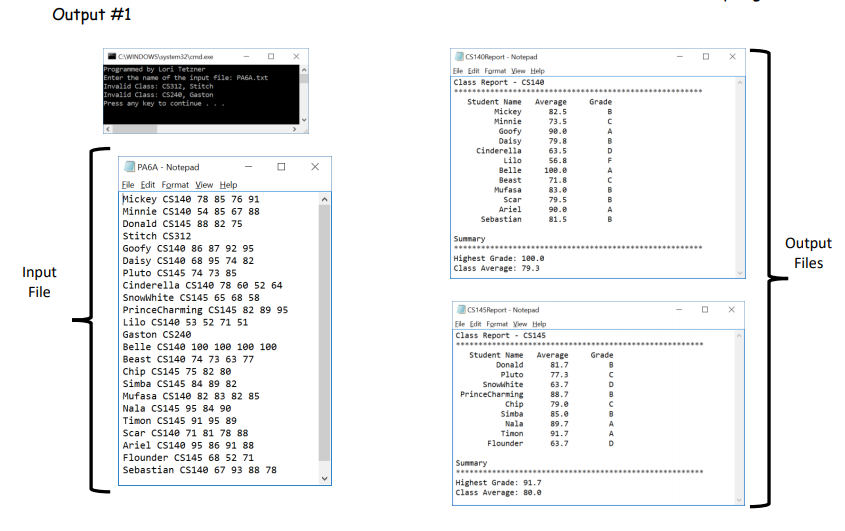
Mickey CS140 78 85 76 91 Minnie CS140 54 85 67 88 Donald CS145 88 82 75 Stitch CS312 Goofy CS140 86 87 92 95 Daisy CS140 68 95 74 82 Pluto CS145 74 73 85 Cinderella CS140 78 60 52 64 SnowWhite CS145 65 68 58 PrinceCharming CS145 82 89 95 Lilo CS140 53 52 71 51 Gaston CS240 Belle CS140 100 100 100 100 Beast CS140 74 73 63 77 Chip CS145 75 82 80 Simba CS145 84 89 82 Mufasa CS140 82 83 82 85 Nala CS145 95 84 90 Timon CS145 91 95 89 Scar CS140 71 81 78 88 Ariel CS140 95 86 91 88 Flounder CS145 68 52 71 Sebastian CS140 67 93 88 78
CS145Report.txt:
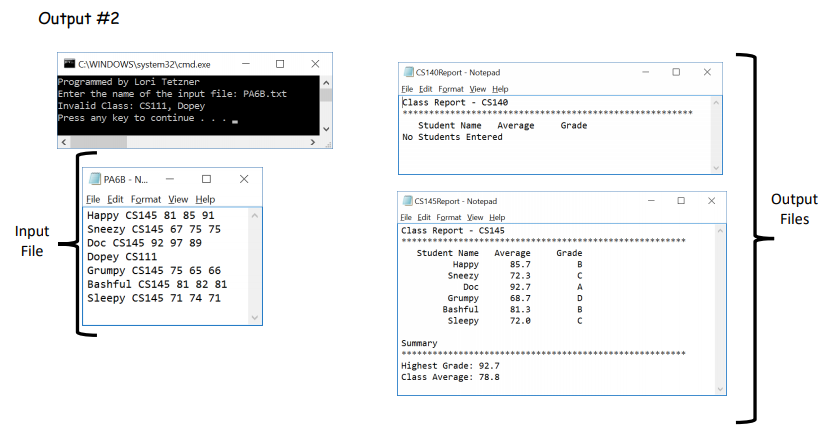
Happy CS145 81 85 91 Sneezy CS145 67 75 75 Doc CS145 92 97 89 Dopey CS111 Grumpy CS145 75 65 66 Bashful CS145 81 82 81 Sleepy CS145 71 74 71
const int NUM140GRADES = 4;
const int NUM145GRADES = 3;
void openFile(ifstream &in, string fileName);
void openFile(ofstream &out, string fileName);
void outputHeaders(ofstream &out, string className);
double readGradesCalcAvg(ifstream &fin, int numGrades);
char determineLetterGrade(double avg);
void printTotals(ofstream &out, double topGrade, double avg);
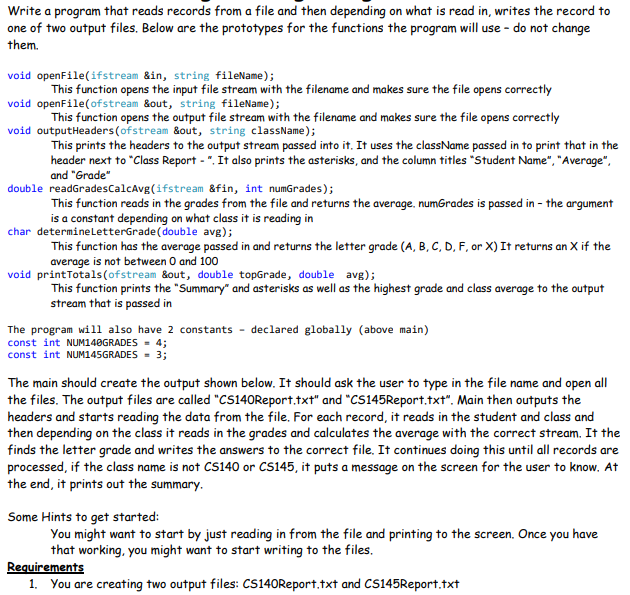
Write a program that reads records from a file and then depending on what is read in, writes the record to one of two output files. Below are the prototypes for the functions the program will use - do not change them. void openFile(ifstream &in, string fileName); void openFile(ofstream &out, string fileName); void outputHeaders (ofstream &out, string className); This function opens the input file stream with the filename and makes sure the file opens correctly This function opens the output file stream with the filename and makes sure the file opens correctly This prints the headers to the output stream passed into it. It uses the className passed in to print that in the header next to "Class Report - ". It also prints the asterisks, and the column titles "Student Name", "Average and "Grade" double readGradesCalcAvg(ifstream &fin, int numGrades) This function reads in the grades from the file and returns the average, numGrades is passed in - the argument is a constant depending on what class it is reading in char determineLetterGrade (double avg); This function has the average passed in and returns the letter grade (A, B, C, D, F, or X) It returns an X if the average is not between 0 and 100 void printTotals (ofstream &out, double topGrade, double avg); This function prints the "Summary and asterisks as well as the highest grade and class average to the output stream that is passed in The program will also have 2 constants declared globally (above main) const int NUM!40GRADES = 4; const int NUM!45GRADES = 3; The main should create the output shown below. It should ask the user to type in the file name and open all the files. The output files are called "CS140Report.txt" and "CS145Report.txt". Main then outputs the headers and starts reading the data from the file. For each record, it reads in the student and class and then depending on the class it reads in the grades and calculates the average with the correct stream. It the finds the letter grade and writes the answers to the correct file. It continues doing this until all records are if the class name is not CS140 or CS145, it puts a message on the screen for the user to know. At the end, it prints out the summary Some Hints to get started: You might want to start by just reading in from the file and printing to the screen. Once you have that working, you might want to start writing to the files. 1. You are creating two output files: CS140Report.txt and CS145Report.txt
Step by Step Solution
There are 3 Steps involved in it

Get step-by-step solutions from verified subject matter experts
 Study Help