



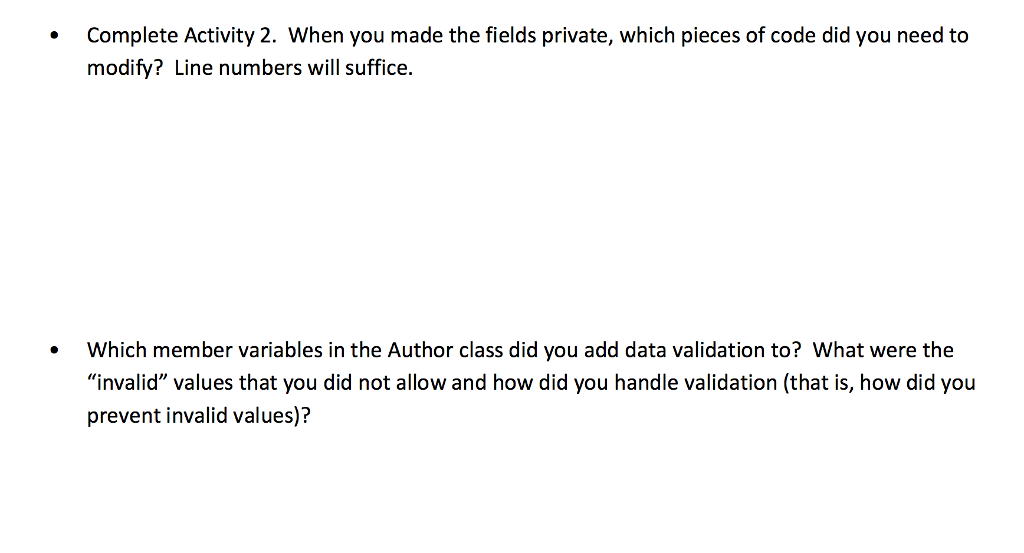
Question: Below code is the whole LibraryDemo.java..I have made the part you may need to modify to italic and bold. package unl.cse.library; import java.io.File; import java.io.FileNotFoundException;
Below code is the whole LibraryDemo.java..I have made the part you may need to modify to italic and bold.
package unl.cse.library;
import java.io.File;
import java.io.FileNotFoundException;
import java.util.List;
import java.util.Scanner;
public class LibraryDemo {
private final Library lib;
public LibraryDemo() {
this.lib = new Library();
loadFile();
}
private void loadFile() {
Scanner s = null;
try {
s = new Scanner(new File("data/books.txt"));
} catch (FileNotFoundException e) {
e.printStackTrace();
}
while(s.hasNext()) {
String line = s.nextLine();
String tokens[] = line.split(",");
String title = tokens[0];
String auth[] = tokens[1].split(" ");
Author author = new Author();
author.firstName = auth[0];
author.lastName = auth[1];
String isbn = tokens[2];
String publishDate = tokens[3];
Book b = new Book();
b.setTitle(title);
b.setAuthor(author);
b.setISBN(isbn);
b.setPublishDate(publishDate);
lib.addBook(b);
}
}
/**
* Method that searches for a book.
*/
private void searchBookInterface() {
System.out.println("Please enter a Search Option: (1) Search By Title (2) Search By Author (3) Keyword Search");
Scanner scanner = new Scanner(System.in);
int userChoice = scanner.nextInt();
System.out.print("Enter your search term: ");
String query = scanner.next();
switch (userChoice) {
case 1:
printBooks(this.lib.titleSearch(query));
break;
case 2:
printBooks(this.lib.authorSearch(query));
break;
case 3:
printBooks(this.lib.keywordSearch(query));
break;
default:
break;
}
return;
}
private void printBooks(List
System.out.print(" ");
System.out.println(String.format("%-50s %-20s %-15s", "TITLE", "AUTHOR", "ISBN"));
for (Book b : books) {
String formattedAuthor = null;
if(b.getAuthor() != null)
formattedAuthor = b.getAuthor().lastName + ", " + b.getAuthor().lastName;
String line = String.format("%-50s %-20s %-15s", b.getTitle(), formattedAuthor, b.getISBN());
System.out.println(line);
}
System.out.print(" ");
}
/**
* Method that adds a book.
*/
private void addBookInterface() {
//change this function
Scanner scanner = new Scanner(System.in);
System.out.println("Please enter the details of the book you want to add to the library");
System.out.println("Enter the title of the book: ");
String title = scanner.nextLine();
System.out.println("Enter the first name of the author: ");
String firstName = scanner.nextLine();
System.out.println("Enter the last name of the author: ");
String lastName = scanner.nextLine();
System.out.println("Enter the ISBN of the book: ");
String isbn = scanner.nextLine();
System.out.println("Enter the publication date (YYYY-MM-DD)");
String publishDate = scanner.nextLine();
Author author = new Author();
author.firstName = firstName;
author.lastName = lastName;
Book b = new Book();
b.setTitle(title);
b.setAuthor(author);
b.setISBN(isbn);
b.setPublishDate(publishDate);
this.lib.addBook(b);
return;
}
/**
* Method that acts as the interface to the library software.
*/
public void libraryInterface() {
int userChoice = 0;
while (userChoice != 4) {
System.out.println("Welcome to the Arcadia Library.");
System.out.print("Please enter a choice: (1) Add a book, (2) Find a book, (3) Print Collection (4) Exit:");
Scanner scanner = new Scanner(System.in);
userChoice = scanner.nextInt();
switch (userChoice) {
case 1:
this.addBookInterface();
break;
case 2:
this.searchBookInterface();
break;
case 3:
printBooks(this.lib.getCollection());
break;
default:
break;
}
}//end of while
System.out.println("Thank You for Using Arcadia Library !");
return;
}
/**
* Main method
* @param args the command line arguments
*/
public static void main(String[] args) {
LibraryDemo demo = new LibraryDemo();
demo.libraryInterface();
}
}
Below code is the Author class which provided to start with..
package unl.cse.library;
public class Author {
public String firstName;
public String lastName;
}
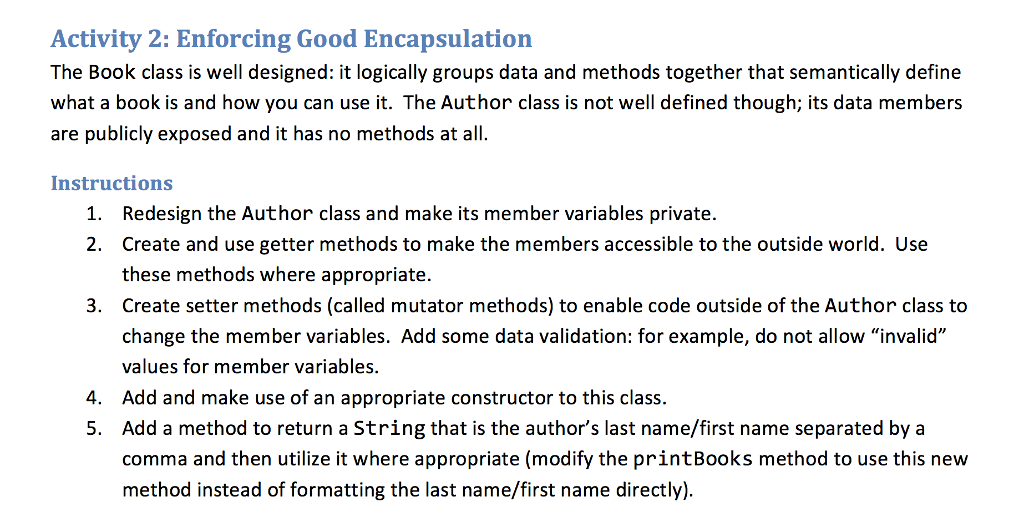
Activity 2: Enforcing Good Encapsulation The Book class is well designed: it logically groups data and methods together that semantically define what a book is and how you can use it. The Author class is not well defined though; its data members are publicly exposed and it has no methods at all. Instructions Redesign the Author class and make its member variables private. Create and use getter methods to make the members accessible to the outside world. Use these methods where appropriate. Create setter methods (called mutator methods) to enable code outside of the Author class to change the member variables. Add some data validation: for example, do not allow "invalid" values for member variables. Add and make use of an appropriate constructor to this class. Add a method to return a String that is the author's last name/first name separated by a comma and then utilize it where appropriate (modify the printBooks method to use this new method instead of formatting the last name/first name directly) 1. 2. 3. 4. 5
Step by Step Solution
There are 3 Steps involved in it

Get step-by-step solutions from verified subject matter experts