







Question: Below is the code of LibraryDemo class code..I have highlight the code of printBooks method part for you. package unl.cse.library; import java.io.File; import java.io.FileNotFoundException; import
Below is the code of LibraryDemo class code..I have highlight the code of printBooks method part for you.
package unl.cse.library;
import java.io.File;
import java.io.FileNotFoundException;
import java.util.List;
import java.util.Scanner;
public class LibraryDemo {
private final Library lib;
public LibraryDemo() {
this.lib = new Library();
loadFile();
}
private void loadFile() {
Scanner s = null;
try {
s = new Scanner(new File("data/books.txt"));
} catch (FileNotFoundException e) {
e.printStackTrace();
}
while(s.hasNext()) {
String line = s.nextLine();
String tokens[] = line.split(",");
String title = tokens[0];
String auth[] = tokens[1].split(" ");
Author author = new Author();
author.firstName = auth[0];
author.lastName = auth[1];
String isbn = tokens[2];
String publishDate = tokens[3];
Book b = new Book();
b.setTitle(title);
b.setAuthor(author);
b.setISBN(isbn);
b.setPublishDate(publishDate);
lib.addBook(b);
}
}
/**
* Method that searches for a book.
*/
private void searchBookInterface() {
System.out.println("Please enter a Search Option: (1) Search By Title (2) Search By Author (3) Keyword Search");
Scanner scanner = new Scanner(System.in);
int userChoice = scanner.nextInt();
System.out.print("Enter your search term: ");
String query = scanner.next();
switch (userChoice) {
case 1:
printBooks(this.lib.titleSearch(query));
break;
case 2:
printBooks(this.lib.authorSearch(query));
break;
case 3:
printBooks(this.lib.keywordSearch(query));
break;
default:
break;
}
return;
}
private void printBooks(List
System.out.print(" ");
System.out.println(String.format("%-50s %-20s %-15s", "TITLE", "AUTHOR", "ISBN"));
for (Book b : books) {
String formattedAuthor = null;
if(b.getAuthor() != null)
formattedAuthor = b.getAuthor().lastName + ", " + b.getAuthor().lastName;
String line = String.format("%-50s %-20s %-15s", b.getTitle(), formattedAuthor, b.getISBN());
System.out.println(line);
}
System.out.print(" ");
}
/**
* Method that adds a book.
*/
private void addBookInterface() {
//change this function
Scanner scanner = new Scanner(System.in);
System.out.println("Please enter the details of the book you want to add to the library");
System.out.println("Enter the title of the book: ");
String title = scanner.nextLine();
System.out.println("Enter the first name of the author: ");
String firstName = scanner.nextLine();
System.out.println("Enter the last name of the author: ");
String lastName = scanner.nextLine();
System.out.println("Enter the ISBN of the book: ");
String isbn = scanner.nextLine();
System.out.println("Enter the publication date (YYYY-MM-DD)");
String publishDate = scanner.nextLine();
Author author = new Author();
author.firstName = firstName;
author.lastName = lastName;
Book b = new Book();
b.setTitle(title);
b.setAuthor(author);
b.setISBN(isbn);
b.setPublishDate(publishDate);
this.lib.addBook(b);
return;
}
/**
* Method that acts as the interface to the library software.
*/
public void libraryInterface() {
int userChoice = 0;
while (userChoice != 4) {
System.out.println("Welcome to the Arcadia Library.");
System.out.print("Please enter a choice: (1) Add a book, (2) Find a book, (3) Print Collection (4) Exit:");
Scanner scanner = new Scanner(System.in);
userChoice = scanner.nextInt();
switch (userChoice) {
case 1:
this.addBookInterface();
break;
case 2:
this.searchBookInterface();
break;
case 3:
printBooks(this.lib.getCollection());
break;
default:
break;
}
}//end of while
System.out.println("Thank You for Using Arcadia Library !");
return;
}
/**
* Main method
* @param args the command line arguments
*/
public static void main(String[] args) {
LibraryDemo demo = new LibraryDemo();
demo.libraryInterface();
}
}
Below is the book class code in case you needed it.
package unl.cse.library;
import org.joda.time.DateTime;
public class Book {
private String title;
private String isbn;
private Author author;
private DateTime publishDate;
/**
* Getter method for author
* @return
*/
public Author getAuthor() {
return null;
}
/**
* Setter method for authors
* @param author
*/
public void setAuthor(Author author) {
this.author = author;
}
/**
* Getter method for call number.
* @return
*/
public String getISBN() {
return null;
}
/**
* Setter method for call number.
* @param callNumber
*/
public void setISBN(String isbn) {
this.isbn = isbn;
}
/**
* Getter method for title
* @return
*/
public String getTitle() {
return null;
}
/**
* Setter method for title
* @param title
*/
public void setTitle(String title) {
this.title = title;
}
public String getPublishDate() {
return this.publishDate.toString("YYYY");
}
public void setPublishDate(String date) {
this.publishDate = DateTime.parse(date);
}
}
And this is the books.txt test case.
War and Peace,Leo Tolstoy,978-0199232765,1869
Data Structures & Problem Solving Using Java,Mark Weiss,0-321-54140-5,2011-03-10
The Naked & The Dead,Norman Mailer,978-0312265052,1948
Barbary Shore,Norman Mailer,0375700390,1951
Discrete Mathematics and Its Applications,Kenneth Rosen,9780073229720,1998-12-11
The Adventures of Tom Sawyer,Mark Twain,9780143039563,1876
Adventures of Huckleberry Finn,Mark Twain,,1885
American Gods,Neil Gaiman,0-380-97365-0,2002-04-30
The Colour of Magic,Terry Pratchett,0-86140-324-X,1983
Mort,Terry Pratchett,0-575-04171-4,1987
The Hitchhiker's Guide to the Galaxy,Douglas Adams,978-0345391803,1979
Dirk Gently's Holistic Detective Agency,Douglas Adams,0-671-69267-4,1987-05

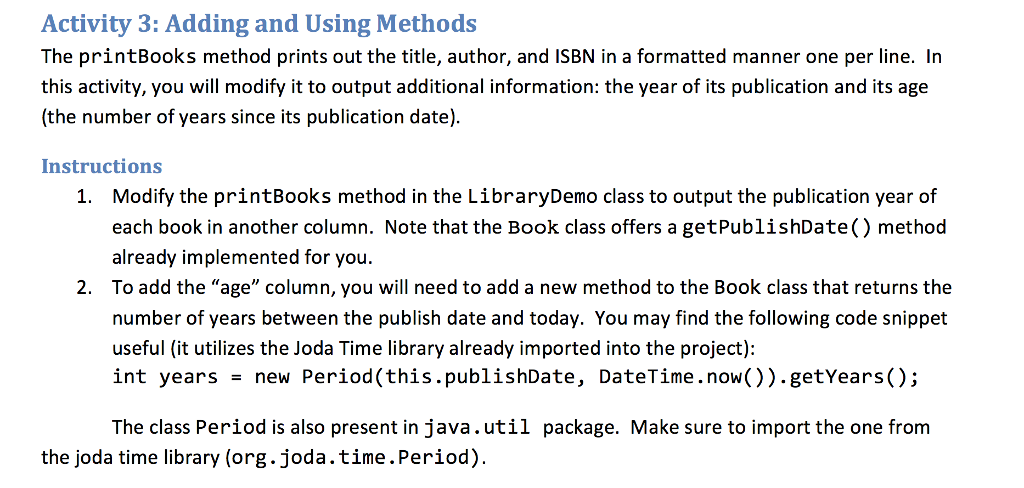
Activity 3: Adding and Using Methods The printBooks method prints out the title, author, and ISBN in a formatted manner one per line. In this activity, you will modify it to output additional information: the year of its publication and its age (the number of years since its publication date). Instructions Modify the printBooks method in the LibraryDemo class to output the publication year of each book in another column. Note that the Book class offers a getPublishDate() method already implemented for you To add the "age" column, you will need to add a new method to the Book class that returns the number of years between the publish date and today. You may find the following code snippet useful (it utilizes the Joda Time library already imported into the project): int years new Period(this.publishDate, DateTime . now.)).getYears.): 1. 2. The class Period is also present in java.util package. Make sure to import the one from the joda time library (org.joda.time.Period)
Step by Step Solution
There are 3 Steps involved in it

Get step-by-step solutions from verified subject matter experts
 Study Help