







Question: Below if the data representing the total mass (in pg ) vs. the separation between the two objects (in cm ). Let's assume that m_(1)=m_(2)=(1)/(2)m
Below if the data representing the total mass (in
pg) vs. the separation between the two objects (in
cm).\ Let's assume that
m_(1)=m_(2)=(1)/(2)m, where
m_(1)and
m_(2)are the two individual masses.\ \\\\table[[
m[pg],
r[cm],
m[pg],
r[cm],
m[pg],
r[cm] 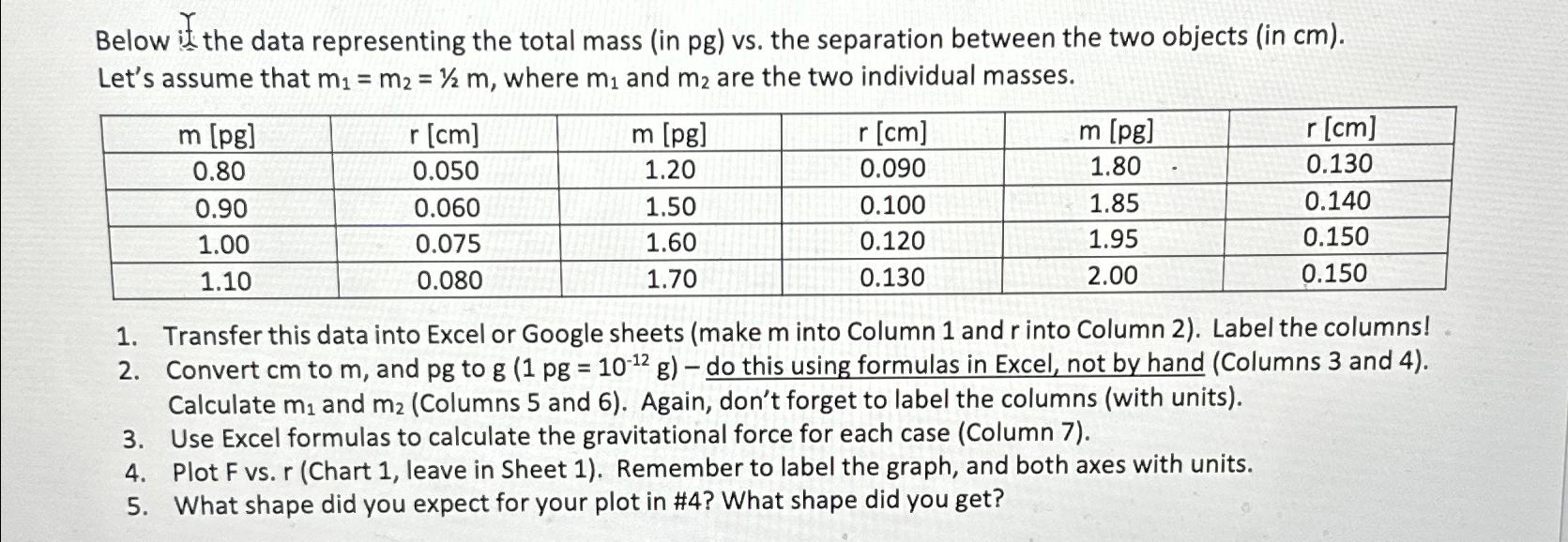
Below if the data representing the total mass (in pg ) vs. the separation between the two objects (in cm ). Let's assume that m1=m2=1/2m, where m1 and m2 are the two individual masses. 1. Transfer this data into Excel or Google sheets (make m into Column 1 and r into Column 2). Label the columns! 2. Convert cm to m, and pg to g(1pg=1012g) - do this using formulas in Excel, not by hand (Columns 3 and 4 ). Calculate m1 and m2 (Columns 5 and 6 ). Again, don't forget to label the columns (with units). 3. Use Excel formulas to calculate the gravitational force for each case (Column 7). 4. Plot F vs. r (Chart 1, leave in Sheet 1). Remember to label the graph, and both axes with units. 5. What shape did you expect for your plot in \#4? What shape did you get? Below if the data representing the total mass (in pg ) vs. the separation between the two objects (in cm ). Let's assume that m1=m2=1/2m, where m1 and m2 are the two individual masses. 1. Transfer this data into Excel or Google sheets (make m into Column 1 and r into Column 2). Label the columns! 2. Convert cm to m, and pg to g(1pg=1012g) - do this using formulas in Excel, not by hand (Columns 3 and 4 ). Calculate m1 and m2 (Columns 5 and 6 ). Again, don't forget to label the columns (with units). 3. Use Excel formulas to calculate the gravitational force for each case (Column 7). 4. Plot F vs. r (Chart 1, leave in Sheet 1). Remember to label the graph, and both axes with units. 5. What shape did you expect for your plot in \#4? What shape did you get
Step by Step Solution
There are 3 Steps involved in it

Get step-by-step solutions from verified subject matter experts
 Study Help