







Question: Below is my Arduino Program for a 2-way traffic controller (6-LED's) with a push-button. This button, when pressed, should turn the 2 Red LEDs on
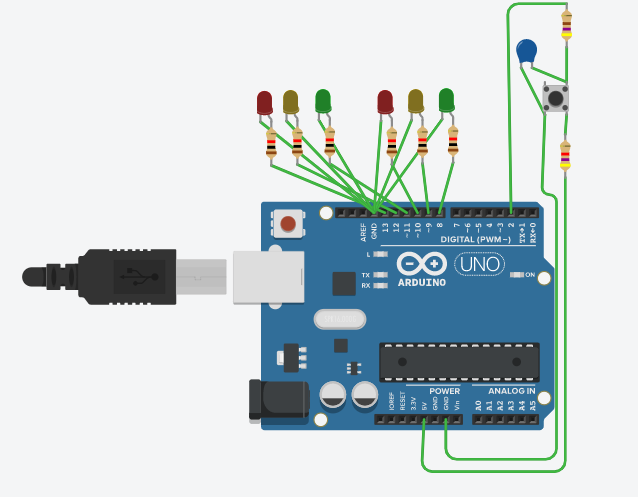
Below is my Arduino Program for a 2-way traffic controller (6-LED's) with a push-button. This button, when pressed, should turn the 2 Red LEDs on and all others off and remain this way till the button is pressed again. Currently, when the button is pressed the 2 Red LEDs turn on, but only stay on for the duration of that phase of the loop remaining before it changes back. Does anyone have any suggestions on how to modify the code/interrupt to allow the program to stay with the 2 Red LED's on until the button is pressed again after the initial pressing?
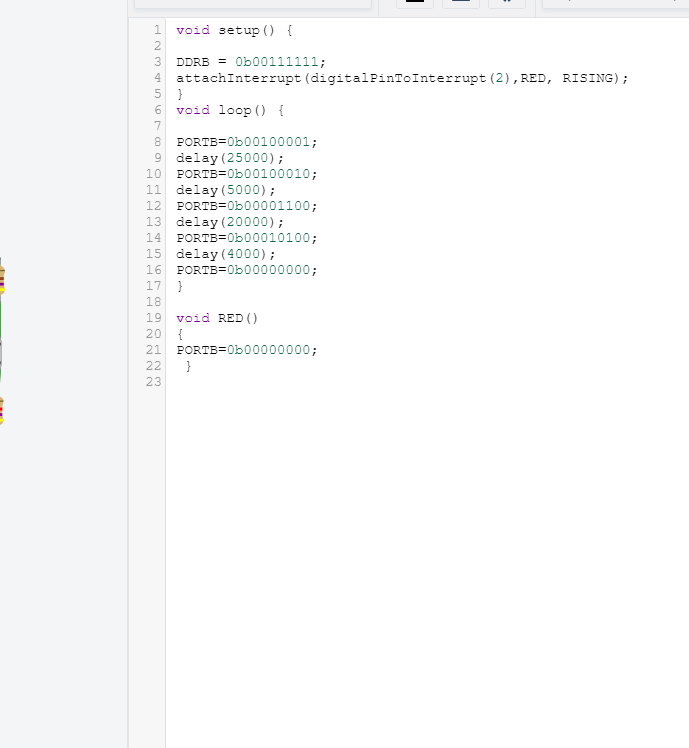
void setup() { DDRB = Ob00111111; attachInterrupt (digitalPintoInterrupt (2), RED, RISING); HM000 void loop() { PORTB=0b00100001; delay(25000); PORTB=0b00100010; delay(5000); PORTB=0b00001100; delay (20000); PORTB=0b00010100; delay (4000); PORTB=0.00000000; 17 19 void RED() 21 PORTB=0b00000000; 22 23 AREF 3 II DIGITAL (PWM-) 00 UNO POWER ANALOG IN void setup() { DDRB = Ob00111111; attachInterrupt (digitalPintoInterrupt (2), RED, RISING); HM000 void loop() { PORTB=0b00100001; delay(25000); PORTB=0b00100010; delay(5000); PORTB=0b00001100; delay (20000); PORTB=0b00010100; delay (4000); PORTB=0.00000000; 17 19 void RED() 21 PORTB=0b00000000; 22 23 AREF 3 II DIGITAL (PWM-) 00 UNO POWER ANALOG IN
Step by Step Solution
There are 3 Steps involved in it

Get step-by-step solutions from verified subject matter experts
 Study Help