







Question: below is the inventory.cpp Welcome to Inventory Do you want to 1 Start a new inventory 2 Open an existing inventory 3 Quit A source
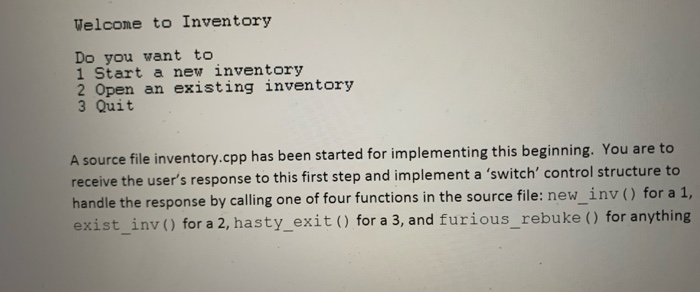

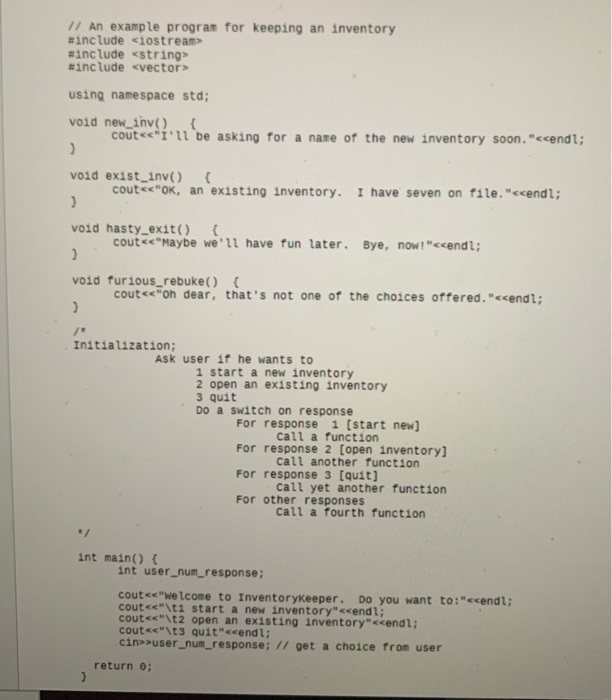
Welcome to Inventory Do you want to 1 Start a new inventory 2 Open an existing inventory 3 Quit A source file inventory.cpp has been started for implementing this beginning. You are to receive the user's response to this first step and implement a 'switch' control structure to handle the response by calling one of four functions in the source file: new_inv () for a 1, exist_inv () for a 2, hasty_exit() for a 3, and furious_rebuke () for anything else. You may examine the functions in the source file, but do not change them. Your contribution to this code should do nothing more than call the appropriate function depending on the user's input. 11 An example program for keeping an inventory #include
Step by Step Solution
There are 3 Steps involved in it

Get step-by-step solutions from verified subject matter experts
 Study Help