







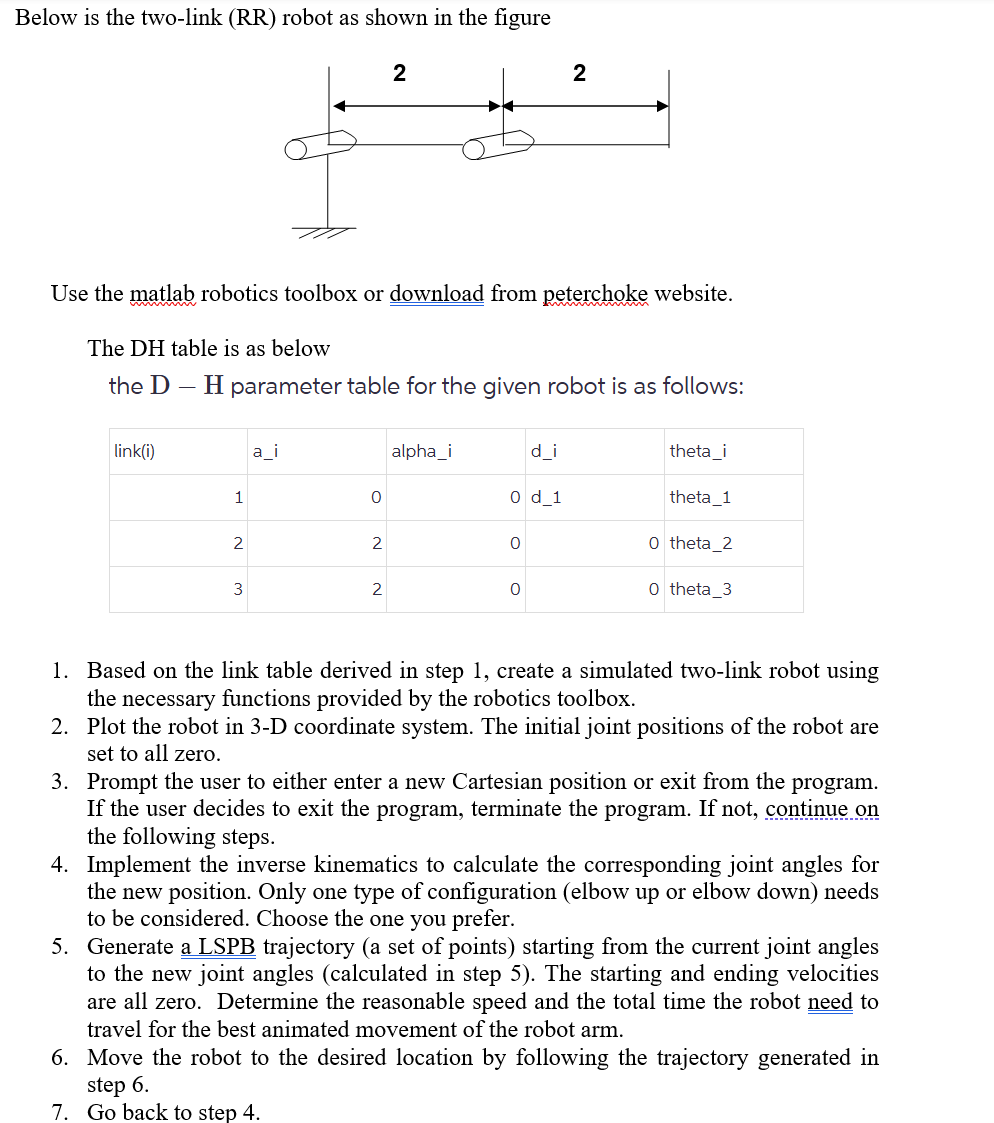
Question: Below is the two - link ( RR ) robot as shown in the figure Use the matlab robotics toolbox or download from peterchoke website.
Below is the twolink RR robot as shown in the figure
Use the matlab robotics toolbox or download from peterchoke website.
The DH table is as below
the mathrmDmathrmH parameter table for the given robot is as follows:
Based on the link table derived in step create a simulated twolink robot using the necessary functions provided by the robotics toolbox.
Plot the robot in D coordinate system. The initial joint positions of the robot are set to all zero.
Prompt the user to either enter a new Cartesian position or exit from the program. If the user decides to exit the program, terminate the program. If not, continue on the following steps.
Implement the inverse kinematics to calculate the corresponding joint angles for the new position. Only one type of configuration elbow up or elbow down needs to be considered. Choose the one you prefer.
Generate a LSPB trajectory a set of points starting from the current joint angles to the new joint angles calculated in step The starting and ending velocities are all zero. Determine the reasonable speed and the total time the robot need to travel for the best animated movement of the robot arm.
Move the robot to the desired location by following the trajectory generated in step
Go back to step
Step by Step Solution
There are 3 Steps involved in it
1 Expert Approved Answer
Step: 1 Unlock

Question Has Been Solved by an Expert!
Get step-by-step solutions from verified subject matter experts
Step: 2 Unlock
Step: 3 Unlock
 Study Help