







Question: Board Class import java.util.ArrayList; public class Board { private ArrayList > board; /** Constructor @param deck gets the deck of card using a deck class
Board Class
import java.util.ArrayList; public class Board { private ArrayList
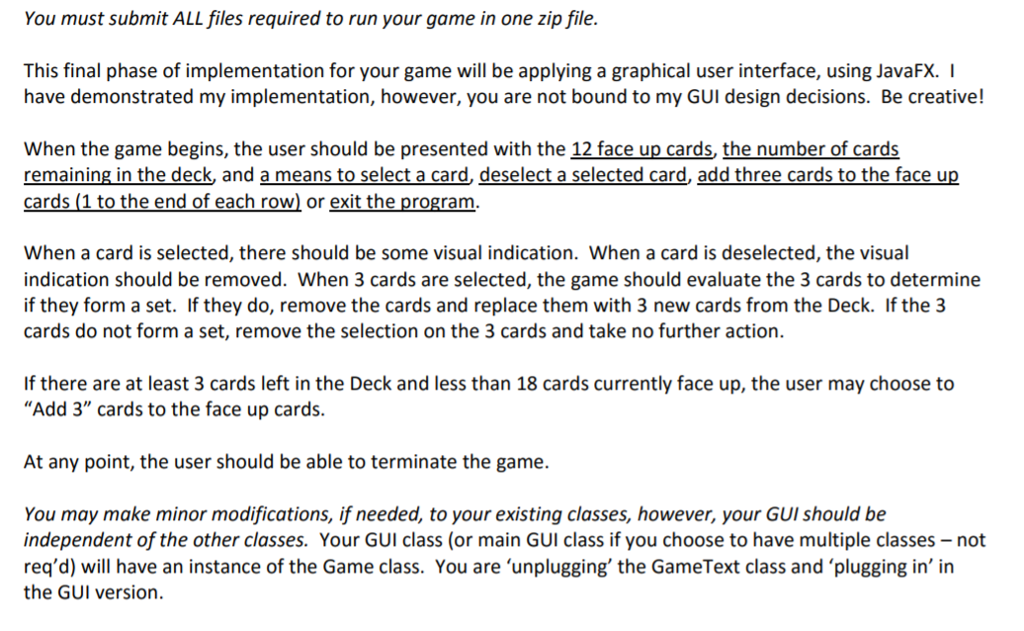
/** Constructor @param deck gets the deck of card using a deck class and adds them to arraylist */ public Board(Deck deck) { board = new ArrayList } } } /** void method to replace the card @param otherCard the card that being replaced @param row the row number of the card @param col the index number of the column */ public void replaceCard(Card otherCard, int row,int col) { getBoardSquare(row,col).setCard(otherCard); } /** method that uses BoardSquare class @param row the number of row @param the number of column @return the board's column and the row */ public BoardSquare getBoardSquare(int row,int col) { return board.get(row).get(col); } /** @param deck accepts deck of the card and adds 3 card from the deck */ public void add3(Deck deck) { int col = board.get(0).size()-1; for(int row = 0; row } } /** @param row the row number of the card @param col the column number of the card @return reference of that card at that row number and column */ public Card getCard(int row, int col) { return getBoardSquare(row, col).getCard(); } /** @return the size of the board which is the row of the board */ public int numRows() { return board.size(); } /** @return the number of column on the board */ public int numCols() { return board.get(0).size(); } public ArrayList BoardSquare public class BoardSquare { //Instance variables private Card card; private int rowPos; private int colPos; boolean selected; /** Constructor @param card the card itself @param rowpos the position of the row on the board @param colpos position of the colomn on the board */ public BoardSquare(Card card, int rowpos, int colpos) { this.card = card; rowPos = rowpos; colPos = colpos; selected = false; } //Getters /** @return card the get method to get the card */ public Card getCard() { return card; } /** @return returns the row position */ public int getRow() { return rowPos; } /** @return return coloumn position of the card */ public int getCol() { return colPos; } /** get method to return whether the card is elected or not */ public boolean getSelect() { return selected; } //Setters /** Setter to set the card in the board @param Card accepts the card object as parameter */ public void setCard(Card other) { card = other; } /** @param row accepts the row number as an integer value */ public void setRow(int row) { rowPos = row; } /** @param col set the colume in the board */ public void setCol(int col) { colPos = col; } /** @param select boolean method to decided whether the set is selected or not. if selected, it set it equal to that */ public void setSelected(boolean select) { selected = select; } } Card Class public class Card { //emurated types for the four characterestic of the card public enum Shapes{OVAL, SQUIGGLE,DIAMOND}; public enum Colors{RED, PURPLE, GREEN}; public enum Numbers{ONE, TWO, THREE}; public enum Fill{SOLID, STRIPED, OUTLINED}; private Shapes shapes; private Colors colors; private Numbers numbers; private Fill fill; /** Constructor @param colors the color of the card @param fill fill of the card(solid, striped, outlined) @param shapes the shape of the card (oval, squiggle, diamond) @param numbers the number in the card 1 through 4 */ public Card(Colors colors,Fill fill, Shapes shapes, Numbers numbers) { this.colors = colors; this.fill = fill; this.shapes = shapes; this.numbers = numbers; } @Override public String toString() { String Card = numbers + "_" + colors + "_" + fill + "_" + shapes; return Card; } /** Static method to decide whether the card forms a set or not @param cardone the first card @param cardtwo second card @param cardThree the third card to check whether it forms a set or not */ public static boolean isSet(Card cardOne, Card cardTwo, Card cardThree) { if(cardOne.colors == cardTwo.colors && cardTwo.colors == cardThree.colors) { return false; } else if (cardOne.colors != cardTwo.colors && cardTwo.colors != cardThree.colors) { return false; } if(cardOne.fill == cardTwo.fill && cardTwo.fill == cardThree.fill) { return false; } else if(cardOne.fill != cardTwo.fill && cardTwo.fill != cardThree.fill) { return false; } if(cardOne.shapes == cardTwo.shapes && cardTwo.shapes == cardThree.shapes) { return false; } if(cardOne.shapes != cardTwo.shapes && cardTwo.shapes != cardThree.shapes) { return false; } if(cardOne.numbers == cardTwo.numbers && cardTwo.numbers == cardThree.numbers) { return false; } if(cardOne.numbers != cardTwo.numbers && cardTwo.numbers != cardThree.numbers) { return false; } return true; } public Shapes getShape(){ return shapes; } public Colors getColor(){ return colors; } public Numbers getNumbers(){ return numbers; } public Fill getFill(){ return fill; } } Deck Class import java.util.*; public class Deck { private ArrayList for(int i = 0; i } } /** boolean method to decided whether deck is empty or not @return size of the deck */ public boolean isEmpty() { return (card.size()== 0); } /** This method allows to get the card from the top of the deck as long as deck has a card */ public Card getTopCard() { if(card.size() != 0) { //return card.get(0); return card.remove(0); } return null; } @Override public String toString() { String s=""; // for (int i = 0; i You must submit ALL files required to run your game in one zip file. This final phase of implementation for your game will be applying a graphical user interface, using JavaFX. have demonstrated my implementation, however, you are not bound to my GUI design decisions. Be creative! When the game begins, the user should be presented with the 12 face up cards, the number of cards remaining in the deck, and a means to select a card, deselect a selected card, add three cards to the face up cards (1 to the end of each row or exit the program. When a card is selected, there should be some visual indication. When a card is deselected, the visual indication should be removed. When 3 cards are selected, the game should evaluate the 3 cards to determine if they form a set. If they do, remove the cards and replace them with 3 new cards from the Deck. If the 3 cards do not form a set, remove the selection on the 3 cards and take no further action. If there are at least 3 cards left in the Deck and less than 18 cards currently face up, the user may choose to "Add 3" cards to the face up cards. At any point, the user should be able to terminate the game. You may make minor modifications, if needed, to your existing classes, however, your GUI should be independent of the other classes. Your GUI class (or main GUI class if you choose to have multiple classes-not req'd) will have an instance of the Game class. You are"unplugging, the GameText class and plugging in' in the GUI version. You must submit ALL files required to run your game in one zip file. This final phase of implementation for your game will be applying a graphical user interface, using JavaFX. have demonstrated my implementation, however, you are not bound to my GUI design decisions. Be creative! When the game begins, the user should be presented with the 12 face up cards, the number of cards remaining in the deck, and a means to select a card, deselect a selected card, add three cards to the face up cards (1 to the end of each row or exit the program. When a card is selected, there should be some visual indication. When a card is deselected, the visual indication should be removed. When 3 cards are selected, the game should evaluate the 3 cards to determine if they form a set. If they do, remove the cards and replace them with 3 new cards from the Deck. If the 3 cards do not form a set, remove the selection on the 3 cards and take no further action. If there are at least 3 cards left in the Deck and less than 18 cards currently face up, the user may choose to "Add 3" cards to the face up cards. At any point, the user should be able to terminate the game. You may make minor modifications, if needed, to your existing classes, however, your GUI should be independent of the other classes. Your GUI class (or main GUI class if you choose to have multiple classes-not req'd) will have an instance of the Game class. You are"unplugging, the GameText class and plugging in' in the GUI version
Step by Step Solution
There are 3 Steps involved in it

Get step-by-step solutions from verified subject matter experts
 Study Help