







Question: body { background-image: url(https://cdn.greenfieldpuppies.com/wp-content/uploads/2016/07/Yorkshire-Terrier-e1540580455806.jpg); background-position: fixed; background-repeat: no-repeat; } Welcome to my page This is a page about my favorite animal. schedule { color: blue;
body
{
background-image: url("https://cdn.greenfieldpuppies.com/wp-content/uploads/2016/07/Yorkshire-Terrier-e1540580455806.jpg");
background-position: fixed;
background-repeat: no-repeat;
}
Welcome to my page
This is a page about my favorite animal.
schedule
{
color: blue;
}
Monday: 9am-9:50am
Tuesday: 10am - 12:15pm
Wednesday: 9am - 8:30pm
Thursday: 10am - 12:15pm
Friday: 9am-9:50am
.poem
{
background-color: lightblue;
padding: 20px;
text-align: center;
}
It aint perfect, but everything's beautiful here.
-Jhene Aiko
color: gold;
text-decoration: none;
padding: 5px;">- Jhene Aiko
Here is my previous webpage .. The new directions are below. Help please?
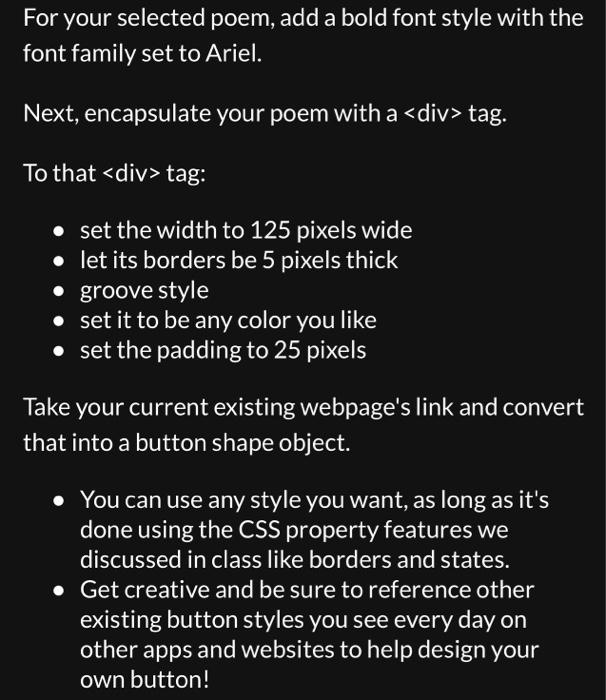
tag. To that
tag: - set the width to 125 pixels wide - let its borders be 5 pixels thick - groove style - set it to be any color you like - set the padding to 25 pixels Take your current existing webpage's link and convert that into a button shape object. - You can use any style you want, as long as it's done using the CSS property features we discussed in class like borders and states. - Get creative and be sure to reference other existing button styles you see every day on other apps and websites to help design your own button
Step by Step Solution
There are 3 Steps involved in it
1 Expert Approved Answer
Step: 1 Unlock

Question Has Been Solved by an Expert!
Get step-by-step solutions from verified subject matter experts
Step: 2 Unlock
Step: 3 Unlock
 Study Help