







Question: Bold is where my error is //Problem 10.13 Geometry the MyRectangle2D Class /********************************************************************** * MyRectangle2D * *---------------------------------------------------------------------* * -x: double * * -y: double *
Bold is where my error is
//Problem 10.13 Geometry the MyRectangle2D Class /********************************************************************** * MyRectangle2D * *---------------------------------------------------------------------* * -x: double * * -y: double * * -width: double * * -height: double * * +MyRectangle2D() * * +MyRectangle2D(x: double, y: double, width: double, height: double) * * +setX(x: double ) * * +setY(y: double) * * +getX(): double * * +getY(): double * * +setHeight(heigth: double) * * +setWidth(width: double) * * +getHeight(): double * * +getWidth(): double * * +getArea(): double * * +getPermeter(): double * * +contains(r: MyRectangle2D) * * +contains(x: double, y: double) * * +overlaps(r: MyRectangle2D) * **********************************************************************/ // Data fields private double x; private double y; private double width; private double height;
// Constructors /** Creates a default rectangle with (0, 0) * for (x, y) and 1 for both width and height */ MyRectangle2D() { this(0, 0, 1, 1); }
/** Creates a rectangle with the specified x, y, width, and height */ MyRectangle2D(double x, double y, double width, double height) { this.x = x; this.y = y; this.width = width; this.height = height; }
// Methods /** Set x to specified point */ public void setX(double x) { this.x = x; }
/** Set y to specified point */ public void setY(double y) { this.x = y; }
/** Return x */ public double getX() { return x; }
/** Return y */ public double getY() { return y; }
/** Set width to specified length */ public void setWidth(double width) { this.width = width; }
/** Set heigth to specified length */ public void setHeight(double height) { this.height = height; }
/** Return height */ public double getHeight() { return height; }
/** Return width */ public double getWidth() { return width; }
/** Returns the area of the rectangle */ public double getArea() { return width * height; }
/** Returns the perimeter of the rectangle */ public double getPerimeter() { return 2 * (width + height); }
/** Returns true if the specified point(x, y) * is inside the rectangle */ public boolean contains(double x, double y) { return getDistance(this.y, y)
/** Returns true if the specified * rectangle is inside this rectangle */ public boolean contains(MyRectangle2D r) { return getDistance(y, r.getY()) + r.getHeight() / 2
/** Returns true if the specified rectangle * overlaps with this rectangle */ public boolean overlaps(MyRectangle2D r) { return !contains(r) && ((x + width / 2 > r.getX() - r.getWidth()) || (y + height / 2 > r.getY() - r.getHeight())) && (getDistance(y, r.getY())
/** Return distance */ private double getDistance(double p1, double p2) { return Math.sqrt(Math.pow(p2 - p1, 2));
} }
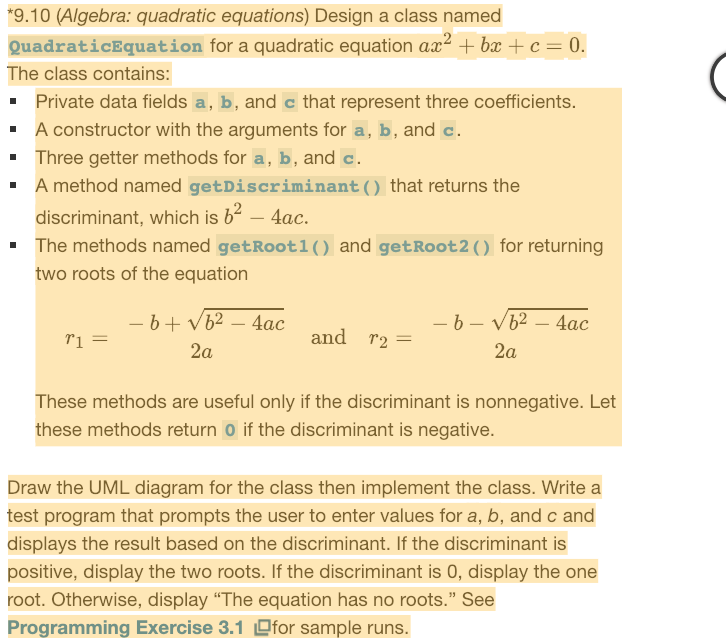
9.10 (Algebra: quadratic equations) Design a class named QuadraticEquation for a quadratic equation ax br c The class contains: 0 Private data fields a, b, and c that represent three coefficients. A constructor with the arguments for a, b, and c. Three getter methods for a, b, and c. A method named getDiscriminant ( ) that returns the discriminant, which is b2-4ac. " The methods named getRoot1) and getRoot2) for returning two roots of the equation and r2- These methods are useful only if the discriminant is nonnegative. Let these methods return O if the discriminant is negative. Draw the UML diagram for the class then implement the class. Write a test program that prompts the user to enter values for a, b, and c and displays the result based on the discriminant. If the discriminant is positive, display the two roots. If the discriminant is 0, display the one root. Otherwise, display "The equation has no roots." See Programming Exercise 3.1 for sample runs
Step by Step Solution
There are 3 Steps involved in it

Get step-by-step solutions from verified subject matter experts
 Study Help