







Question: Bond Pricing - Excel FILE HOME INSERT PAGE LAYOUT FORMULAS DATA REVIEW VIEW Ruler Formula Bar 100 Normal Page Break Page Custom Gridlines Headings
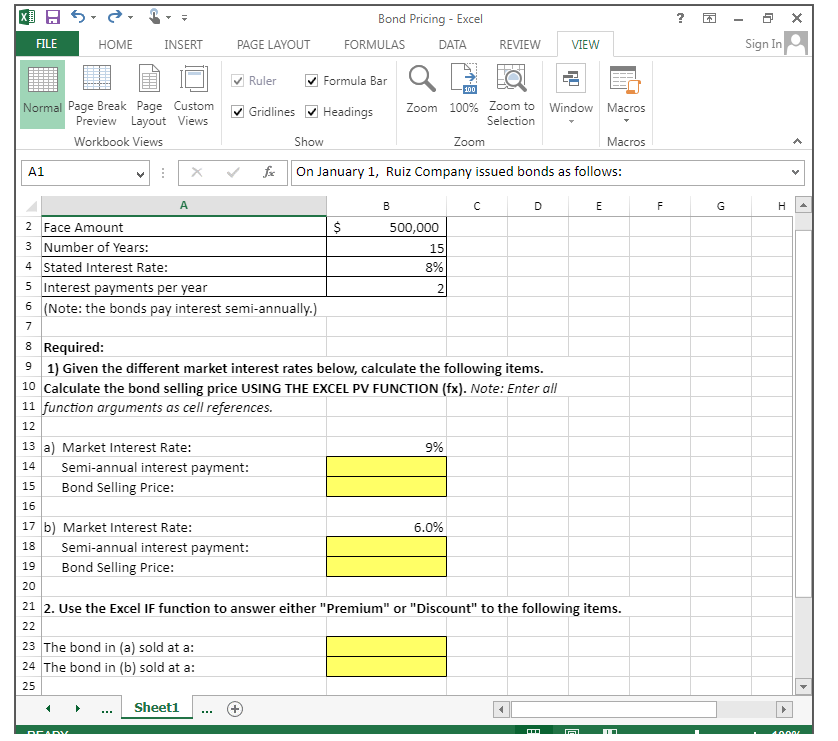
Bond Pricing - Excel FILE HOME INSERT PAGE LAYOUT FORMULAS DATA REVIEW VIEW Ruler Formula Bar 100 Normal Page Break Page Custom Gridlines Headings Preview Layout Views Zoom 100% Zoom to Selection Window Macros Workbook Views Show Zoom Macros A1 fx A On January 1, Ruiz Company issued bonds as follows: N Sign In C D E F G H 2 Face Amount 3 Number of Years: 4 Stated Interest Rate: 5 Interest payments per year 6 (Note: the bonds pay interest semi-annually.) 7 8 Required: B $ 500,000 15 8% 2 91) Given the different market interest rates below, calculate the following items. 10 Calculate the bond selling price USING THE EXCEL PV FUNCTION (fx). Note: Enter all 11 function arguments as cell references. 12 13 a) Market Interest Rate: Semi-annual interest payment: 9% 14 15 Bond Selling Price: 16 17 b) Market Interest Rate: 18 Semi-annual interest payment: 19 Bond Selling Price: 20 6.0% 21 2. Use the Excel IF function to answer either "Premium" or "Discount" to the following items. 22 23 The bond in (a) sold at a: 24 The bond in (b) sold at a: 25 READY Sheet1 40.00 > >
Step by Step Solution
There are 3 Steps involved in it

Get step-by-step solutions from verified subject matter experts
 Study Help