







Question: Bookmark Previous pages Completed By: abmarz esten co modifying the default chart of accounts When modifying deleted, or k to select wh 1 you
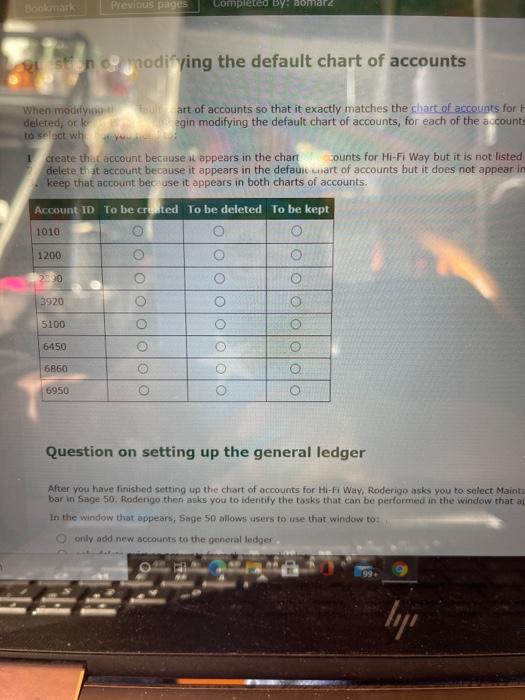
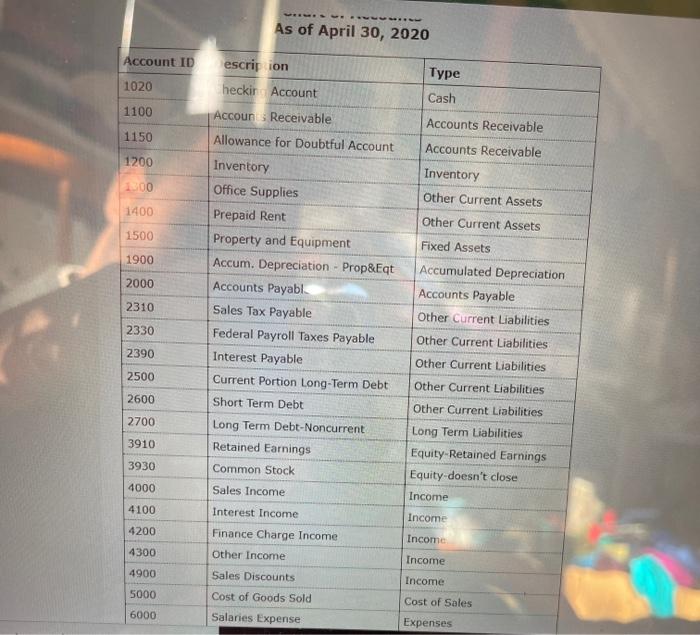
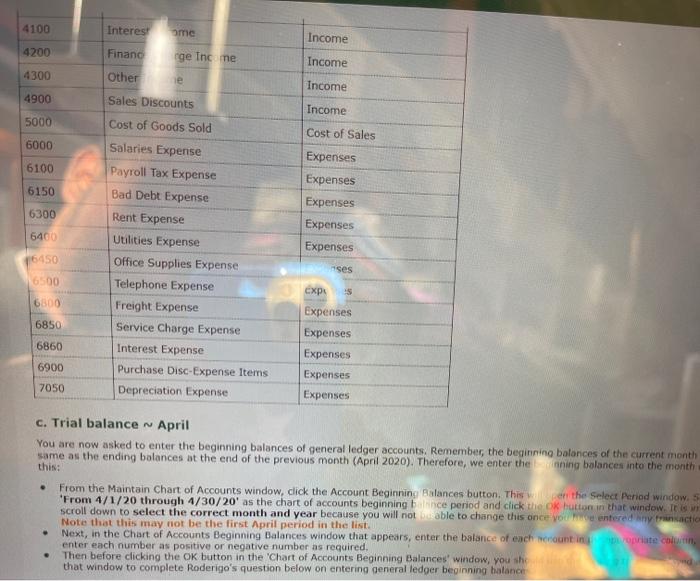
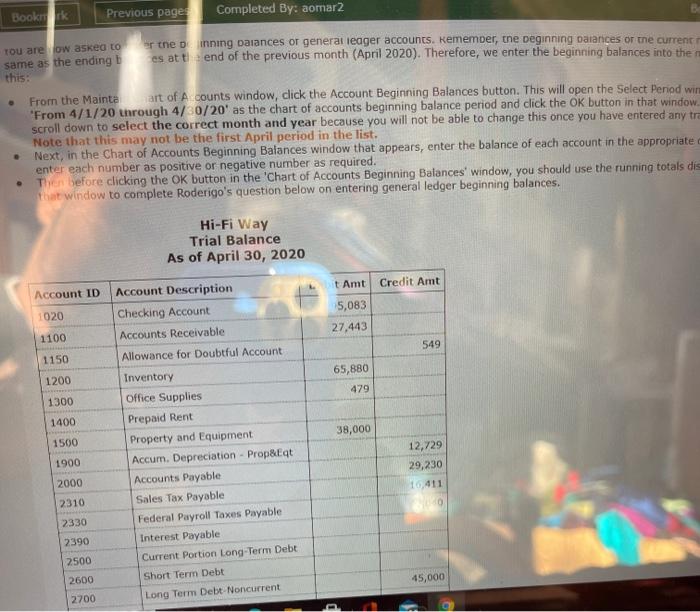
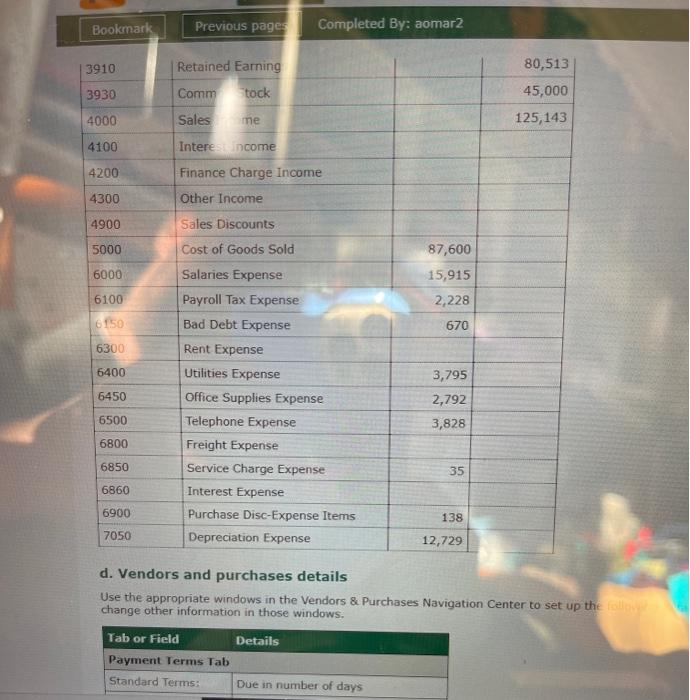
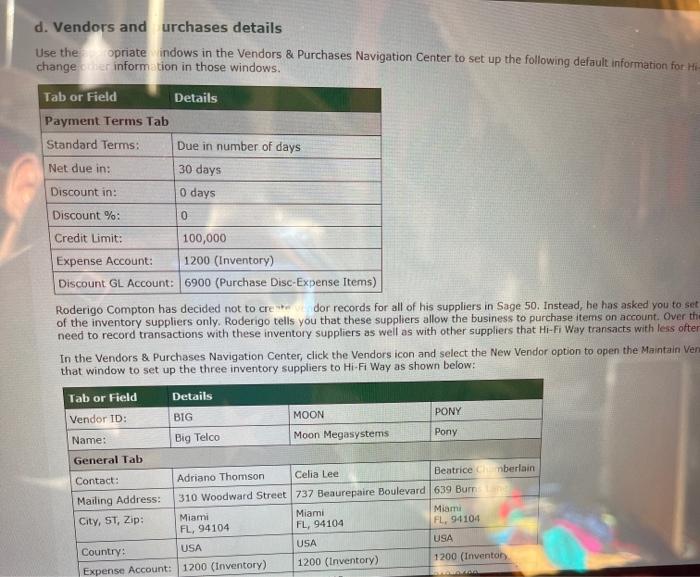
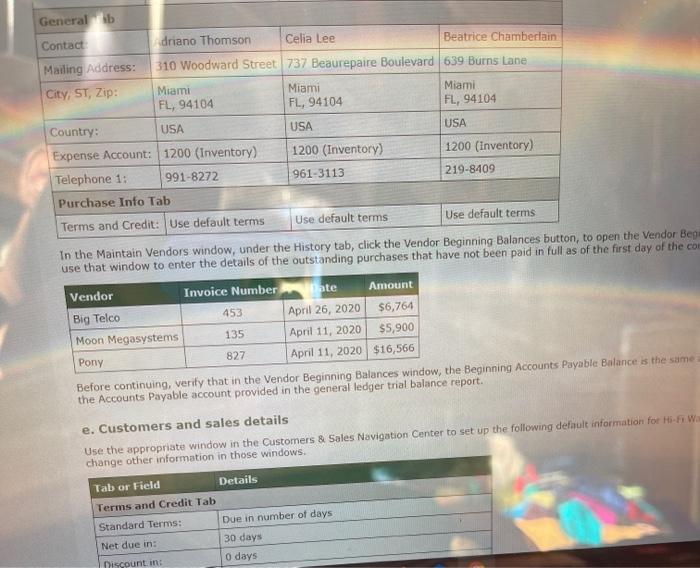
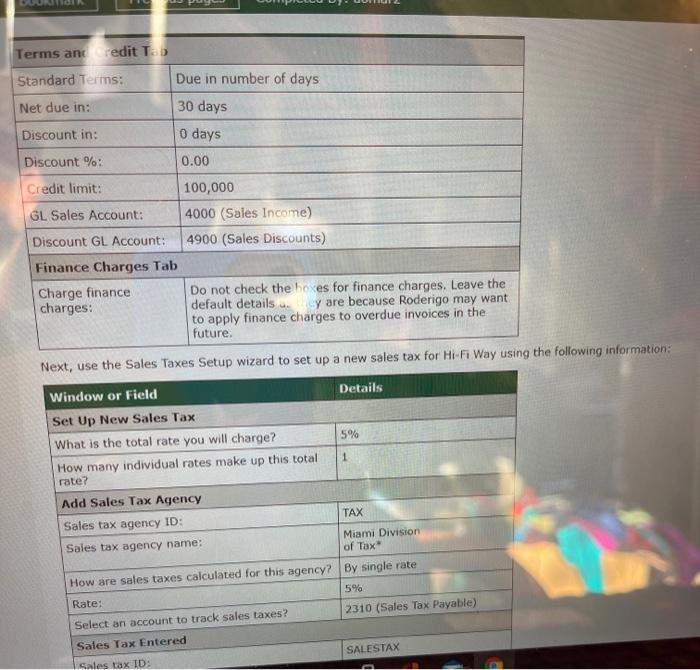
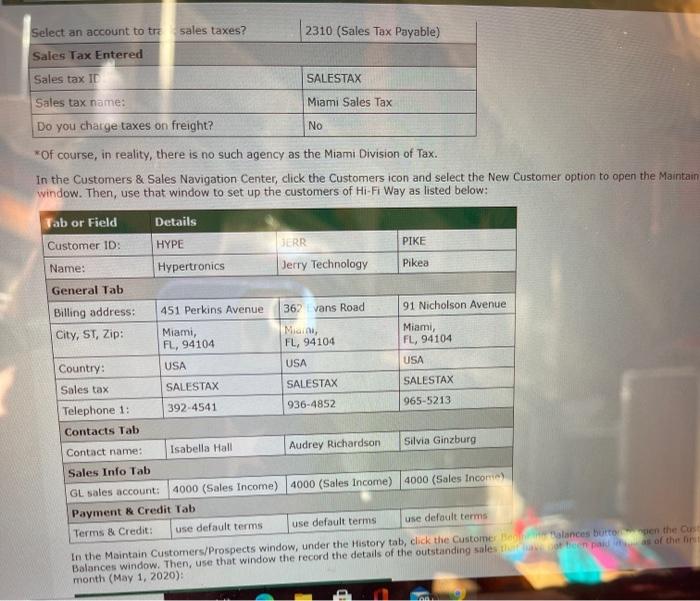
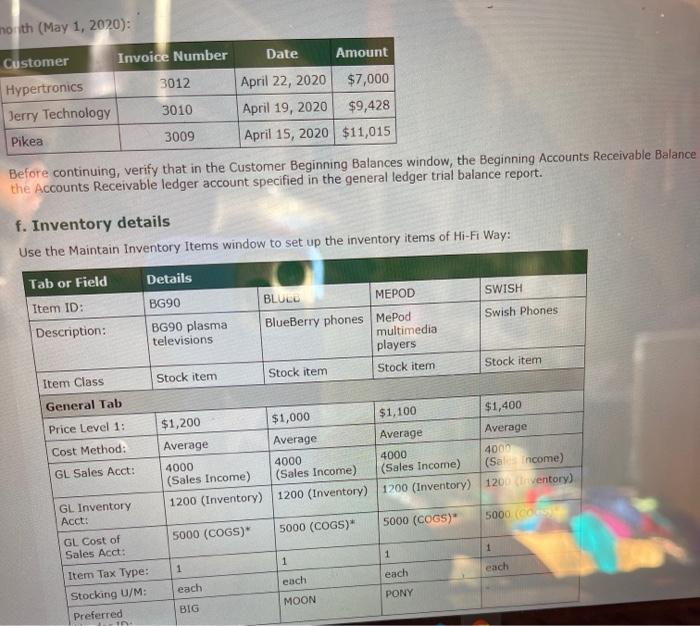
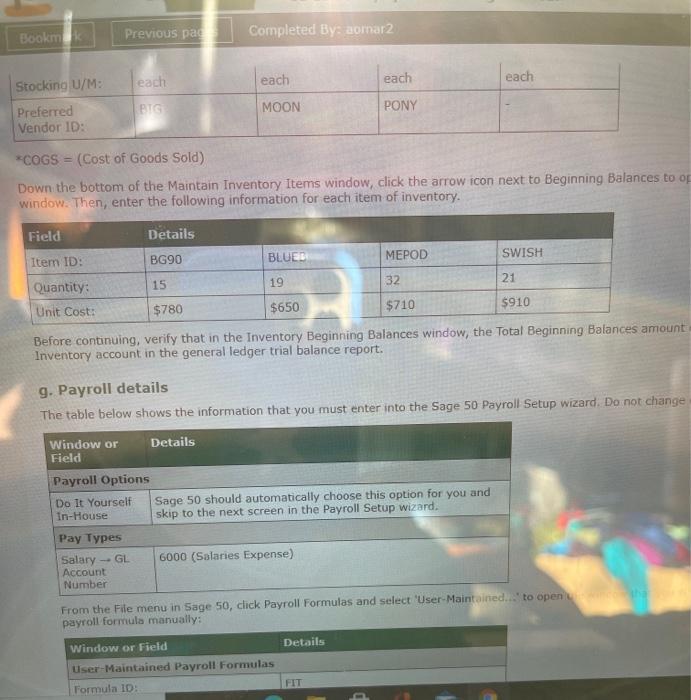
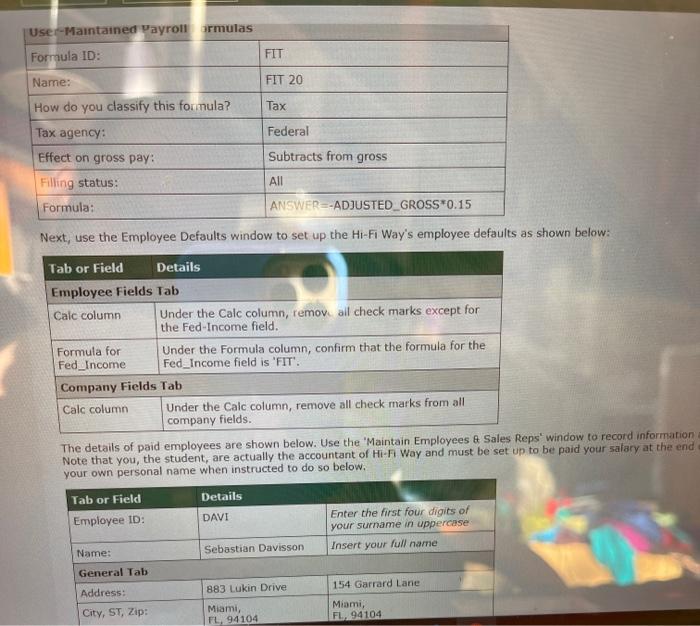
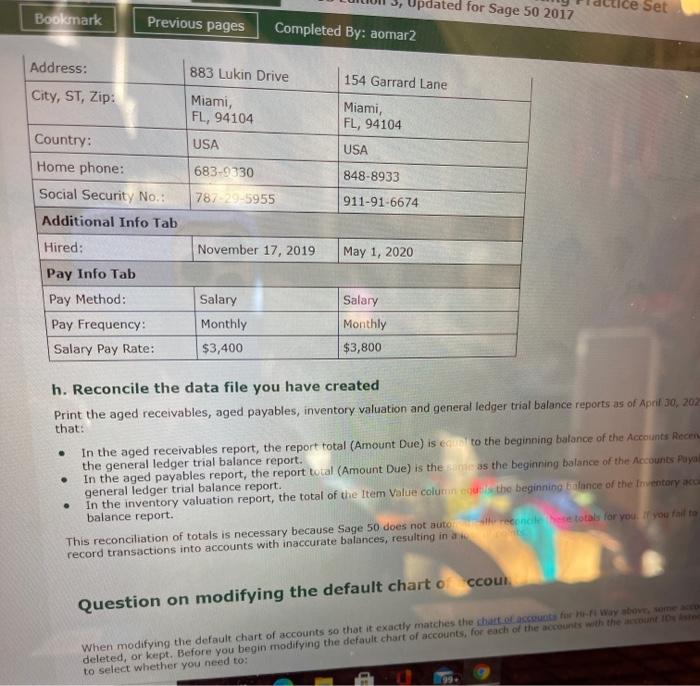
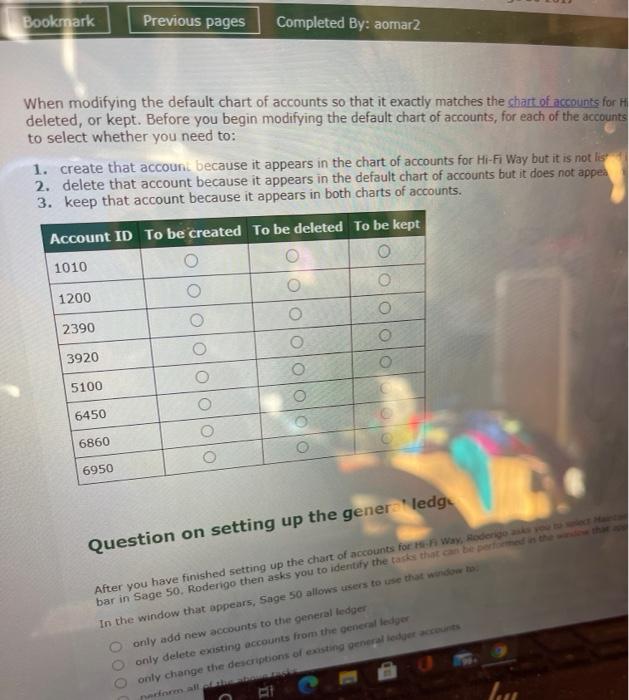
Bookmark Previous pages Completed By: abmarz esten co modifying the default chart of accounts When modifying deleted, or k to select wh 1 you Fault art of accounts so that it exactly matches the chart of accounts for H egin modifying the default chart of accounts, for each of the accounts create that account because it appears in the chart counts for Hi-Fi Way but it is not listed delete that account because it appears in the defauic chart of accounts but it does not appear in keep that account because it appears in both charts of accounts. Account ID To be created To be deleted To be kept 1010 1200 2390 3920 5100 6450 6860 6950 O 0 Question on setting up the general ledger After you have finished setting up the chart of accounts for Hi-Fi Way, Roderigo asks you to select Mainta bar in Sage 50. Rodengo then asks you to identify the tasks that can be performed in the window that ap In the window that appears, Sage 50 allows users to use that window to: Oonly add new accounts to the general ledger. lyi As of April 30, 2020 Account IDescription Type 1020 heckin Account Cash 1100 Accounts Receivable Accounts Receivable 1150 Allowance for Doubtful Account Accounts Receivable 1200 Inventory Inventory 1300 Office Supplies 1400 Prepaid Rent 1500 1900 2000 Property and Equipment Accum. Depreciation - Prop&Eqt Accounts Payabl Other Current Assets Other Current Assets Fixed Assets Accumulated Depreciation Accounts Payable 2310 Sales Tax Payable Other Current Liabilities 2330 Federal Payroll Taxes Payable Other Current Liabilities 2390 Interest Payable Other Current Liabilities 2500 Current Portion Long-Term Debt Other Current Liabilities 2600 Short Term Debt 2700 Long Term Debt-Noncurrent 3910 Retained Earnings 3930 Common Stock Other Current Liabilities Long Term Liabilities Equity-Retained Earnings Equity-doesn't close 4000 Sales Income Income 4100 Interest Income Income 4200 Finance Charge Income Income 4300 Other Income Income 4900 Sales Discounts Income 5000 Cost of Goods Sold Cost of Sales 6000 Salaries Expense Expenses 4100 Interest me Income 4200 Financ rge Income Income 4300 Other Income 4900 Sales Discounts Income 5000 Cost of Goods Sold Cost of Sales 6000 Salaries Expense Expenses 6100 Payroll Tax Expense Expenses 6150 Bad Debt Expense Expenses 6300 Rent Expense Expenses 6400 Utilities Expense Expenses 6450 Office Supplies Expense Enses 6500 Telephone Expense cxp 6800 Freight Expense Expenses 6850 Service Charge Expense Expenses 6860 6900 Interest Expense Expenses Purchase Disc-Expense Items Expenses 7050 Depreciation Expense Expenses c. Trial balance ~ April You are now asked to enter the beginning balances of general ledger accounts. Remember, the beginning balances of the current month same as the ending balances at the end of the previous month (April 2020). Therefore, we enter the inning balances into the month this: . From the Maintain Chart of Accounts window, click the Account Beginning Balances button. This wen the Select Period window. S 'From 4/1/20 through 4/30/20' as the chart of accounts beginning balance period and click the OK button in that window. It is w scroll down to select the correct month and year because you will not be able to change this once you have entered any transaction Note that this may not be the first April period in the list. Next, in the Chart of Accounts Beginning Balances window that appears, enter the balance of each recount inpropriate column, enter each number as positive or negative number as required. Then before clicking the OK button in the 'Chart of Accounts Beginning Balances' window, you sho that window to complete Roderigo's question below on entering general ledger beginning balance nd Bookmark Previous pages Completed By: aomar2 Tou are low asked to er the pinning balances or general ledger accounts. Kemember, the beginning paiarices or the current r same as the ending bes at the end of the previous month (April 2020). Therefore, we enter the beginning balances into the ra this: From the Mainta art of A counts window, click the Account Beginning Balances button. This will open the Select Period wire 'From 4/1/20 through 4/30/20' as the chart of accounts beginning balance period and click the OK button in that window. scroll down to select the correct month and year because you will not be able to change this once you have entered any tra Note that this may not be the first April period in the list. Next, in the Chart of Accounts Beginning Balances window that appears, enter the balance of each account in the appropriate c enter each number as positive or negative number as required. Then before clicking the OK button in the 'Chart of Accounts Beginning Balances' window, you should use the running totals dis that window to complete Roderigo's question below on entering general ledger beginning balances. Hi-Fi Way Trial Balance As of April 30, 2020 Account ID Account Description Lit Amt Credit Amt 1020 Checking Account 5,083 1100 Accounts Receivable 27,443 1150 Allowance for Doubtful Account 549 1200 Inventory 65,880 1300 Office Supplies 479 1400. Prepaid Rent 1500 Property and Equipment 38,000 1900 Accum. Depreciation - Prop&Eqt 12,729 2000 Accounts Payable 29,230 2310 Sales Tax Payable 16,411 2330 Federal Payroll Taxes Payable 040 2390 Interest Payable 2500 Current Portion Long-Term Debt 2600 Short Term Debt 2700 Long Term Debt-Noncurrent 45,000 Bookmark Previous pages Completed By: aomar2 3910 Retained Earning 80,513 3930 Comm Stock 45,000 4000 Sales me 125,143 4100 Interest income 4200 Finance Charge Income 4300 Other Income 4900 Sales Discounts 5000 Cost of Goods Sold 87,600 6000 Salaries Expense 15,915 6100 Payroll Tax Expense 2,228 6150 Bad Debt Expense 670 6300 Rent Expense 6400 Utilities Expense 3,795 6450 Office Supplies Expense 2,792 6500 Telephone Expense 3,828 6800 Freight Expense 6850 Service Charge Expense 35 6860 Interest Expense 6900 Purchase Disc-Expense Items 138 7050 Depreciation Expense 12,729 d. Vendors and purchases details Use the appropriate windows in the Vendors & Purchases Navigation Center to set up the follow change other information in those windows. Tab or Field Payment Terms Tab Standard Terms: Details Due in number of days d. Vendors and urchases details Use the opriate windows in the Vendors & Purchases Navigation Center to set up the following default information for Hi- change other information in those windows. Tab or Field Details Payment Terms Tab Standard Terms: Due in number of days Net due in: 30 days Discount in: 0 days Discount %: 0 Credit Limit: 100,000 Expense Account: 1200 (Inventory) Discount GL Account: 6900 (Purchase Disc-Expense Items) Roderigo Compton has decided not to crevendor records for all of his suppliers in Sage 50. Instead, he has asked you to set of the inventory suppliers only. Roderigo tells you that these suppliers allow the business to purchase items on account. Over the need to record transactions with these inventory suppliers as well as with other suppliers that Hi-Fi Way transacts with less ofter In the Vendors & Purchases Navigation Center, click the Vendors icon and select the New Vendor option to open the Maintain Verw that window to set up the three inventory suppliers to Hi-Fi Way as shown below: Tab or Field Vendor ID: Details BIG Name: Big Telco MOON PONY Moon Megasystems Pony General Tab Contact: Adriano Thomson Celia Lee. Beatrice Chamberlain Mailing Address: 310 Woodward Street 737 Beaurepaire Boulevard 639 Burns Land City, ST, Zip: Miami FL, 94104 Miami FL, 94104 Miami FL, 94104 Country: USA USA USA Expense Account: 1200 (Inventory) 1200 (Inventory) 1200 (Inventory General b Contact Adriano Thomson Celia Lee Beatrice Chamberlain Mailing Address: 310 Woodward Street 737 Beaurepaire Boulevard 639 Burns Lane City, ST, Zip: Miami FL, 94104 Miami FL, 94104 Country: USA USA Miami FL, 94104 USA Expense Account: 1200 (Inventory) Telephone 1: 991-8272 1200 (Inventory) 961-3113 1200 (Inventory) 219-8409 Purchase Info Tab Terms and Credit: Use default terms Use default terms Use default terms In the Maintain Vendors window, under the History tab, click the Vendor Beginning Balances button, to open the Vendor Begi use that window to enter the details of the outstanding purchases that have not been paid in full as of the first day of the com Vendor Invoice Number Date Amount Big Telco 453 April 26, 2020 $6,764 Moon Megasystems 135 April 11, 2020 $5,900 Pony 827 April 11, 2020 $16,566 Before continuing, verify that in the Vendor Beginning Balances window, the Beginning Accounts Payable Balance is the same the Accounts Payable account provided in the general ledger trial balance report. e. Customers and sales details Use the appropriate window in the Customers & Sales Navigation Center to set up the following default information for Hi-Fi Wa change other information in those windows.. Tab or Field Details Terms and Credit Tab Standard Terms: Net due in: Due in number of days. 30 days Discount in: 0 days Terms and Credit Tab Standard Terms: Net due in: Due in number of days 30 days Discount in: 0 days Discount %: Credit limit: GL Sales Account: Discount GL Account: Finance Charges Tab Charge finance charges: 0.00 100,000 4000 (Sales Income) 4900 (Sales Discounts) Do not check the boxes for finance charges. Leave the default details. ey are because Roderigo may want to apply finance charges to overdue invoices in the future. Next, use the Sales Taxes Setup wizard to set up a new sales tax for Hi-Fi Way using the following information: Window or Field Set Up New Sales Tax What is the total rate you will charge? Details 5% How many individual rates make up this total rate? 1 Add Sales Tax Agency Sales tax agency ID: Sales tax agency name: TAX Miami Division of Tax How are sales taxes calculated for this agency? By single rate Rate: Select an account to track sales taxes? Sales Tax Entered 5% 2310 (Sales Tax Payable) Sales tax ID: SALESTAX Select an account to tra sales taxes? Sales Tax Entered Sales tax ID Sales tax name: 2310 (Sales Tax Payable) SALESTAX Miami Sales Tax Do you charge taxes on freight? No *Of course, in reality, there is no such agency as the Miami Division of Tax. In the Customers & Sales Navigation Center, click the Customers icon and select the New Customer option to open the Maintain window. Then, use that window to set up the customers of Hi-Fi Way as listed below: Tab or Field Customer ID: Details HYPE JERR PIKE Name: Hypertronics Jerry Technology Pikea General Tab Billing address: 451 Perkins Avenue 362 Evans Road 91 Nicholson Avenue City, ST, Zip: Miami, FL, 94104 Miai, FL, 94104 Miami, FL, 94104 Country: USA USA USA Sales tax SALESTAX SALESTAX SALESTAX Telephone 1: 392-4541 936-4852 965-5213 Contacts Tab Contact name: Isabella Hall Audrey Richardson Silvia Ginzburg Sales Info Tab GL sales account: 4000 (Sales Income) 4000 (Sales Income) 4000 (Sales Income) Payment & Credit Tab: Terms & Credit: use default terms use default terms use default terms In the Maintain Customers/Prospects window, under the History tab, click the Customer Begin Palances buttonpen the Cust Balances window. Then, use that window the record the details of the outstanding sales have got been paid as of the firm month (May 1, 2020): north (May 1, 2020): Customer Invoice Number Date Amount Hypertronics 3012 April 22, 2020 $7,000 Jerry Technology Pikea 3010 3009 April 19, 2020 $9,428 April 15, 2020 $11,015 Before continuing, verify that in the Customer Beginning Balances window, the Beginning Accounts Receivable Balance the Accounts Receivable ledger account specified in the general ledger trial balance report. f. Inventory details Use the Maintain Inventory Items window to set up the inventory items of Hi-Fi Way: Tab or Field Item ID:: Description: Details BG90 BLUED MEPOD SWISH BG90 plasma televisions BlueBerry phones MePod Swish Phones multimedia players Item Class Stock item Stock item Stock item Stock item General Tab Price Level 1: $1,200 $1,000 $1,100 $1,400 Cost Method: Average Average Average Average GL Sales Acct: 4000 4000 4000 4000 (Sales Income) (Sales Income) (Sales Income) (Sales Income) GL Inventory Acct: 1200 (Inventory) 1200 (Inventory) 1200 (Inventory) 1200 (Inventory) GL Cost of Sales Acct: 5000 (COGS)* 5000 (COGS)* 5000 (COGS) 5000 (CO Item Tax Type: 1 1 1 1 Stocking U/M: eachi each each each Preferred BIG MOON PONY 10. Bookmak Stocking U/M: Previous pac Completed By: aomar2 each Preferred Vendor ID: BIG *COGS = (Cost of Goods Sold) each each each MOON PONY Down the bottom of the Maintain Inventory Items window, click the arrow icon next to Beginning Balances to op window. Then, enter the following information for each item of inventory. Field Item ID: Details BG90 BLUED MEPOD SWISH Quantity: 15 19 32 21 Unit Cost: $780 $650 $710 $910 Before continuing, verify that in the Inventory Beginning Balances window, the Total Beginning Balances amount Inventory account in the general ledger trial balance report. g. Payroll details The table below shows the information that you must enter into the Sage 50 Payroll Setup wizard. Do not change Window or Field Payroll Options Do It Yourself In-House Pay Types Salary- GL Account Number Details Sage 50 should automatically choose this option for you and skip to the next screen in the Payroll Setup wizard. 6000 (Salaries Expense) From the File menu in Sage 50, click Payroll Formulas and select 'User-Maintained... to open incontha payroll formula manually: Window or Field User-Maintained Payroll Formulas Details Formula ID: FIT Use Maintained Payroll ormulas Formula ID: Name: How do you classify this formula? Tax agency: FIT FIT 20 Tax Federal Effect on gross pay: Filling status: Formula: Subtracts from gross All ANSWER ADJUSTED GROSS 0.15 Next, use the Employee Defaults window to set up the Hi-Fi Way's employee defaults as shown below: Tab or Field Details Employee Fields Tab Calc column Formula for Fed Income Under the Calc column, remove all check marks except for the Fed-Income field. Under the Formula column, confirm that the formula for the Fed Income field is 'FIT'. Company Fields Tab Calc column Under the Calc column, remove all check marks from all company fields. The details of paid employees are shown below. Use the 'Maintain Employees & Sales Reps' window to record information Note that you, the student, are actually the accountant of Hi-Fi Way and must be set up to be paid your salary at the end your own personal name when instructed to do so below. Tab or Field Employee ID: Details DAVI Sebastian Davisson Enter the first four digits of your surname in uppercase Insert your full name Name: General Tab Address: City, ST, Zip: 883 Lukin Drive Miami, FL, 94104 154 Garrard Lane Miami, FL, 94104 ce Set ated for Sage 50 2017 Bookmark Address: City, ST, Zip: Previous pages Completed By: aomar2 883 Lukin Drive Miami, FL, 94104 Country: USA Home phone: 683-9330 Social Security No.: 787-29-5955 154 Garrard Lane Miami, FL, 94104 USA 848-8933 911-91-6674 Additional Info Tab November 17, 2019 May 1, 2020 Hired: Pay Info Tab Pay Method: Salary Pay Frequency: Monthly Salary Pay Rate: $3,400 Salary Monthly $3,800 h. Reconcile the data file you have created Print the aged receivables, aged payables, inventory valuation and general ledger trial balance reports as of April 30, 202 that: In the aged receivables report, the report total (Amount Due) is equal to the beginning balance of the Accounts Recen the general ledger trial balance report. In the aged payables report, the report total (Amount Due) is the sanic as the beginning balance of the Accounts Payal general ledger trial balance report. In the inventory valuation report, the total of the Item Value column couls the beginning balance of the Inventory acca balance report. This reconciliation of totals is necessary because Sage 50 does not autor reconcile these totals for you. If you fail to record transactions into accounts with inaccurate balances, resulting in a Question on modifying the default chart of accou When modifying the default chart of accounts so that it exactly matches the chart of accounts for Hi-Fi Way above, some acco deleted, or kept. Before you begin modifying the default chart of accounts, for each of the accounts with the account IDs sted to select whether you need to: Bookmark Previous pages Completed By: aomar2 When modifying the default chart of accounts so that it exactly matches the chart of accounts for H deleted, or kept. Before you begin modifying the default chart of accounts, for each of the accounts to select whether you need to: 1. create that account because it appears in the chart of accounts for Hi-Fi Way but it is not lis 2. delete that account because it appears in the default chart of accounts but it does not appea 3. keep that account because it appears in both charts of accounts. Account ID To be created To be deleted To be kept 1010 1200 2390 3920 5100 6450 6860 6950 000 Question on setting up the generaledge After you have finished setting up the chart of accounts for Hi-Fi Way, Roderigo asks bar in Sage 50, Roderigo then asks you to identify the tasks that can be performed in the window that In the window that appears, Sage 50 allows users to use that window to to select Mainta only add new accounts to the general ledger only delete existing accounts from the general ledger only change the descriptions of existing general ledger accounts perform all of the above tasks
Step by Step Solution
There are 3 Steps involved in it
To modify the default chart of accounts for HiFi Way here is a more detailed approach based on the provided rejection reason and images Account Modifi... View full answer

Get step-by-step solutions from verified subject matter experts
 Study Help