







Question: Brewbeans has a BB_PRODUCT_REQUEST table where requests to refill stock levels are inserted automatically via a trigger. After the stock level falls below the reorder
Brewbeans has a BB_PRODUCT_REQUEST table where requests to refill stock levels are inserted automatically via a trigger. After the stock level falls below the reorder level, this trigger fires and enters a request in the table. This procedure works great; however, when store clerks record that the product request has been filled by updating the table's DTRECD and COST columns, they want the stock level in the product table to be updated. Create a trigger named BB_REQFILL_TRG to handle this task, using the following steps as a guideline:
In SQL Developer, run the following INSERT statement to create a product request you can use in this exercise:
INSERT INTO bb_product_request(idRequest, idProduct, dtequest, qty) VALUES (3, 5, sysdate, 45); COMMIT;
Create the trigger (BB_REQFILL_TRG) so that it fires when a received date is entered in the BB_PRODUCT_REQUEST table. This trigger needs to modify the STOCK column in the BB_PRODUCT table to reflect the increased inventory.
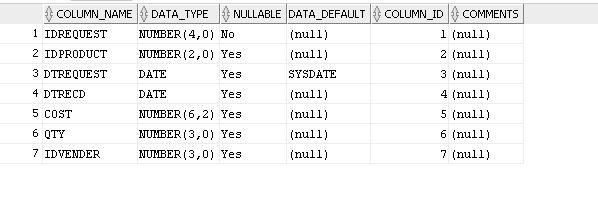
BB_PRODUCT_REQUEST table
BB_PRODUCT

COLUMN NAME | DATA TYPE- NULLABLE?DATA DEFAULT |35 COLUMN IDI COMMENTS UNBER (4,0) No IDREQUEST 2 ID PRODUCT 3 DTREQUEST 4 DTRECI 5 COST 6 QTY 7 IDWENDER NUMBER (2,0) Yes DATE DATE NUMBER (6,2) Yes NUMBER (3,0) Yes NUMBER (3,0) Yes inull) (null) SYSDATE (null) (null) (null) (null) 1 (null) 2 (null) 3 (null) 4 (null) 5 (null) 6 (null) 7 (null) Yes Yes
Step by Step Solution
There are 3 Steps involved in it

Get step-by-step solutions from verified subject matter experts
 Study Help