







Question: .btn{border:1px solid black; padding:5px;display:inline-block} Sum of primes Click the button to determine sum of the prime numbers between number X and number Y (inclusive). Number
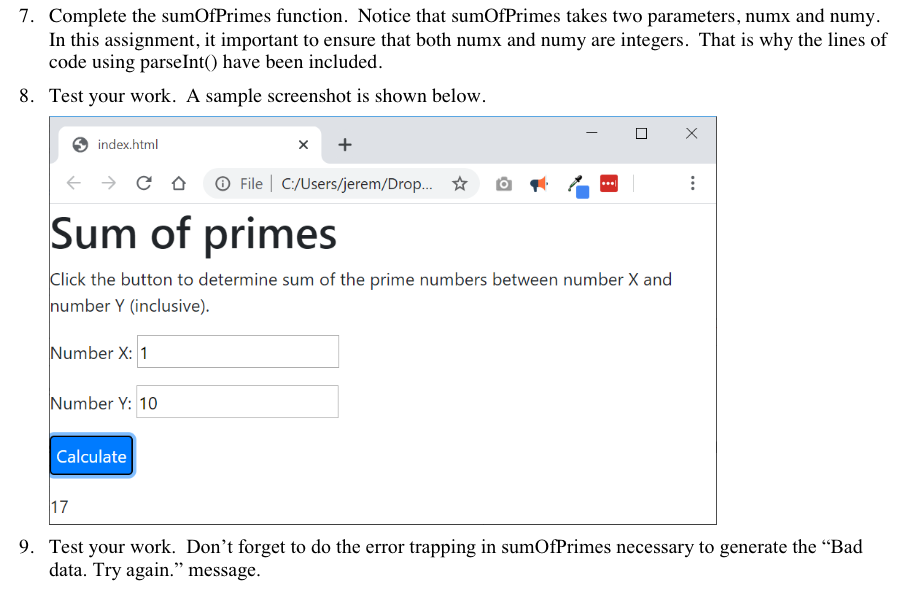
Sum of primes
Click the button to determine sum of the prime numbers between number X and number Y (inclusive).
Number X:
Number Y:
//
// Write a program that computes the sum of the prime numbers bewteen two inputs, X and Y.
//
// What's a prime number?
// In mathematics, a prime number is any number that has exactly two positve divisors: 1 and itself.
//
// For example, 7 is prime.
// 7 / 1 = 7
// 7 / 2 = 3.5 (not a divisor)
// 7 / 3 = 2.333... (not a divisor)
// 7 / 4 = 1.75 (not a divisor)
// 7 / 5 = 1.4 (not a divisor)
// 7 / 6 = 1.1666... (not a divisor)
// 7 / 7 = 1
//
// 7 has only two divisors: 1 and 7.
//
//
// If a user provides any input that is not a natural number, then the function should
// return the error message: "Bad data. Try again."
//
/////////////////////////////////////////////////////////////////////////////////
// Supporting Functions start here //
/////////////////////////////////////////////////////////////////////////////////
function Isnaturalnumber (x){
if(!isNaN(x) && x > 0 && x==parseInt(x) ) {
return true;
} else {
return false;
}
}
/////////////////////////////////////////////////////////////////////////////////
// Supporting Functions end here //
/////////////////////////////////////////////////////////////////////////////////
function isPrime(x){
/////////////////////////////////////////////////////////////////////////////////
// Insert your code between here and the next comment block. Do not alter //
// any code in any other part of this file. //
/////////////////////////////////////////////////////////////////////////////////
if (x==1){
return false;
}
for (var i = 2; i
if(x%i == 0){
return false;
}
}
return true;
/////////////////////////////////////////////////////////////////////////////////
// Insert your code between here and the previous comment block. Do not alter //
// any code in any other part of this file. //
/////////////////////////////////////////////////////////////////////////////////
}
function sumOfPrimes(numx,numy){
/////////////////////////////////////////////////////////////////////////////////
// Insert your code between here and the next comment block. Do not alter //
// any code in any other part of this file. //
/////////////////////////////////////////////////////////////////////////////////
var result = 0; //here result is a number.
numx = parseInt(numx);
numy = parseInt(numy);
/////////////////////////////////////////////////////////////////////////////////
// Insert your code between here and the previous comment block. Do not alter //
// any code in any other part of this file. //
/////////////////////////////////////////////////////////////////////////////////
}
$('#btn_1').click(function(){
var numx = $('#textEntered1').val();
var numy = $('#textEntered2').val();
var message = sumOfPrimes(numx, numy);
$('#textDisplayed1').html(message);
})
7. Complete the sumOfPrimes function. Notice that sumOfPrimes takes two parameters, numx and numy. In this assignment, it important to ensure that both numx and numy are integers. That is why the lines of code using parseInt() have been included. 8. Test your work. A sample screenshot is shown below. index.html X +
Step by Step Solution
There are 3 Steps involved in it

Get step-by-step solutions from verified subject matter experts
 Study Help