







Question: Build a Java GUI program to manage a email mailing list, using the MVC design pattern.The application will allow a user to add add or
Build a Java GUI program to manage a email mailing list, using the MVC design pattern.The application will allow a user to add add or remove an email address from the mailing list. The program will handle an empty input, will not allow duplicates, and doesnt allow removing an email thats not on the list. The program doesnt otherwise check whether a user input represents a valid email address.
I need to complete the ADDs comment sections in the following:
- The MailingListView class: ADD #1 ~ 6
- The MailingListController class: ADD #1 ~ 2
The four Java files and data file can be found in my shared google drive folder: https://drive.google.com/open?id=1ZIpy4xopDYYdvP7nt_U1w9RAMAItd0TC
The following screenshots show the typical behaviors of the program:
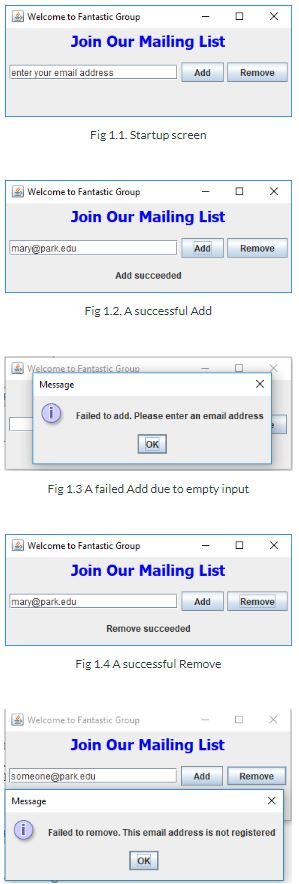
X Welcome to Fantastic Group - Join Our Mailing List enter your email address Add Remove Fig 1.1. Startup screen Welcome to Fantastic Group - OX Join Our Mailing List mary@park.edu Add Remove Add succeeded Fig 1.2. A successful Add Welcome to Fantastic Grue Message Failed to add. Please enter an email address [ok] Fig 1.3 A failed Add due to empty input O X Welcome to Fantastic Group - Join Our Mailing List mary@park.edu Add Remove Remove succeeded Fig 1.4 A successful Remove Welcome to Fantastic Group Join Our Mailing List someone@park.edu Add Remove Message Failed to remove. This email address is not registered OK X Welcome to Fantastic Group - Join Our Mailing List enter your email address Add Remove Fig 1.1. Startup screen Welcome to Fantastic Group - OX Join Our Mailing List mary@park.edu Add Remove Add succeeded Fig 1.2. A successful Add Welcome to Fantastic Grue Message Failed to add. Please enter an email address [ok] Fig 1.3 A failed Add due to empty input O X Welcome to Fantastic Group - Join Our Mailing List mary@park.edu Add Remove Remove succeeded Fig 1.4 A successful Remove Welcome to Fantastic Group Join Our Mailing List someone@park.edu Add Remove Message Failed to remove. This email address is not registered OK
Step by Step Solution
There are 3 Steps involved in it

Get step-by-step solutions from verified subject matter experts
 Study Help