







Question: Building functions in python . Lab Week 5 Functions Skills Needed to complete this Lab Create functions . Invoke functions iterate over strings . All
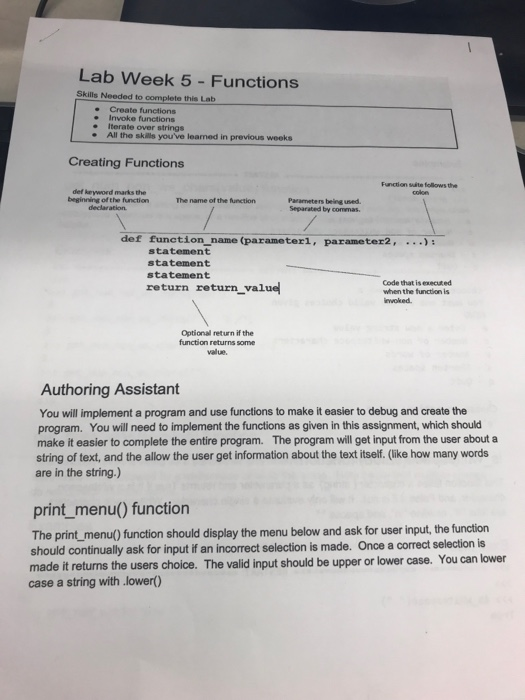


Lab Week 5 Functions Skills Needed to complete this Lab Create functions . Invoke functions iterate over strings . All the skills you've leamed in previous weeks Creating Functions Function suite follows the def keyword marks the beginning of the function declaration The name of the function Parameters being used. Separated by commas def function name (parameterl, parameter2, .. statement statement statement return return_value Code that is exec ed when the functlion is iwoked. Optional return if the function returns some value. Authoring Assistant You will implement a program and use functions to make it easier to debug and create the program. You will need to implement the functions as given in this assignment, which should make it easier to complete the entire program. The program will get input from the user about a string of text, and the allow the user get information about the text itself. (like how many words are in the string.) print_menu() function The print_menu) function should display the menu below and ask for user input, the function should continually ask for input if an incorrect selection is made. Once a correct selection is made it returns the users choice. The valid input should be upper or lower case. You can lower case a string with lower MENU e- Enter a new string value c-Number of non-whitespace characters w- Number of words s Shorten spaces q Quit Choose an option: = Examples >>> print_menu() MENU e Enter a new string value c Number of non-whitespace characters W Number of words s Shorten spaces q-Quit Choose an option: z You must one of the valid choices given MENU e Enter a new string value c Number of non-whitespace characters w Number of words s Shorten spaces q Quit Choose an option: e is_whitespace(value) function This function takes a character( string) as a parameter and returns True if it is a whitespace character, and False it if is not. It will only evaluate a single character. Whitespace characters are tabs "r, newline "In", and spaces Examples >> is_whitespace( True >>> is_whitespace("In") True >>> is whitespace("t") True is_whitespace("a") False >>> is_whitespace("Inn") False get_num_non_ws_chars(value) function This function takes a string as the parameter and returns the number of non_ws_characters. A whitespace character is a space, or a newline In or a tab It. The previous function may be helpful. Examples >>> get_num_non_ws_chars("abc") >>> get_num_non_ws_chars(" a b c") >>> get_num_non_ws_chars(" a blnlt c") >> get_num_non_ws_chars("" get_num_words/value) function s function takes a string as a parameter and returns the number of words in the string. A word ends if it is followed by a whitespace or ends the string. Note below that multiple spaces do not denote multiple words. Thi Examples >>> get_num_words() >get num words("one ") >>> get_num words("one") >> get num_words("my list" get.num words ('my list.") get num words("my listln") shorten_space(value) function This function then the result will only have a single space. Examples takes a string parameter and returns a string. The result returned is the original sting with extra whitespaces removed. If there are 2 mororetspaces between words. >> shorten_space("a new program") a new program >> shorten_space(" one two" ' one two Lock ps hift Finishing the program. Now write a program that runs untl they choose quit from the menu option. It will do the functions for each of the menu items. Ctrl respond and Example Enter the initial string to evaluate ..> now is the time! MENU e Enter a new string value c Number of non-whitespace characters w Number of words s Shorten spaces q Quit Pause Prtscn F12 Choose an option: The number of non whitespace characters is 13 MENU e Enter a new string value c Number of non-whitespace characters w Number of words s Shorten spaces q-Quit Choose an option: W The number of words is 4 MENU e Enter a new string value c Number of non-whitespace characters w Number of words s Shorten spaces q Quit Choose an option: The new string is now is the time! MENU e Enter a new string value c Number of non-whitespace characters W Number of words s Shorten spaces q - Quit Choose an option:>e Enter a new string to evaluate > program done MENU e Enter a new string value c Number of non-whitespace characters W -Number of words s Shorten spaces q- Quit Choose an option: w The number of words is 2
Step by Step Solution
There are 3 Steps involved in it

Get step-by-step solutions from verified subject matter experts
 Study Help