







Question: Building HTML with PHP (HTML code provided below) HTML code: Lab 6 Login Email address Enter an email Password Email and password not found Server
Building HTML with PHP (HTML code provided below)
HTML code:
Login
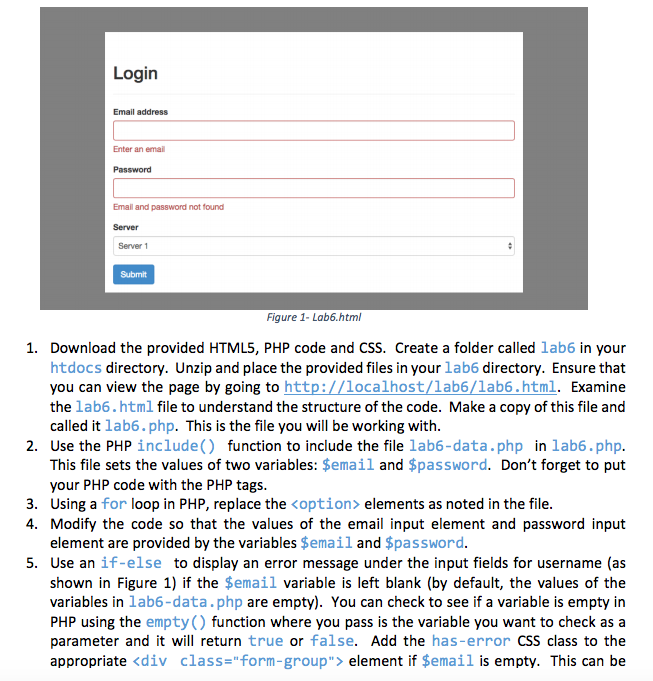
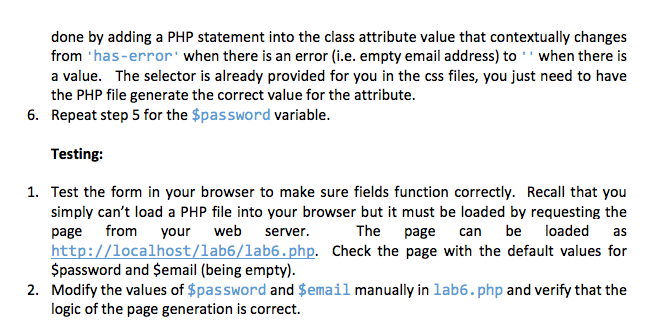
Login Email address Enter an email Password Email and password not found Server 1 Figure 1- Lab6.html 1. Download the provided HTML5, PHP code and CSS. Create a folder called lab6 in your htdocs directory. Unzip and place the provided files in your lab6 directory. Ensure that you can view the page by going to htt Examine the lab6.html file to understand the structure of the code. Make a copy of this file and called it lab6.php. This is the file you will be working with 2. Use the PHP include() function to include the file lab6-data.php in lab6.php. This file sets the values of two variables $email and $password. Don't forget to put your PHP code with the PHP tags. 3. Using a for loop in PHP, replace the koption elements as noted in the file 4. Modify the code so that the values of the email input element and password input element are provided by the variables $email and $password. 5. Use an if-else to display an error message under the input fields for username (as shown in Figure 1) if the $email variable is left blank (by default, the values of the variables in lab6-data.php are empty). You can check to see if a variable is empty in PHP using the empty() function where you pass is the variable you want to check as a parameter and it will return true or false. Add the has-error CSS class to the appropriate
Step by Step Solution
There are 3 Steps involved in it

Get step-by-step solutions from verified subject matter experts
 Study Help