


Question: Chapter 8 Login Email address Enter an email Password Email and password not found Server Server 1 Server 2 Server 3 Server 4 Server 5
 Chapter 8 Login Email address Enter an email Password Email and

Chapter 8

Login

Enter an email

Email and password not found

This is the code . Please Help

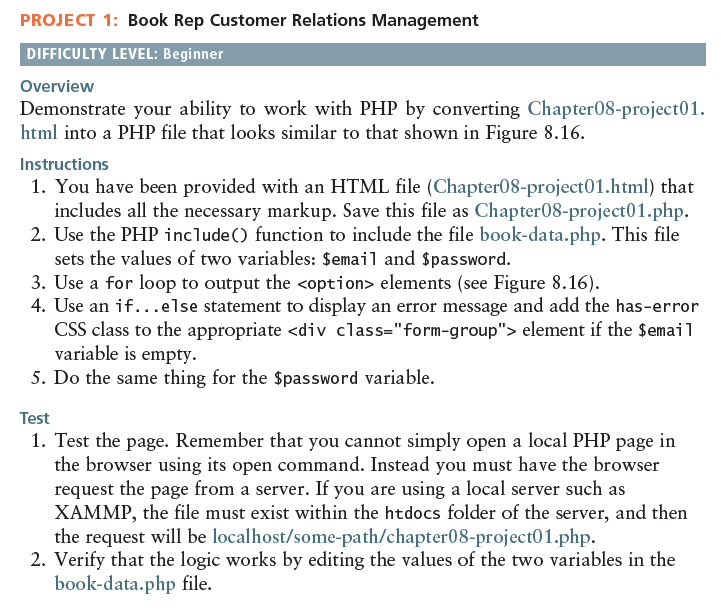
PROJECT 1: Book Rep Customer Relations Management DIFFICULTY LEVEL: Beginner Overview Demonstrate your ability to work with PHP by converting Chapter08-project01. html into a PHP file that looks similar to that shown in Figure 8.16. Instructions 1. You have been provided with an HTML file (Chapter08-project 01.html) that includes all the necessary markup. Save this file as Chapter08-project01.php 2. Use the PHP include C) function to include the file book-data.php. This file sets the values of two variables: $email and $password. 3. Use a for loop to output the

element if the $email variable is empty 5. Do the same thing for the Spassword variable Test 1. Test the page. Remember that you cannot simply open a local PHP page in the browser using its open command. Instead you must have the browser request the page from a server. If you are using a local server such as XAMMP, the file must exist within the htdocs folder of the server, and then the request will be localhost/some-path/chapter08-project01.php. 2. Verify that the logic works by editing the values of the two variables in the book-data.php file. PROJECT 1: Book Rep Customer Relations Management DIFFICULTY LEVEL: Beginner Overview Demonstrate your ability to work with PHP by converting Chapter08-project01. html into a PHP file that looks similar to that shown in Figure 8.16. Instructions 1. You have been provided with an HTML file (Chapter08-project 01.html) that includes all the necessary markup. Save this file as Chapter08-project01.php 2. Use the PHP include C) function to include the file book-data.php. This file sets the values of two variables: $email and $password. 3. Use a for loop to output the

Step by Step Solution

There are 3 Steps involved in it

1 Expert Approved Answer
Step: 1 Unlock blur-text-image

Question Has Been Solved by an Expert!

Get step-by-step solutions from verified subject matter experts

Step: 2 Unlock
Step: 3 Unlock

Students Have Also Explored These Related Databases Questions!