







Question: BUSA 245: Lab 4 - Evaluating Mobile Security Software Smartphones are now getting hacked, infected with malware and lost or stolen. It may be time
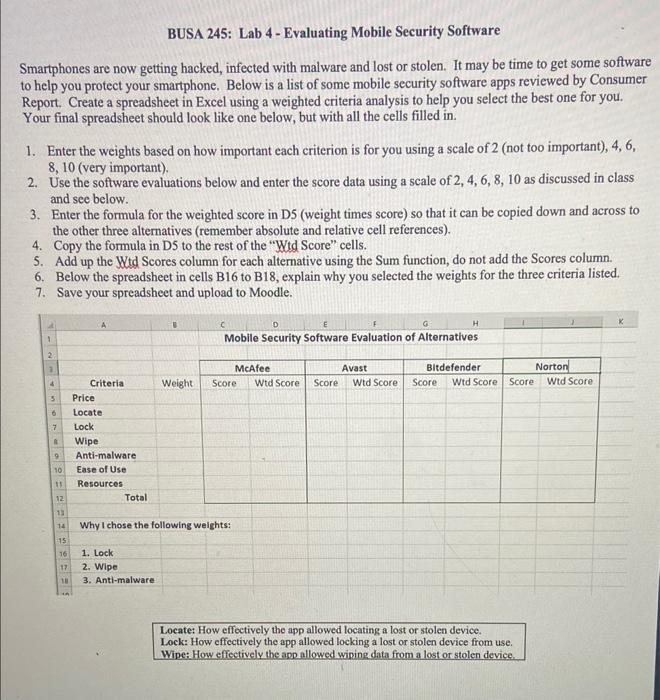
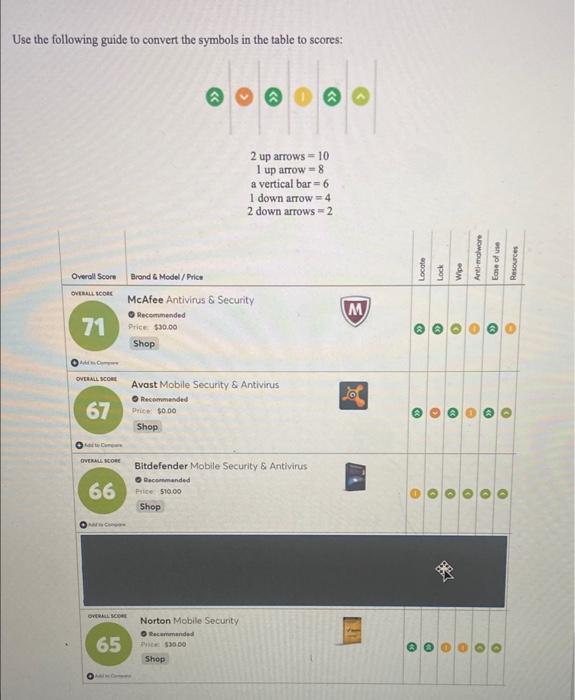
BUSA 245: Lab 4 - Evaluating Mobile Security Software Smartphones are now getting hacked, infected with malware and lost or stolen. It may be time to get some software to help you protect your smartphone. Below is a list of some mobile security software apps reviewed by Consumer Report. Create a spreadsheet in Excel using a weighted criteria analysis to help you select the best one for you. Your final spreadsheet should look like one below, but with all the cells filled in. 1. Enter the weights based on how important each criterion is for you using a scale of 2 (not too important), 4,6 , 8,10 (very important). 2. Use the software evaluations below and enter the score data using a scale of 2,4,6,8,10 as discussed in class and see below. 3. Enter the formula for the weighted score in D5 (weight times score) so that it can be copied down and across to the other three alternatives (remember absolute and relative cell references). 4. Copy the formula in D5 to the rest of the "Wtd Score" cells. 5. Add up the Witd Scores column for each alternative using the Sum function, do not add the Scores column. 6. Below the spreadsheet in cells B16 to B18, explain why you selected the weights for the three criteria listed. 7. Save your spreadsheet and upload to Moodle. Why I chose the following weights: 1. Lock 2. Wipe 3. Anti-malware Locate: How effectively the app allowed locating a lost or stolen device. Lock: How effectively the app allowed locking a lost or stolen device from use. Wipe: How effectively the app allowed wiping data from a lost or stolen device. Use the following guide to convert the symbols in the table to scores: 2uparrows=101uparrow=8averticalbar=61downarrow=42downarrows=2
Step by Step Solution
There are 3 Steps involved in it

Get step-by-step solutions from verified subject matter experts
 Study Help