







Question: Business case example This is an example request from a business user. Please checks provided information and make an analysis based on the input from
Business case example
This is an example request from a business user.
Please checks provided information and make an analysis based on the input from user, provided screenshot and table.
Answer following questions:
- Why shipper data cannot be amended
- Why Routing details of the shipment cannot be amended
==================================================================================
Requested_by_Name: Eric C
Company: AUKN
Branch: AUPER
Department: AI
Ticket_Category: Incident
Affected_Module: FA Import
Application_Area: Airfreight
Issue_Description:
Hello team,
Please check shipment 1122334455.
We were able to modify the business solution on this shipment, but shipper data and routing details are protected. Can you please check why?
Regards,
Eric
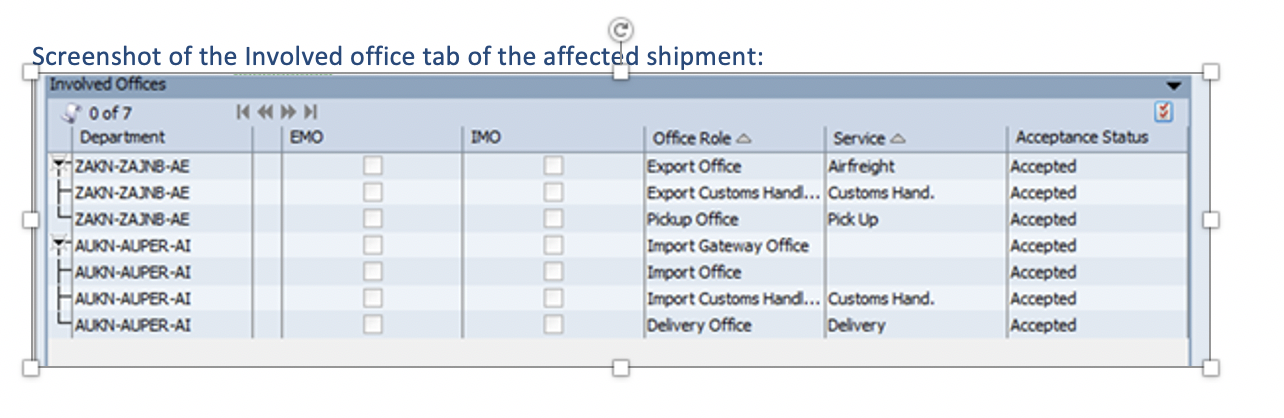
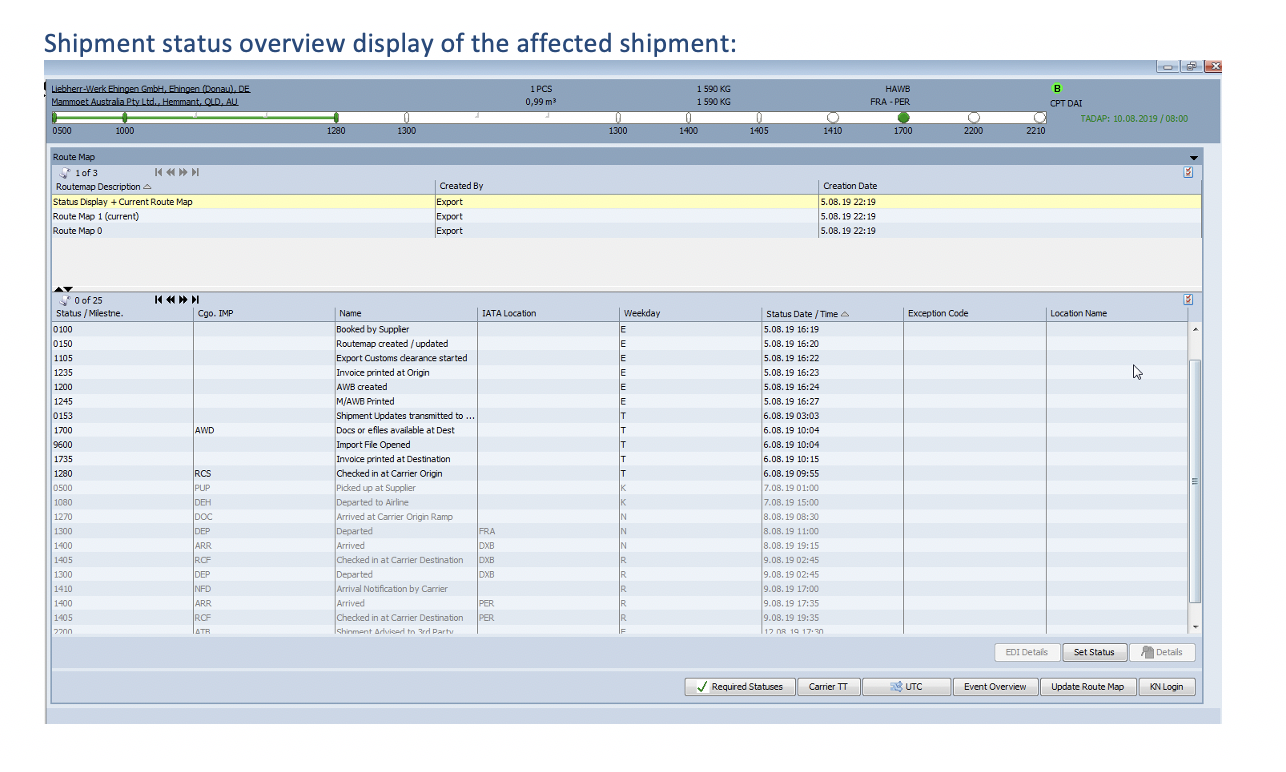
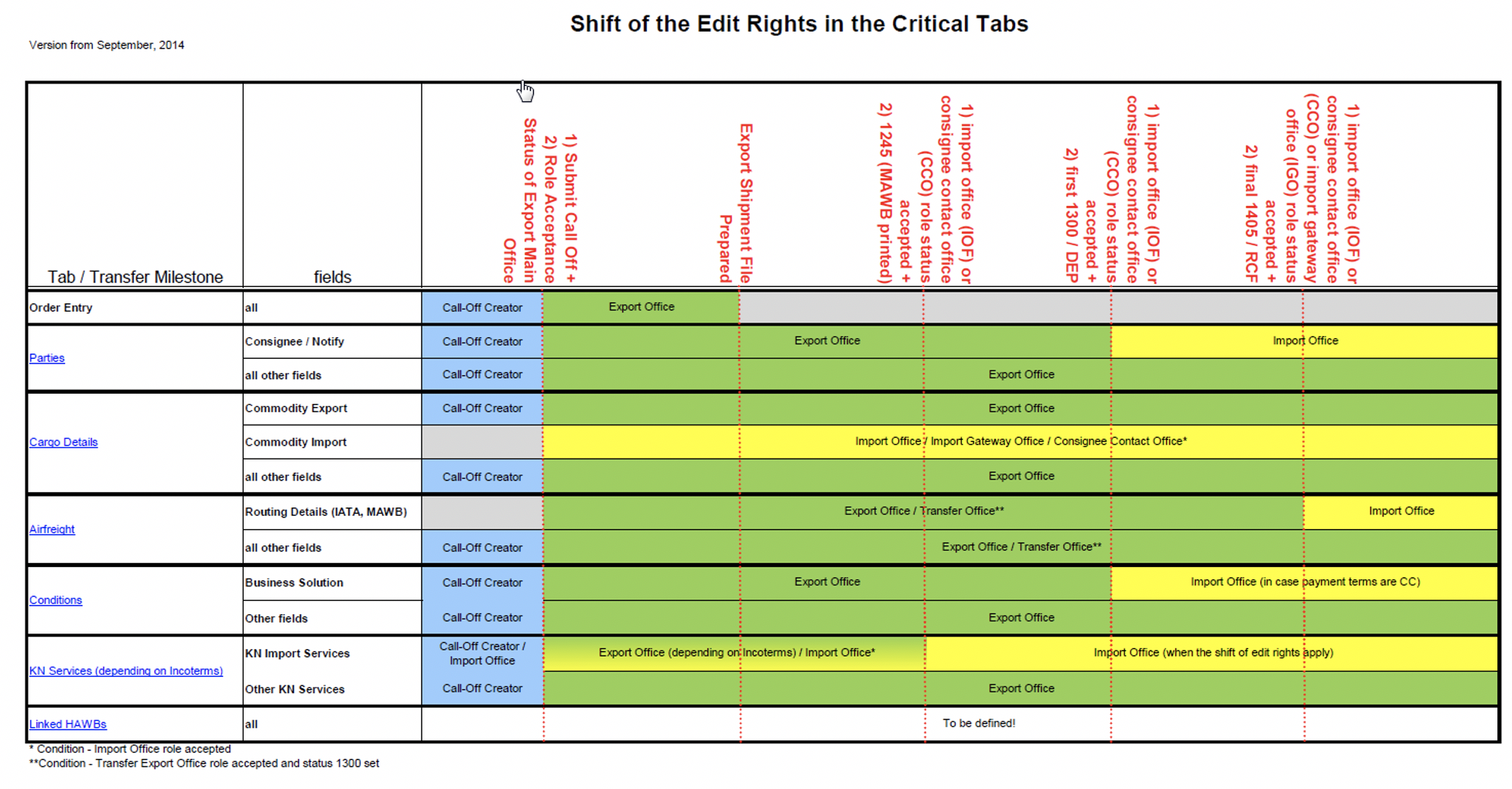
Screenshot of the Involved office tab of the affected shipment: Involved Offices O of 7 K >>> Department EMO IMO Office Role A Service Y ZAKN-ZAINB-AE Export Office Airfreight ZAKN-ZAJNB-AE Export Customs Hand... Customs Hand. ZAKN-ZAN-AE Pidoup Office Pick Up Y AUKN-AUPER-AI Import Gateway Office AUKN-AUPER-AI Import Office AUKN-AUPER-AI Import Customs Hand... Customs Hand. AUKN-AUPER-AI Delivery Office Delivery DDDDDDD HONDADE Acceptance Status Accepted Accepted Accepted Accepted Accepted Accepted Accepted Shipment status overview display of the affected shipment: Tolx Liebherr-Werk Ehingen GmbH. Ehingen (Donau). DE Mammoet Australia Pty Ltd.. Hemmant. QLD, AU 1 PCS 0,99 m 1 590 KG 1 590 KG HAWB FRA - PER B CPT DAI TADAP: 10.08.2019/08:00 2210 O 2200 0500 0 1410 1000 1280 1300 1300 1400 1405 1700 1 Route Map 1 of 3 KI Routemap Description A Status Display + Current Route Map Route Map 1(current) Route Map 0 Created By Export Export Export Creation Date 5.08.19 22:19 5.08.19 22:19 5.08.19 22:19 E KI Cgo. IMP Weekday Exception Code Location Name E E E E E E E E T T IT AWD 0 of 25 Status Milestne. 0100 0150 1105 1235 1200 1245 0153 1700 9600 1735 1280 0500 1080 1270 1300 1400 1405 1300 1410 1400 1405 Name IATA Location Booked by Supplier Routemap created / updated Export Customs dearance started Invoice printed at Origin AWB created M/AWB Printed Shipment Updates transmitted to ... Docs or efiles available at Dest Import Fie Opened Invoice printed at Destination Checked in at Carrier Origin Picked up at Supplier Departed to Airline Arrived at Carrier Origin Ramp Departed FRA Arrived DXB checked in at Carrier Destination DXB Departed DXB Arrival Notification by Carrier Arrived PER Checked in at Carrier Destination PER Ishinment advical trd Part Status Date/Time 5.08.19 16:19 5.08.19 16:20 5.08.19 16:22 5.08.19 16:23 5.08.19 16:24 5.08.19 16:27 6.08.19 03:03 6.08.19 10:04 6.08.19 10:04 6.08.19 10:15 6.08.19 09:55 7.08.19 01:00 7.08.19 15:00 8.08.19 08:30 8.08.19 11:00 8.08.19 19:15 9.08.19 02:45 9.08.19 02:45 9.08.19 17:00 9.08.19 17:35 9.08.19 19:35 112 R 19 17.30 IK RCS PUP DEH DOC DEP ARR |ROF DEP NFD ARR IROS IK IN IN IN IR IR R IR IR ATR EDI Details Set Status Details Required Statuses Carrier TT UTC Event Overview Update Route Map KN Login Shift of the Edit Rights in the Critical Tabs Version from September, 2014 Status of Export Main 2) Role Acceptance 1) Submit Call Off + Office Export Shipment File Prepared 2) 1245 (MAWB printed) consignee contact office (CCO) role status 1) import office (IOF) or accepted + 2) first 1300 / DEP|| consignee contact office (CCO) role status 1) import office (IOF) or accepted + 2) final 1405 / RCF| office (IGO) role status (CCO) or import gateway consignee contact office 1) import office (IOF) or accepted + Tab/ Transfer Milestone fields Order Entry all Call-Off Creator Export Office Consignee / Notify Call-Off Creator Export Office Import Office Parties all other fields Call-Off Creator Export Office Commodity Export Call-Off Creator Export Office Cargo Details Commodity Import Import Office / Import Gateway Office / Consignee Contact Office* all other fields Call-Off Creator Export Office Routing Details (IATA, MAWB) Export Office / Transfer Office** Import Office Airfreight all other fields Call-Off Creator Export Office / Transfer Office** Business Solution Call-Off Creator Export Office Import Office (in case payment terms are CC) Conditions Other fields Call-Off Creator Export Office KN Import Services Call-Off Creator / Import Office Export Office (depending on: Incoterms) / Import Office Import Office (when the shift of edit rights apply) KN Services (depending on Incoterms) Other KN Services Call-Off Creator Export Office Linked HAWBS all To be defined! *Condition - Import Office role accepted **Condition - Transfer Export Office role accepted and status 1300 set
Step by Step Solution
There are 3 Steps involved in it

Get step-by-step solutions from verified subject matter experts
 Study Help