







Question: By using MATLAB solve this Note on Image Processing Toolbox, There are not enough seats in the license for the Image Processing Toolbox to accommodate
By using MATLAB solve this
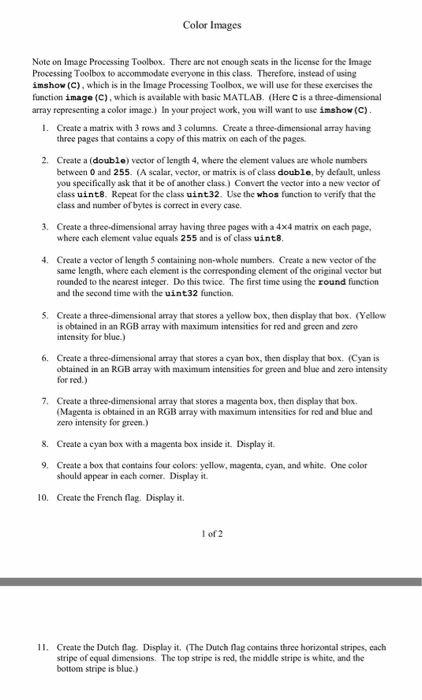
Note on Image Processing Toolbox, There are not enough seats in the license for the Image Processing Toolbox to accommodate everyone in this class. Therefore, instead of using imshow (C). which is in the linage Processing Toolbox, we will use for these exercises the function image (C). which is available with basic MATLAB. (Here C is a three-dimensional array representing a color image.) In your project work. you will want to use imshow (C). Create a matrix with 3 rows and 3 columns. Create a three-dimensional array having three pages that contains a copy of this matrix on each of the pages. Create a double) sector of length 4, where the element values are whole numbers between 0 and 255 (A scalar, vector, or matrix is of class double, by default, unless you specifically ask that it be of another class.) Convert the vector into a new vector of class unit8 Repeat for the class unit32 Use the whos function to verify that the class and number of bytes is correct in every case. Create a three-dimensional array have in three pages w it a 4 times 4 matrix on each page, where each element value equals 255 and is of class unit8. Create a vector of length 5 containing non-whole numbers. Create a new vector of the same length, where each element is the corresponding element of the original vector but rounded to the nearest integer. Do this twice. The first time using the round function and the second tune w it the unit32 function. Create a three-dimensional array that stores a yellow box. then display that box (Yellow is obtained in an RGB array with maximum intensities for red and green and zero intensity for blue.) Create a three-dimensional array that stores a cyan box, then display that box. (Cyan is obtained in an RGB array with maximum intensities for green and blue and zero intensity for red.) Create a three-dimensional array that stores a magenta box. then display that box. (Magenta is obtained in an RGB array with maximum intensities for red and blue and zero intensity for green.) Create a cyan box with a magenta box inside it. Display it. Create a box that contains four colors: yellow, magenta, cyan, and white. One color should appear in each corner. Display it. Create the French flag Display it. Create the Dutch flag. Display it. (The Dutch flag contains three horizontal stripes, each stripe of equal dimensions The top stripe is red. the middle stripe is white, and the bottom stripe is blue.) Note on Image Processing Toolbox, There are not enough seats in the license for the Image Processing Toolbox to accommodate everyone in this class. Therefore, instead of using imshow (C). which is in the linage Processing Toolbox, we will use for these exercises the function image (C). which is available with basic MATLAB. (Here C is a three-dimensional array representing a color image.) In your project work. you will want to use imshow (C). Create a matrix with 3 rows and 3 columns. Create a three-dimensional array having three pages that contains a copy of this matrix on each of the pages. Create a double) sector of length 4, where the element values are whole numbers between 0 and 255 (A scalar, vector, or matrix is of class double, by default, unless you specifically ask that it be of another class.) Convert the vector into a new vector of class unit8 Repeat for the class unit32 Use the whos function to verify that the class and number of bytes is correct in every case. Create a three-dimensional array have in three pages w it a 4 times 4 matrix on each page, where each element value equals 255 and is of class unit8. Create a vector of length 5 containing non-whole numbers. Create a new vector of the same length, where each element is the corresponding element of the original vector but rounded to the nearest integer. Do this twice. The first time using the round function and the second tune w it the unit32 function. Create a three-dimensional array that stores a yellow box. then display that box (Yellow is obtained in an RGB array with maximum intensities for red and green and zero intensity for blue.) Create a three-dimensional array that stores a cyan box, then display that box. (Cyan is obtained in an RGB array with maximum intensities for green and blue and zero intensity for red.) Create a three-dimensional array that stores a magenta box. then display that box. (Magenta is obtained in an RGB array with maximum intensities for red and blue and zero intensity for green.) Create a cyan box with a magenta box inside it. Display it. Create a box that contains four colors: yellow, magenta, cyan, and white. One color should appear in each corner. Display it. Create the French flag Display it. Create the Dutch flag. Display it. (The Dutch flag contains three horizontal stripes, each stripe of equal dimensions The top stripe is red. the middle stripe is white, and the bottom stripe is blue.)
Step by Step Solution
There are 3 Steps involved in it

Get step-by-step solutions from verified subject matter experts
 Study Help