







Question: C++ Arrays and Functions Write a program CIS22A-lab7-XXXXX.cpp that asks user to enter a string of characters, then computes and displays the number of occurrences
C++ Arrays and Functions
Write a program "CIS22A-lab7-XXXXX.cpp" that asks user to enter a string of characters, then computes
and displays the number of occurrences of the vowel letters 'a', 'e', 'i', 'o', 'u', (and 'A', 'E', 'I', 'O', 'U')
without case sensitivity, i.e. use one single count for both 'a' and 'A'.
Use an array (size 5) to store the occurrence counts.
Sample run:
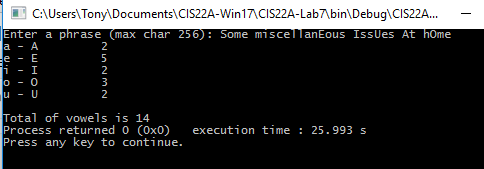
Define these function prototypes:
// Function to get the vowel counts in a string
// Parameter:
// counts: array of 5 integers (for 5 counts of a, e, i, o, u)
// str: input character array
// Return: total count
int countVowels(int counts[], char str[]);
// Function to display counts
// Parameter:
// text: array of string that contains the description count (a - A, e - E,.........)
// counts: array of counts
// Assume that the text array and counts array have the same size using the global constant VOWEL_CNT //(see below)
void displayCounts(string text[], int counts[]);
Define this global constant and use it in all your functions as necessary:
const int VOWEL_CNT = 5;
Do not define any other global data in your code
Use this main function exactly:
int main()
{
string VOWELS_TEXT [VOWEL_CNT] = { "a - A", "e - E", "i - I", "o - O", "u - U" };
const int SIZE = 257;
char str[SIZE];
int vowelCnt[VOWEL_CNT];
cout
cin.getline (str, SIZE);
countVowels(vowelCnt, str);
displayCounts(VOWELS_TEXT, vowelCnt);
}
Hint:
1- To get the length of a C string (that is a null-terminated character array), use the strlen() function.
2- The getline() function automatically puts a NULL character after the last character that it reads.
CAUsers Tony Documents\CIS22A-win17CIS22A-Lab7binDebugACIS22A... Enter a phrase max char 256 Some misce ous IssUes At home Total of vowels is 14 Process returned 0 (0x0 execution time 25.993 s Press any key to continue
Step by Step Solution
There are 3 Steps involved in it

Get step-by-step solutions from verified subject matter experts
 Study Help