







Question: C++ code thank you on the bottom is ( console.cpp ) #include #include #include namespace console { // declare helper functions void discard_remaining_chars(); void handle_invalid_number();
C++ code thank you
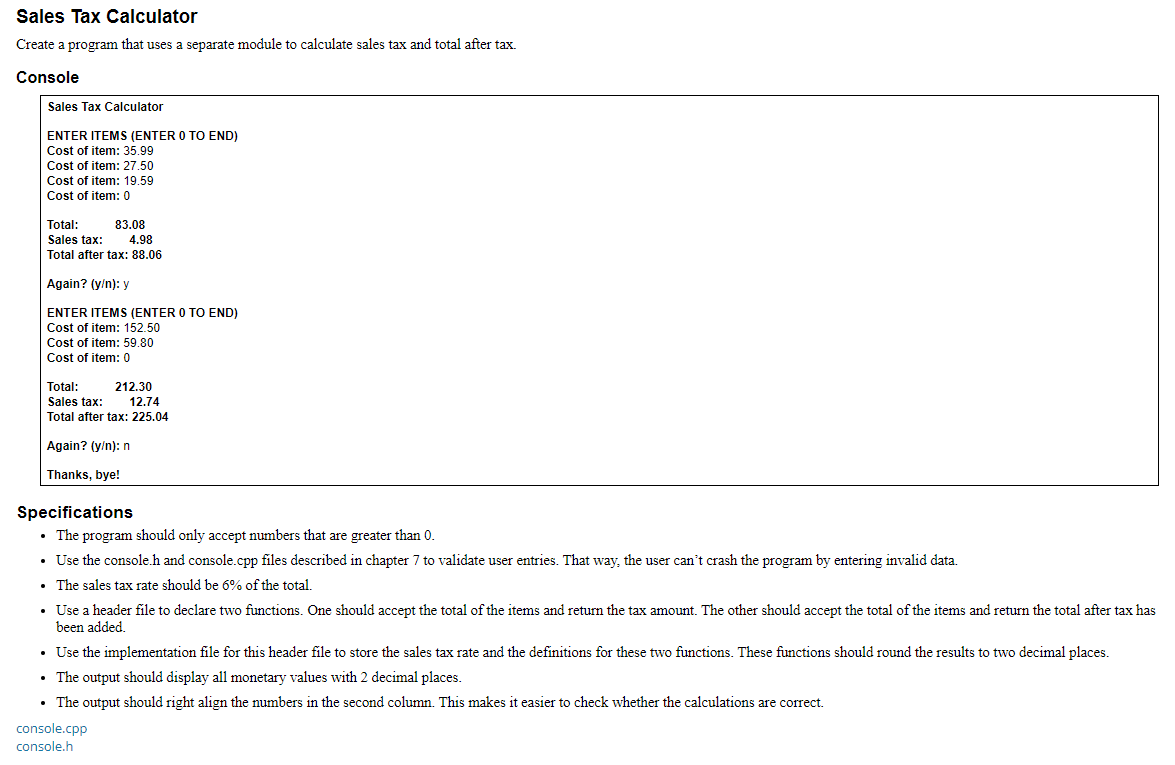 on the bottom is ( console.cpp )
#include#include #include namespace console { // declare helper functions void discard_remaining_chars(); void handle_invalid_number(); bool check_range(double num, double min, double max); // define general-purpose functions double get_double(std::string prompt, double min, double max) { double num = 0.0; bool is_valid = false; while (!is_valid) { std::cout > num)) { handle_invalid_number(); } else { discard_remaining_chars(); is_valid = check_range(num, min, max); } } return num; } int get_int(std::string prompt, int min, int max) { int num = 0; bool is_valid = false; while (!is_valid) { std::cout > num)) { handle_invalid_number(); } else { discard_remaining_chars(); is_valid = check_range(num, min, max); } } return num; } char get_char(std::string prompt, bool add_blank_line = true) { char choice = 'n'; std::cout > choice; if (add_blank_line) std::cout ::max(), ' '); } void handle_invalid_number() { std::cout max) { std::cout on the bottom is ( console.h )
#ifndef MURACH_CONSOLE_H #define MURACH_CONSOLE_H #includeSales Tax Calculator Create a program that uses a separate module to calculate sales tax and total after tax. Console Sales Tax Calculator ENTER ITEMS (ENTER O TO END) Cost of item: 35.99 Cost of item: 27.50 Cost of item: 19.59 Cost of item: 0 Total: 83.08 Sales tax: 4.98 Total after tax: 88.06 Again? (y): y ENTER ITEMS (ENTER O TO END) Cost of item: 152.50 Cost of item: 59.80 Cost of item: 0 Total: 212.30 Sales tax: 12.74 Total after tax: 225.04 Again? [y): n Thanks, bye! Specifications The program should only accept numbers that are greater than 0. Use the console.h and console.cpp files described in chapter 7 to validate user entries. That way, the user can't crash the program by entering invalid data. The sales tax rate should be 6% of the total. Use a header file to declare two functions. One should accept the total of the items and return the tax amount. The other should accept the total of the items and return the total after tax has been added. Use the implementation file for this header file to store the sales tax rate and the definitions for these two functions. These functions should round the results to two decimal places. The output should display all monetary values with 2 decimal places. The output should right align the numbers in the second column. This makes it easier to check whether the calculations are correct. console.cpp console.h#include namespace console { // declare general-purpose functions double get_double(std::string prompt, double min = std::numeric_limits ::min(), double max = std::numeric_limits ::max()); int get_int(std::string prompt, int min = std::numeric_limits ::min(), int max = std::numeric_limits ::max()); char get_char(std::string prompt, bool add_blank_line = true); } #endif // MURACH_CONSOLE_H
Step by Step Solution
There are 3 Steps involved in it
1 Expert Approved Answer
Step: 1 Unlock

Question Has Been Solved by an Expert!
Get step-by-step solutions from verified subject matter experts
Step: 2 Unlock
Step: 3 Unlock
 Study Help