







Question: C# I attached a solution to Exercise 15-1. So please use it to do this exercise below. I also attached figure 15-11 that is mentioned
C# I attached a solution to Exercise 15-1. So please use it to do this exercise below. I also attached figure 15-11 that is mentioned in this exercise.
In this exercise, you'll modify your solution to exercise 15-1 so the clones are stored in a CustomerList object that implements an enumerator. 1. Implement the IEnumerable
3. Run the application and test it to be sure it works properly C# Exercise 15-2 is the exercise I need and it need Exercise 15-1 to do. However, I attached a solution to Exercise 15-1. So please use it to do Exersise 15-2. I also attached figure 15-11 that is mentioned in Exercise 15-2.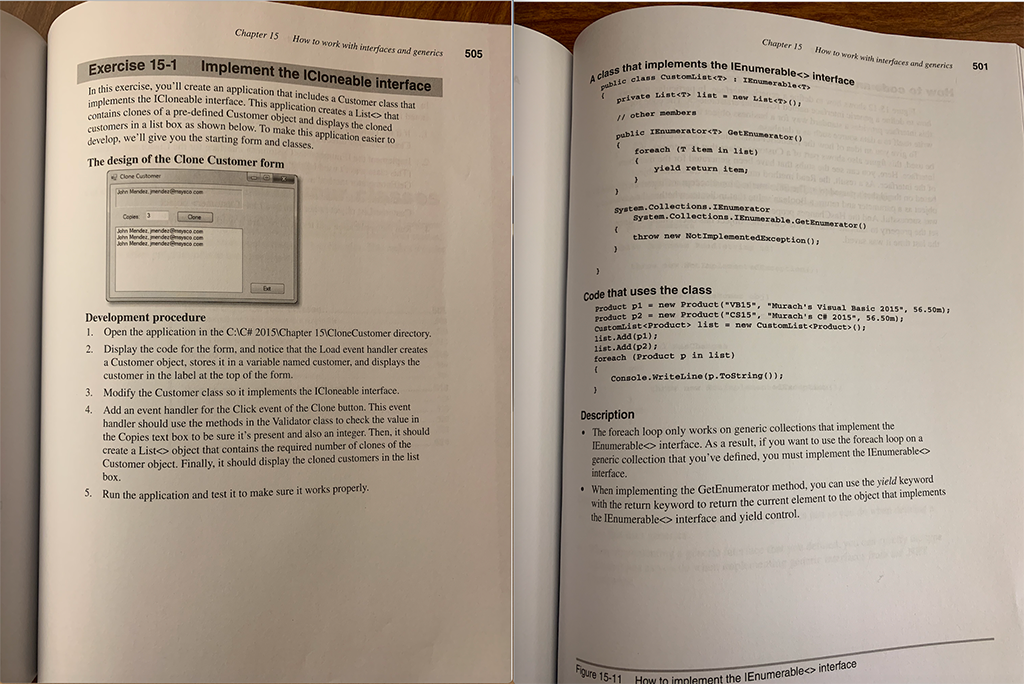
using System; using System.Collections.Generic; using System.ComponentModel; using System.Data; using System.Drawing; using System.Linq; using System.Text; using System.Threading.Tasks; using System.Windows.Forms; using CloneCustomer.DataValidation;
namespace CloneCustomer { public partial class Form1 : Form { public Form1() { InitializeComponent(); }
private Customer customer; private List customers;
private void Form1_Load(object sender, System.EventArgs e) { customer = new Customer("John", "Mendez", "jmendez@msysco.com"); lblCustomer.Text = customer.GetDisplayText(); }
private void btnClone_Click(object sender, System.EventArgs e) { if (IsValidData()) { int count = Convert.ToInt16(txtCopies.Text); customers = MakeCustomerList(customer, count); lstCustomers.Items.Clear(); foreach (Customer c in customers) { lstCustomers.Items.Add(c.GetDisplayText()); } } }
private bool IsValidData() { return Validator.IsPresent(txtCopies) && Validator.IsInt32(txtCopies); }
private List MakeCustomerList(Customer c, int count) { List customerList = new List(); for (int i = 0; i
private void btnExit_Click(object sender, System.EventArgs e) { this.Close(); }
} } ___________________________________________________________________
using System;
namespace CloneCustomer { public class Customer : ICloneable { private string firstName; private string lastName; private string email;
public Customer() { }
public Customer(string firstName, string lastName, string email) { this.FirstName = firstName; this.LastName = lastName; this.Email = email; }
///
/// The Customer First Name. ///
public string FirstName { get { return firstName; } set { firstName = value; } }
public string LastName { get { return lastName; } set { lastName = value; } }
public string Email { get { return email; } set { email = value; } }
public string GetDisplayText() => firstName + " " + lastName + ", " + email;
public object Clone() => new Customer(this.FirstName, this.LastName, this.Email); } } _____________________________________________________
namespace CloneCustomer { internal interface ICloneCustomers { } }
_____________________________________________________
using System; using System.Collections.Generic; using System.Linq; using System.Text; using System.Threading.Tasks; using System.Windows.Forms;
namespace CloneCustomer.DataValidation { ///
/// Validator Utility Class to Validate inputs ///
public static class Validator { private static string title = "Entry Error";
///
/// Title Propertu of Validator Class Object ///
public static string Title { get { return title; } set { title = value; } }
///
/// Check if Input is Present ///
///TextBox Type /// bool public static bool IsPresent(TextBox textBox) { if (textBox.Text == "") { MessageBox.Show(textBox.Tag + " is a required field.", Title); textBox.Focus(); return false; } return true; }
public static bool IsDecimal(TextBox textBox) { decimal number = 0m; if (Decimal.TryParse(textBox.Text, out number)) { return true; } else { MessageBox.Show(textBox.Tag + " must be a decimal value.", Title); textBox.Focus(); return false; } }
public static bool IsInt32(TextBox textBox) { int number = 0; if (Int32.TryParse(textBox.Text, out number)) { return true; } else { MessageBox.Show(textBox.Tag + " must be an integer.", Title); textBox.Focus(); return false; } }
public static bool IsWithinRange(TextBox textBox, decimal min, decimal max) { decimal number = Convert.ToDecimal(textBox.Text); if (number max) { MessageBox.Show(textBox.Tag + " must be between " + min + " and " + max + ".", Title); textBox.Focus(); return false; } return true; }
public static bool IsValidEmail(TextBox textBox) { if (textBox.Text.IndexOf("@") == -1 || textBox.Text.IndexOf(".") == -1) { MessageBox.Show(textBox.Tag + " must be a valid email address.", Title); textBox.Focus(); return false; } else { return true; } } } } ____________________________________________
using System; using System.Collections.Generic;
namespace CloneCustomer { public class CustomerList { private List customers = new List();
public int Count => customers.Count;
public Customer this[int i] => customers[i];
public void Add(Customer customer) => customers.Add(customer); } }
Step by Step Solution
There are 3 Steps involved in it

Get step-by-step solutions from verified subject matter experts
 Study Help