







Question: C++ Implement a class called Counter that simulates the functionality of a handheld counter with a four-digit display. The Counter should have 4 digits, corresponding
C++
Implement a class called Counter that simulates the functionality of a handheld counter with a four-digit display. The Counter should have 4 digits, corresponding to tens of dollars, dollars, dimes, and cents. The Counter should also have an overflow feature that displays 0 (false) if the current value of the counter is within the counter's limit and 1 (true) if the input has caused the counter value to overflow its limit. For example, a four-digit counter has a limit of 9999, so if the user tries to increment the counter above that amount, the overflow displays 1. Implement the following member functions in your class: - A constructor that takes as an argument the highest number that the counter can count to. For example, Counter(9999) should create a counter that can store values up to 9999. - void reset(); which sets the counter's number to 0. - Member functions to increment each digit and detect possible overflow. For example, void incr1000() should increment the tens of dollars digit. - bool overflow(); which returns the value of the overflow In main(), test your class by prompting the user to interact with the counter by pressing a key to select the digit they want to increment and entering a value corresponding to the number of times that digit should be incremented. Use the following key mappings: a for cents; s for dimes; d for dollars; f for tens of dollars; and q to quit. So, entering 'a 5' will increment the rightmost digit by 5.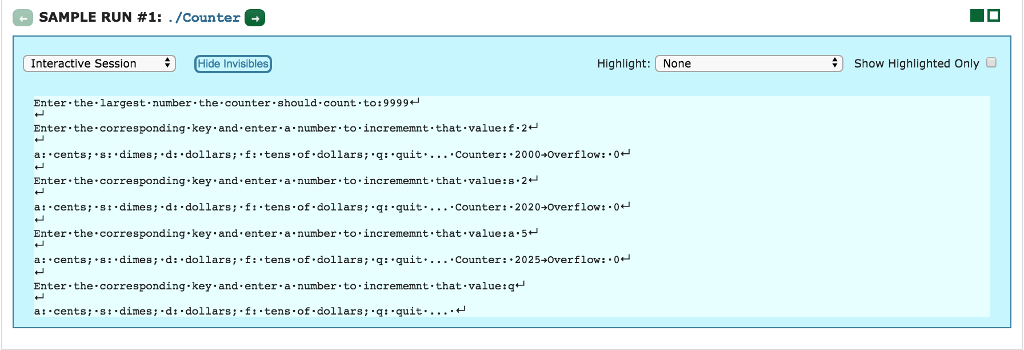
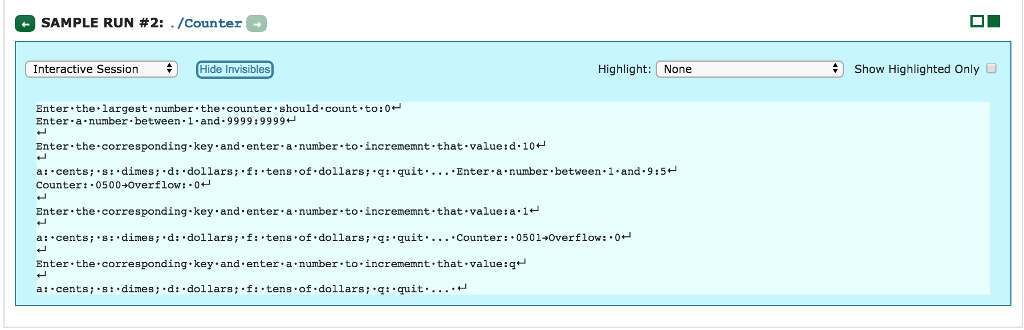
SAMPLE RUN #1: . /Counter Interactive Sessionide Invisibles Enter the.largest number the.counter should.count.to:9999+ Enter the corresponding key and.enter a number to.incrememnt.that value:f.2+ a: . cents; + s: . dimes; . d; . dollars ; . f: . tens. of. dollars ;-q:-guit. . " . . counter: + 2 000Overflow: . 0 Enter the.corresponding.key and.enter a number.to.incrememnt.that value:s 2 ai cents;s dimes .d.dollars; .f:.tens.of.dollars; .qi-quit-... .Counter.2020-overflowt-0- Enter the corresponding key and.enter.a number to incrememnt that value:a.5+ Highlight: None Show Highlighted Only Enter the.corresponding key and.enter a number.to.incrememnt.that value:q : . cents; . st . dimes; . dt . dollars ; . ft-tens-of-dollars ; .G4 . quit. . .. .. SAMPLE RUN #1: . /Counter Interactive Sessionide Invisibles Enter the.largest number the.counter should.count.to:9999+ Enter the corresponding key and.enter a number to.incrememnt.that value:f.2+ a: . cents; + s: . dimes; . d; . dollars ; . f: . tens. of. dollars ;-q:-guit. . " . . counter: + 2 000Overflow: . 0 Enter the.corresponding.key and.enter a number.to.incrememnt.that value:s 2 ai cents;s dimes .d.dollars; .f:.tens.of.dollars; .qi-quit-... .Counter.2020-overflowt-0- Enter the corresponding key and.enter.a number to incrememnt that value:a.5+ Highlight: None Show Highlighted Only Enter the.corresponding key and.enter a number.to.incrememnt.that value:q : . cents; . st . dimes; . dt . dollars ; . ft-tens-of-dollars ; .G4 . quit
Step by Step Solution
There are 3 Steps involved in it

Get step-by-step solutions from verified subject matter experts
 Study Help