







Question: c++ langaunge 3 Assignment Description 3.1 Part 1 - The circuit Using TinkerCad circuits create the Arduino circuit in Fig. 3-1. You can make use
c++ langaunge
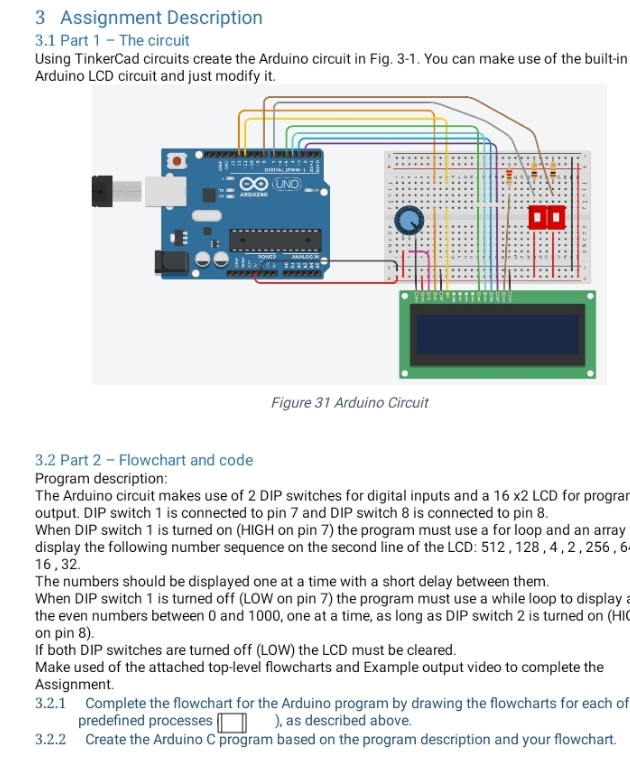
3 Assignment Description 3.1 Part 1 - The circuit Using TinkerCad circuits create the Arduino circuit in Fig. 3-1. You can make use of the built-in Arduino LCD circuit and just modify it. CO UNO Figure 31 Arduino Circuit 3.2 Part 2 - Flowchart and code Program description: The Arduino circuit makes use of 2 DIP switches for digital inputs and a 16 x2 LCD for progra output. DIP switch 1 is connected to pin 7 and DIP switch 8 is connected to pin 8 When DIP switch 1 is turned on (HIGH on pin 7) the program must use a for loop and an array display the following number sequence on the second line of the LCD: 512, 128 , 4, 2, 256 , 6 16, 32. The numbers should be displayed one at a time with a short delay between them. When DIP switch 1 is turned off (LOW on pin 7) the program must use a while loop to display the even numbers between 0 and 1000, one at a time, as long as DIP switch 2 is turned on (HI on pin 8). If both DIP switches are turned off (LOW) the LCD must be cleared. Make used of the attached top level flowcharts and Example output video to complete the Assignment. 3.2.1 Complete the flowchart for the Arduino program by drawing the flowcharts for each of predefined processes | | ), as described above. 3.2.2 Create the Arduino C program based on the program description and your flowchart
Step by Step Solution
There are 3 Steps involved in it

Get step-by-step solutions from verified subject matter experts
 Study Help